Tuesday, 15 November 2022

Dyson Gen5detect Absolute - Dyson Keeps Dysoning

If I've said it once I've said it a thousand times; nobody does design like Dyson does.

Boasting perhaps the most innovative and imaginative team of engineers of any company in the world, year after year Dyson seems to be able to reinvent itself and its products; the way they look, the way they perform and essentially, what they do.

Over the years we've seen Dyson revolutionise domestic heating, cooling and air purifying with a combination of crazy ideas like bladeless fans and unheard-of advances in filtration.

Somehow Dyson has also become the go-to brand in hair-care appliances - even professional hairdressers often choose Dyson for its superior durability and performance.

But let's be real here; it all starts and ends with the vacuum cleaners. Sir James Dyson wouldn't be where he is today if he hadn't decided to build a better vacuum all those years ago and the main reason Dyson has kept its position at the top of the vacuum pile ever since is its unwavering commitment to reinventing itself.

This year's stick vacuum is the ultimate result.


The Dyson Gen5detect Absolute is much more than the next evolutionary step in the Dyson range. Due to patents expiring on the previous Hyperdymium motor technology, competing brands were able to start copying what Dyson had spent decades developing; an incredibly powerful and reliable motor in the tiniest of form factors.

So the Dyson engineers literally went back to the drawing board and came up with an even tinier motor, that's even more powerful and even more power-efficient.

By stripping everything back to its smallest component pieces, these geniuses realised by doing things like wrapping the copper coil that makes the motor spin in a different shape, they could extract more speed than ever - the next-gen Hyperdymium motor spins at up to 135,000rpm. (Apparently, that's about nine times faster than a Formula One engine)

But the 2022 upgrades don't stop there. As I've mentioned already, Dyson is pretty renowned for its air filtration tech and while other manufacturers claim to be using HEPA filters, apparently they only really work properly if the machine is completely sealed, which the Gen5detect is.

To prove it, there's a piezo sensor built into the device to count and size particles at the rate of 15,000 times a second. The results are then displayed on the redesigned colour LCD screen - once the number of particles (of all sizes) drops to zero, you know your floor is clean and you can move on.

That display also keeps track of battery levels and here, once again, Dyson has raised the bar, with up to 70 minutes of non-stop suction. If you can't vacuum your whole house in that time, you must be living in a hotel. If so, you can always buy a spare battery; it clips in for easy replacement.

Last year, Dyson introduced a new innovation to help with your clean; a laser mounted on the "fluffy" hard floor cleaning head. On the Gen5detect this Fluffy Optic cleaner head now produces twice the brightness, so you'll see every speck of that disgusting dust, pet hair and other detritus in all lighting conditions - not just in the dim corners.

But for me, the two biggest innovations are the power button and the hidden surprise.

The power button was a surprise in itself because there's never been one before. Dyson stick vacuums have always been operated with a power-tool-like trigger mechanism. This was to preserve as much battery as possible - so you were only using it when you were using it, if you get what I mean. Now the battery life has been extended so much, they've decided we don't have to wear out our trigger fingers anymore and we're allowed an always-on switch. This is fantastic news although, in a rare misstep, the Dyson designers have put it in the wrong place. The on/off button is on the back, above the LCD display. I can't reach it with my thumb while holding the device and have to use my other hand instead. They could have easily located it next to the power mode button, which you can operate with one hand. Weird. Perhaps they were trying to avoid the risk of button confusion?

As for the "hidden surprise?" This is a real crowd-pleaser; the combined dusting and crevice tool is now cunningly concealed inside the main wand. This is classic Dyson design brilliance; taking the concept of onboard tools a step further, having them even more conveniently located inside the vacuum itself. It's a slightly tricky concept to describe but hopefully, you'll appreciate just how game-changing it is when you watch my demonstration video below.

We saw the tangle-free cleverness of the Digital Motorbar head and the Hair Screw tool last year, so I won't dwell on them too much, only to re-emphasise how totally effective they are. Be it pet or human hair, it all just disappears into the Gen5detect without trace - and although all the Dyson heads are easily dismantled for cleaning maintenance, I rarely have to because virtually nothing gets caught or clogged.

In essence, with the Gen5detect we have an elegant combination of recent innovations with some out-of-the-box new tricks and a totally redesigned, more-powerful-than-ever motor. At NZ$1599.00 you're certainly paying a premium but this is undoubtedly the premier vacuum available right now.

I wouldn't usually suggest any household appliance as a Christmas gift but this one is probably a pretty safe exception.


Click here for more information and pricing on the Dyson Gen5detect Absolute.

Monday, 14 November 2022

glennzb's 2022 Gadget Gift Guide

Although it seems like every year I review even more devices than the last, I'm pretty sure 2022 has seen more significant upgrades and advances than I can ever remember.

That means this Christmas could easily be a tech-based one, with lots of crazy toys for everyone under the tree...


1. Orbi 960 WiFi 6E Mesh System


I have trialled many routers, modems and extenders over the years but the Orbi 960 Wi-Fi 6E mesh system from Netgear is the best by so far, I couldn't wait to tell you and I spoiled my verdict by revealing it right at the beginning of the review. That's how good it is and I knew it pretty much the moment I had it up and running.

What's amazed me about the Orbi 960 system is when I measure the coverage around my house, it stays unbelievably consistent. Sometimes I even get marginally faster download speeds from the satellite units than I do from the primary router. How can this possibly be?

Part of the explanation for this incredible connectivity lies in the fact this is a quad-band system - with a dedicated channel just for backhaul; the connection between the router and the satellites. This means you're not using up any of the bandwidth for the connected device, regardless of which unit it's currently connected to. What's more, if your device is compatible, you're also utilising the new 6Ghz Wi-Fi 6E band, which is the fastest and highest-capacity Wi-Fi technology currently available.

I wouldn't usually include something as "purely functional" in a gift guide but surely giving someone the best Wi-Fi experience they've ever had would be welcome under the tree?


2 . Samsung Galaxy Buds2 Pro


Samsung's Galaxy Buds2 Pro have come to this year's Christmas party with a total redesign shakeup.

The Buds2 Pro are dramatically smaller and are shaped quite differently to their predecessors. Samsung obviously heard the criticism of the original Buds Pros' tendency to bobble out when exercising vigorously or dancing stupidly and decided to do something about it. A good fit has fast become my number one consideration when it comes to earbuds as these days features like sound quality and reliable connectivity should be a minimum expectation.

The two-way speakers, dedicated woofer and separate tweeter combine to provide the clearest, most authentic sound of any Samsung buds yet.

Battery life is also good; up to five hours with ANC on and another 18 hours charge in the case.

In fact, it's very difficult to fault these earbuds in any way. These are my new favourite buds. Now I know you think I'm always saying, "These are my new favourite buds," but that's because the buds keep getting better and these ones have definitely got better - in many, many ways.

Click here for more information and pricing on the Samsung Galaxy Buds2 Pro.


3. Huawei Watch GT 3 Pro


The Huawei Watch GT 3 Pro is inarguably a thing of beauty. As usual, it comes in packed in a nice-looking, substantial box that prominently displays the device as soon as you lift the lid.

Once again, Huawei has opted for a circular face and once again, at first glance most people probably wouldn't even realise this is a smartwatch. That's not to say they wouldn't take a second look, just as you might when you witness any luxury timepiece when you're out and about.

The crystal is made from sapphire glass, which in my experience has proven to be extremely durable and after a couple of weeks' constant wear is showing no blemishes at all. The case is also as hard as nails - actually, it's much harder. It's made of titanium and has been ingeniously crafted into a seamless, one-piece design.

Where the Watch GT 3 Pro truly excels, is in health and sports. There's an ECG function - and like other recent Huawei wearables, functions like heartrate monitoring and sleep tracking are excellent - providing plenty of insight both on the watch itself and then even more detail on the Health app. 

 Now there's also a skin temperature sensor, which gives you excellent insight into trends over time, but sports tracking is really the icing on the cake; I've been a fan of Huawei's exercise interface for years and it just keeps getting better - whatever the exercise (and you can choose from more than a hundred - from mountain biking to jazz dancing to darts to triathlon) the display is clear, useful and provides great updates on the go.

There's no doubt this is a versatile, high-performance smartwatch that looks... well, just breathtakingly good. It's more than just a tech statement, it's a fashion statement too.


Click here for more information on the Huawei Watch GT 3 Pro.


4. GoPro HERO11 Black


The HERO11 Black looks very similar to its predecessor which in turn, looked pretty much the same as the HERO9. But with GoPro, it's what's inside that counts. The HERO10's GP2 processor marked a true evolution in performance and this year the addition of a larger 1/1.9" sensor has taken things to an even more impressive level. Sensor and processor combine to offer higher resolution photos - up to 27MP, a significant upgrade to GoPro's already standout digital stabilisation tech, HyperSmooth 5.0 and perhaps most eye-catching and brain-bending of all; you can now shoot at up to 5.3K in an all new 8:7 aspect ratio.

This last feature essentially means you now get all the benefits of GoPro's legendary wide-angle capture both vertically and horizontally - an acknowledgement that a lot of unmissable action happens up and down, as well as side-to-side. Obviously, this can be cropped to other aspects depending on your preference using the Quik app - without losing any of the new, incredible image quality.

There's even a new battery; specifically developed for better cold-temperature performance. GoPro promises up to 38% longer recording time in normal temps over previous batteries. More battery life is always good news.

Twenty years in the business pretty much guarantees the HERO11 Black delivers unprecedented performance, still in a typically tiny package. What's more, yet again I can't believe the price; right now cheaper than most smart phones, on special for NZ$699.99.


5. HyperX Pulsfire wireless gaming mouse


Most of what you need to know about the HyperX Pulsefire Haste Wireless can be found in my previous Pulsefire Haste review. For all intents and purposes the new cable-free version is basically indistinguishable; the size and shape is the same, button layout identical, even the pattern of hexagonal holes both top and bottom matches up meaning despite this device now incorporates 2.4Ghz wireless technology, it's still essentially weightless.

That, combined with its long, slim shape, concave buttons and IP-rated sweat-resistant, matte finish all adds up to an extremely comfortable user experience, even if you do have the time to game for hours on end.

As with the original, all the buttons are fully programmable - which you'd expect - as is the RGB scroll wheel and other settings like Polling Rate and Lift-Off Distance. This happens via the HyperX NGENUITY app which, unfortunately, is still only available for PC - no MacOS version although the mouse works perfectly with Apple devices.

The big, obvious difference is the wireless USB dongle. It's USB-A so you'll need an adapter or hub if you're planning on using the Pulsefire Haste Wireless with a USB-C only laptop. There's no pairing required - simply plug the dongle in, turn on the mouse and you're in business. Assuming it's charged, obviously. 

That probably won't be an issue; HyperX claims up to a hundred hours battery life on a single charge - pretty decent. 

This wireless Pulsefire Haste works just as well as the corded one. If there's any lag at all, this very amateur gamer has yet to detect it. I loved the non-slip feel and lightness of the original and the new one is just as much a pleasure to use.


Click here for more information on the HyperX Pulsefire Wireless gaming mouse.


6. Samsung Neo QLED 8K QN900B


As I say every year, this is one of my favourite reviews; Samsung's latest top-of-the-line offering; in 2022 that means the Neo QLED 8K QN900B.

In terms of how the TV looks before you even turn it on, Samsung has been setting the standard for a fair old while. If you haven't checked out the infinity screen on one of these incredible tellies, next time you're walking past an appliance store, grant yourself five minutes to pop in for a look. How Samsung manages to cram one of the world's most advanced displays into a screen that's just 15mm thick is truly a wonder of modern engineering. Not only that but its Infinity One classification means there's basically no bezel at all. The final effect is picture and nothing else, suspended on your wall or hovering on its minimalistic, silver stand.

Perhaps the most exciting thing about this year's OS update is the addition of the Xbox app. Incredibly, this means just by signing in with your Xbox Game Pass Ultimate subscription, you'll be able to play the full Xbox Cloud Gaming library on this exquisite TV without having to connect an actual Xbox. All you need is a compatible bluetooth controller and you're away.

Yes, the QN900B costs a pretty penny - especially if you go the whole hog and have the space for the 85-inch model - but it really is the best you can get right now; it looks incredible before you even switch it on and once you do, the brightness, clarity and contrast are unbeatable. And thanks to the app, it now basically comes with Xbox built in. I'm not sure what more you can ask for and that's why it's worth top dollar.


Click here for more information on the Samsung Neo QLED 8K QN900B.


7. Technics EAH-A800


For whatever reason, Technics has suddenly decided to give this bluetooth ear-wear thing a really good bash. We've already seen the new range of true wireless buds and now we have some over-ears; the EAH-A800 headset and it's time to see if Technics can hit it out of the park on its first attempt... again.

Everything looks and feels as premium as the NZ$499.00 price-tag suggests. The outer covers on the earcups have been machined in a circular way, reminiscent of the fine grooves on a record. There's just the right amount of flex in the headband without any nervous creaking. The earcups extend from that headband to the length required with satisfyingly chunky clicks.

At almost 300grams, the A800 is not the lightest headset around but I can't complain about the fit. The balance, cushioning and softness of both the headband and earcups is up there with any other headphones I've worn - and I have to wear them for hours on end, every single day. They're a pleasure.

The ANC is also top class. The ultimate test of this is if I can hear my Executive Producer talking to me while I have the live radio show in one ear and different audio previewed in the other. The answer is, I can't hear him at all. Perfect.

The A800's are certainly at the upper end of the price range - perhaps ambitiously so given the Technics brand hasn't really been seen on a high-end pair of bluetooth headphones before. However, as far as I'm concerned they've checked all the boxes. They sound fantastic - especially if you take a minute or two to tweak the EQ in the app. That app is comprehensive - you can even turn off the utterly pointless flashing bluetooth LED, yay! They look good, feel even better and you'll get about fifty hours playback from a single charge - and that's with ANC on.

There's no arguing with the pedigree of the Technics brand and these headphones definitely live up to that name.


Click here for more information on the Technics EAH-A800.


8. ECOVACS DEEBOT X1 OMNI


The people at ECOVACS seem pretty excited about their latest and greatest, the DEEBOT X1 OMNI. 

They brought in the Jacob Jensen design team to give the X1 OMNI a Danish minimalist makeover. So rather than some stark, white, utilitarian box in the corner you have a classy, matte silver and black box in the corner. It's a talking point anyway.

Of course, there is a reason this Deebot has been upsized; it now fills its own water tank and washes and dries its own mopping pads. Yes, you read that right. The OMNI Station houses two large water containers, one for clean, one dirty. Both of these are simple to remove, fill, empty and reinstall and it genuinely does mean you no longer have to muck around with wet, dirty mopping pads. 

What's more, the X1 knows when the pads need a clean and will automatically return to the OMNI Station for another rinse-off mid-mop. The X1's unique OZMO Turbo 2.0 rotating mopping system is vastly superior to any I've used before. Because the twin mop-heads protrude slightly from the rear of the device, they do a much better job of getting into tight spaces and corners - like around chair and table legs.

ECOVACS has made plenty of other advancements on the vacuuming side of the equation too. The X1 now sucks at a whopping 5000Pa - up from 3000Pa on the Deebot T9+. 

The auto-emptying capabilities of the OMNI Station are also a major improvement. I have two cats, a dog and people with hair living in my house and previously that's meant a lot of clogging - not just for robot vacuums but any vacuum. Since I've been using the X1 I haven't had to go near the dust bin or floating main brush at all. Very impressive.

This is the most full-functioned and autonomous robot vacuum I've tried yet. I've been using it for weeks and still haven't got my hands dirty once.


9. Apple iPhone 14

For months before this year's iPhone launch I'd been reading rumours about Apple making an unprecedented decision to split up its base and pro models by reserving the new-generation A16 Bionic chip for the iPhone 14 Pro and Pro Max while recycling 2021's A15 chip for the cheaper iPhone 14 and iPhone 14 Plus. What a shock. 

Perhaps even more shocking is most of those articles neglected to point out there were two different chips used last year too; it's just they were just both called A15. The '21 Pro version boasted better graphics performance which also meant more powerful camera capabilities and it's that A15 Bionic running the iPhone 14.

This means a noticeable uptick in gaming and photography before you even touch the rest of the phone. The physical camera sensors have also been tweaked and combined with the processor boost, the photography experience on the iPhone 14 feels much more like what the pro models offered last time around.

More importantly, I'd like to point out something so many tech critics often fail to; even if the iPhone 14 was exactly the same as the iPhone 13 - which as we've already established, it isn't - it would still be a great phone.

Features like its ceramic shield screen and MagSafe wireless charging and accessories are still totally unique in the market and are amazing. In fact, I've become so enamoured with MagSafe over the last couple of years I get withdrawal symptoms when I have to review another handset without it. Being able to magnetise my wallet onto my phone or my phone onto its car charger isn't just super practical, it's pretty cool too.

Look, was the iPhone 12 a great phone? Yes. And it still is. Was the iPhone 13 a great phone? Yes. And it still is. Is the iPhone 14 dramatically different to either of those phones? Maybe not. So what does that mean? Yes, it's a great phone. Again. If it's been longer than two years you'll definitely appreciate the difference and if you're coming from another platform entirely, you may be surprised by just how good iOS has got. I know I was.


Click here for more information and pricing on Apple iPhone 14


10. Amazon Kindle (11th generation) 2022


As I've commented before, the eReader was a near-perfect device right from its first inception. That's not to say things can't be honed of course and this year's Kindle is clear proof of that.

This may well be Amazon's smallest and lightest Kindle yet - which is not to say the screen is too small or in any way difficult to read - quite the opposite in fact. To begin with, display resolution has been improved dramatically. At 300ppi this new model is now on par with the rest of the Kindle family - that's three times the pixels of its predecessor so you're getting much sharper images and clearer text. In turn, that means you can reduce the font size right down without losing any legibility.

The glare-free, anti-reflective screen lets you adjust the brightness to your preference and now there's the welcome option of a dark mode - inverting the black text on a white background to a much more eye-friendly white-on-black instead. This has definitely become my preference on all devices over recent years and I now actually find myself blinking in shock if I'm confronted with a mostly-white screen.

Another major upgrade for the 2022 Kindle is storage space, now doubled to 16GB. If you're not sure how many books that converts into, the action novel I'm currently reading, "Blowback" by Brad Thor is 1.1MB. That means I could fit more than 15,000 books of a similar size on this device. I'm a slow reader, so that's never going to happen.

The 2022 kindle comes in both black and denim - with matching denim-feel cases available too. While it doesn't have built-in speakers, you can pair bluetooth headphones to listen to audiobooks. Once signed in with your Amazon account, you can purchase books straight from the device itself and Amazon now offers a Kindle Unlimited subscription, giving you access to over a million titles for a monthly fee. If you're an avid reader, it just makes economic sense.

In fact, everything about the new Kindle makes sense. I'm pretty sure even those old-fashioned "page-turners" must be convinced by now. At least try it. There's no shame in admitting you were just being pigheaded about it. I won't tell.


Click here for more information on the Amazon Kindle (11th generation) 2022.


11. Samsung Galaxy S22 Ultra

There's simply no denying the Galaxy S22 Ultra is just a Note in disguise - and it's not much of a disguise. In recent years Samsung's S-range has included three models; the base version, a larger "Plus" and and even bigger and more specced-up Ultra.

This year, Samsung has followed the same formula although the Ultra looks quite different when compared with its other 2022 siblings. While the vanilla and plus models look more like a direct evolution of last year's S21's, with a slightly more streamlined camera module and a few different colour options, the S22 Ultra is almost an exact clone of 2020's Note 20 Ultra, available in Phantom Black, Phantom White, Green and Burgundy.

And what cameras! Just like the Notes of old, Samsung has crammed pretty much every photographic innovation it can get its hands on into the S22 Ultra's camera setup - even inventing words like "Nightography" to describe the improvements in low-light shooting. 

The new combination of larger sensors, Super Clear Glass lenses and of course, the very latest in chip technology means it's not just night shooting that gets a boost.

Video performance is just as impressive and features like Portrait Video and Director's View are now more powerful than ever. 

The 40MP forward-facing shooter shares many of these new refinements and features as well.

You might think it's the S-Pen that makes a Note a Note but it's always been all that other stuff too; class-leading processing power, the latest mobile photography advances and a truly massive screen. While this is no longer called a note, there's no argument Samsung has delivered the exact device Note fans have been waiting for.


Click here for more information and pricing on the Samsung Galaxy S22 Ultra.


12. Google Chromecast with Google TV (4K)


Although the Chromecast with Google TV (4K) isn't really much bigger than its immediate predecessors, it ships with the Google TV OS installed. This means for just $110, your previously dumb telly can smarten up from the moment you plug the new Chromecast into one of its HDMI ports.

Apart from the Google TV smart powers, the remote is reason enough to snap one of these things up today. Remember, this still functions just like any other Chromecast but now you have a physical remote to play, pause, skip etc - meaning you don't have to fiddle around with your source device (phone / tablet / PC) once you've started streaming. So much more convenient.

Of course, being an actual Google TV device, chances are you won't need to stream to it anymore anyway. Common apps like TVNZ+, Netflix, Disney Plus, Amazon Prime Video and Apple TV+ are all preinstalled - all you have to do is log in and away you go. What's more, you have access to thousands (yes, thousands) of other apps via your Google account. What's even more, you can sideload other apps if you have particular unusual favourites.

In fact, everything about the Chromecast with Google TV makes me happy - from the user-friendly remote to the intuitive home screen layout to the sheer number of apps available to the fact I can set my favourite pictures of the dog as a screensaver. 

Recently, Google released a cheaper version of this device which essentially functions exactly the same way but is only HD, not 4K. If you're planning on plugging it into a nice, big, recent model TV, the extra $40 for 4K is well worth it.


Chromecast with Google TV (4K) is available from Wednesday, June 22, 2022 at Noel Leeming, The Warehouse, JB Hi-Fi, Harvey Norman and PB Tech. RRP; NZ$110.00

Thursday, 10 November 2022

Elgato Key Light Mini with Master Mount, Flex Arm and Heavy Base - I Liked It So Much I Broke It

This year I've gone from knowing nothing about Elgato and its products to being one of its greatest fans.

The main reason for this is I've been making a lot more videos lately. My ability to do this has been greatly enhanced with the use of several Elgato products, including the Key Light and the Facecam.

The good news for you is you've been able to see the devices I've been reviewing much clearer and hopefully, I've demonstrated their features and pitfalls in greater detail than ever. The bad news is; you've seen me a lot more clearly too. Nobody wants that. Nobody asked for that. Just an unfortunate side-effect of better video quality, I'm afraid.

Then I got to thinking... I take a lot of still shots for these reviews too. Surely Elgato can help out with that as well...


As you've probably heard me say before, my favourite tech products are the ones that just do the thing they're supposed to. See a problem, fix it. That's exactly what the Elgato Key Light Mini does so efficiently.

It's a light you can take anywhere. End of story. See? Simple.

You want a bit more detail? Oh, alright then.

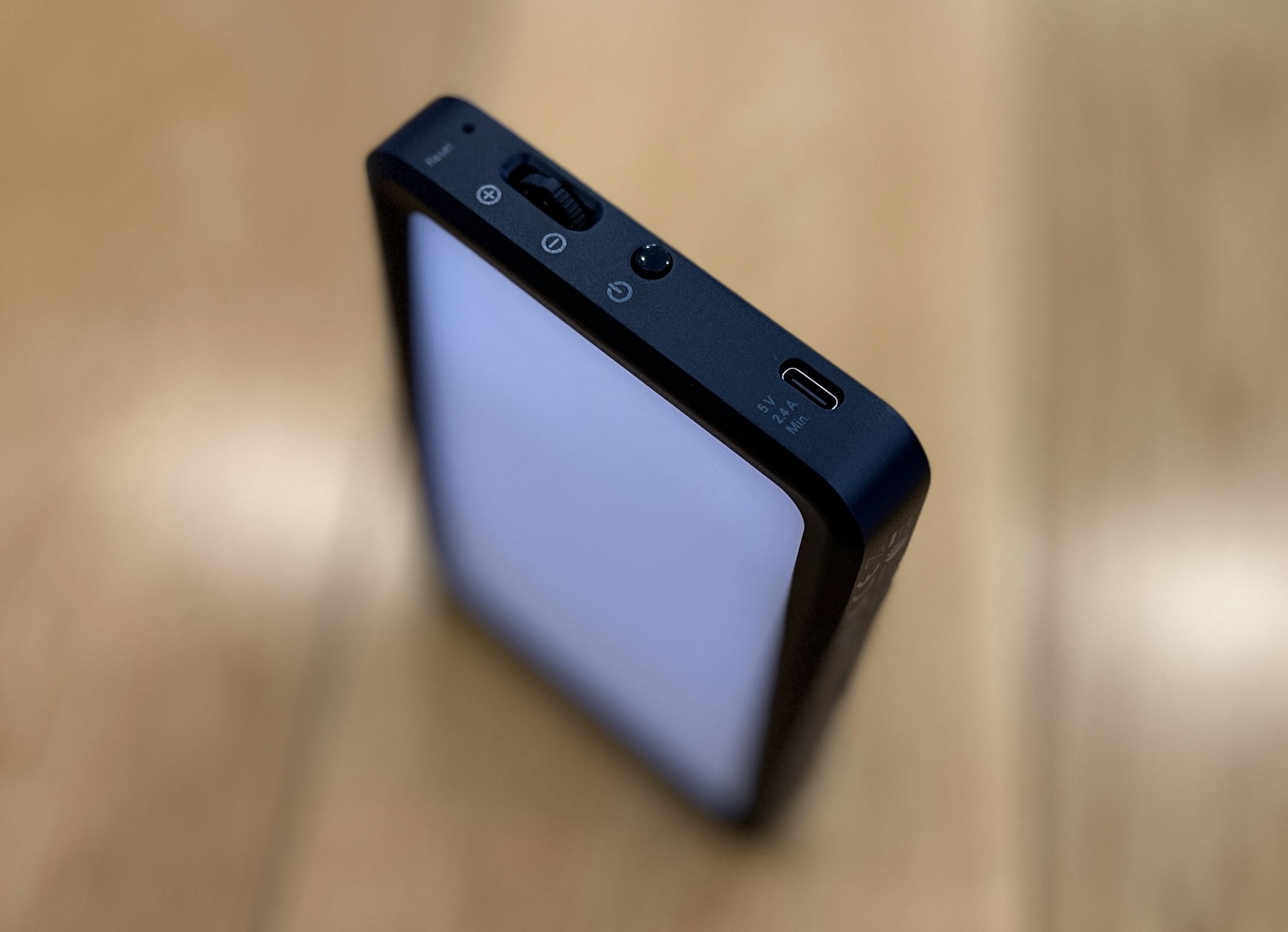
The Mini is literally a more compact version of Elgato's Key Light - using all the same technology to provide its fully dimmable 800-lumen output. Like the full-sized model, it's packed with industrial Osram LEDs that shine through multiple diffusion layers, creating heatless, shadow-free illumination. There are onboard controls to switch the Key Light Mini on and off, as well as adjust the brightness and colour temperature.

You can also control the Key Light Mini via Wi-Fi using the Elgato Control Centre app. This is available for iPhone, Android, PC or Mac and lets you fine-tune brightness and temperature, then save those settings so they stay the same the next time you turn it on.

The Key Light Mini runs on a 3.7V, 4000mAh LiPo battery, which Elgato suggests will last around four hours with the brightness set at 50%. I usually have the brightness toggled all the way up and as result I seem to get about an hour's use on a full charge which is plenty for my usual photo sessions.

Alternatively, you can leave it plugged in - via the supplied two-metre USB-C charging cable - and operate in Studio Mode which bypasses the battery completely.

The device is light enough and small enough to hold in one hand, so it really is a take-anywhere lighting solution. It also sports a standard 1/4-inch screw-in mounting socket on the bottom edge, which means it'll fit pretty much any photographic device and accessory - screw it onto the top of your video camera for nighttime shooting if you like.

Personally, for my purposes, I needed my hands free to photograph my various review devices.

Wouldn't you just know it? Elgato has just the right gear for that, starting with the Master Mount - essentially an extendable stand available in two sizes with a ball head and a fully-adjustable padded clamp to attach it to any table or desktop. This is a very solid and stable piece of kit - the larger model extends up to 1.25 metres and works a bit like a mic stand, with a couple of rubberised locking rings which don't have to be particularly tight to hold everything securely in place. 

Because I wasn't taking pictures on my desk or at my table, I removed the clamp and added the Elgato Heavy Base - literally a black steel disc weighing in at almost five kilos. Using the supplied allen keys and screws you have the option of attaching your stand either in the centre or at the edge if that's going to better suit your space. This meant I now had a stand I could use anywhere but wouldn't move at all once I had it in position.

That was a good start but I needed (wanted) more. For some misguided creative reason, I've decided to always photograph my gadgets against the background of my solid-wood floor. So unless said gadget is particularly tall, mounting the Key Light Mini more than a metre off the floor wasn't going to be hugely helpful.

Enter the final (and most fun) piece of the puzzle; the Elgato Flex Arm, an ingenious combination of four different length extensions and ball sockets that can be adjusted to pretty much any shape required. This then allowed me to bend my mounting system right back down to floor level, so I could get the Key Light Mini as close as possible to the object being photographed.

This has led to a dramatic and noticeable upgrade in my photo quality, virtually eliminating any shadows and highlighting any small details I desire.

Perfect. With one small catch.

While Elgato confidently boasts of stability, flexibility and durability - all of which I've found to be absolutely the case - the fine print on the quick start guide for the Master Mount does warn the maximum load for the ball socket at the top is just 2kg. 

Have you spotted the problem yet?

That's right; my Heavy Base weighs precisely 4.8kg. This meant when picked up my whole Multi Mount rigging system by the top, rather than by the base, I broke it.

Stupid physics.

I don't blame Elgato's construction standards in the slightest and I'm hoping a liberal dose of Liquid Nails will remedy the situation after the recommended curing time. This was definitely operator error and serves as my warning to you; if you're looking for a truly versatile, solid and easily portable lighting setup, the combination of Elgato's Multi Mount system with the Key Light Mini is an excellent way to go... just make sure you lift it from the bottom. Like any normal person would.


Wednesday, 9 November 2022

Sonos Sub Mini - The Difference Has to Be Heard to Be Believed

There are certain brands that are simply synonymous with their product categories - market leaders that pave the way in terms of innovation and performance so consistently, the other names can only aspire to catch up.

Think Dyson and vacuum cleaners. GoPro and action cameras. Sonos and home theatre.

Yes, over the years Sonos has effectively reinvented the concept of home theatre, wireless speaker systems and multi-room audio. Sonos soundbars in particular woke consumers up to the concept of a full-fledged cinematic audio experience from a single speaker unit and we've seen a continual refinement and evolution of this theme.

That said, no matter how good your soundbar is, there's still no substitute for pairing it with some surround speakers and a subwoofer.

It's just physics. While it's technically possible to bounce sound around the room to simulate stereo, surround and even height effects, you can't compete with physical speakers, which is why Sonos has a range of speakers you can pair to your Ray, Beam or Arc soundbar for a genuine, surround-sound home theatre.

And the same goes for bass.


Ten years since Sonos first launched its wireless Sub - followed by two further generations, we now have the Sub Mini - much more compact and perhaps even more importantly, much cheaper.

This follows on from the Ray soundbar, released earlier this year - also a more budget-friendly option from a brand not previously marketed to the lower end of the AV market.

The good news is Sonos being Sonos, a lower price tag doesn't necessarily mean any compromise in the exacting standards of engineering and audio tuning we've come to expect.

To be honest, the Sub Mini is not exactly tiny - just smaller than its rather distinctive older sibling. Like the full-sized Sub, the Mini also has an eye-catching hole in the middle but it isn't a square box like most subwoofers, it's cylindrical - about the size and shape of a kitchen rubbish bin.

Of course, the contents here are definitely not trash - quite the opposite; dual custom woofers that face each other across that distinctive central cavity. The theory is this unusual configuration eliminates any distortion and from what I've heard so far, that definitely holds true. I've had nothing but clean, accurate, noise-free, low-end awesomeness.

The round shape seems less imposing than those other clunky cubes, especially in the white option.

Initial setup is very straightforward indeed - the Sonos app has the option to add a sub to any speaker system you've already set up and will recognise the Sub Mini as soon as it's powered on. Should you decide to move it from one room to another, things get a bit more complicated. I discovered this when I was putting together my little demonstration video for the end of this article. Pro-tip; remember to remove it from your existing room before trying to attach it to a new one. While making the movie I had to set it up three different times - let's just say if it's still paired to a device you've already unplugged, things can get confusing.

Other than that, the Sonos app offers the usual tweaks; adjustments for bass, treble, loudness, height etc... and once you've added the Sub Mini, a control to raise or lower its specific level appears in the app too. for my tastes, there's not much point pairing a subwoofer if you're not going to ride the bass a bit, so I like to give it a reasonable boost.

You also have the option of auto-tuning the speaker setup for your room using the TruePlay function, which involves two phone-based sound tests, one sitting in your preferred viewing location and one walking around the room, waving your phone in circles. I like to hope this achieves something useful - especially since it takes good three or four minutes and if anyone saw me doing it, they'd assume I'd lost the plot.

Unfortunately, TruePlay is only available on iOS and iPadOS devices so if you're an Android user, bad luck. What's really odd is the latest iPhone 14 range, the new iPhone SE and some of the new iPads can't do it yet either - the app simply tells you the feature is "coming soon". Come on Sonos, get it together. Are you seriously telling me these new Apple devices and all the Android phones out there can't run this sound test? What's going on? It doesn't make sense. A bit of research shows the functionality took several months to turn up on last year's iPhones too. So weird.

Anyway - don't let that put you off. there's absolutely no doubt the Sub Mini helps create a much fuller soundscape, whether it's paired with the entry-level Ray soundbar or the top-of-the-line ARC, complete with a couple of One SL surrounds.

What Sonos is engineered to achieve so ingeniously is speakers working together to complement each other. Thanks to their strong and reliable 5Ghz Wi-Fi connection, Sonos speakers are in constant communication so when you add the Sub Mini, not only do you now have a speaker physically capable of pumping out lower frequencies, more powerfully but it also means the Arc (or Ray or Beam) doesn't have to use as many resources trying to reproduce those low notes, freeing up more audio resource for the rest of the soundscape.

And this is just as true listening to music as it is watching movies.

For example, "Don't Take My Sunshine Away" by Sparklehorse is a fairly simple alt-pop/rock number, alternating between exposed, effected vocals and full band, driven by a monotonous, relentless bass line. Thanks to the Sub Mini, the contrasts here are stark and brilliant.

Between the Edge's mumbled lead vocals and Adam Clayton's fluttering fingerwork, U2's "Numb" is pretty much all about the bass - and yet none of it comes across blurry or rattly. Turn it up loud and you can feel the track pour right through you, physically as well as sonically.

Meanwhile, back in the home theatre, whether it's the ominous, droney, futuristic soundtrack of my new favourite sci-fi show, Peripheral, or the constant and frantic warzone action of Seal Team, once again the Sub Mini carries all the heavy lifting bass-wise, leaving the Arc and surrounds to fill out the dialogue and other, high-frequency sound effects.

The Sub Mini has quickly become one of those things I never realised I needed - but now I have it, there's no way I'm giving it up. I've never had the opportunity to try the full-sized Sonos Sub and I can only imagine what it's capable of. If the Mini is anything to go by, I'm not sure I could handle it.

This video won't do it justice - please listen with some half-decent headphones or earbuds - not just on your tinny laptop speakers...


Monday, 7 November 2022

Amazon eero 6+ - This Wi-Fi Shouldn't Be This Good

Before you continue reading I feel obliged to remind you I'm not an expert. In anything.

The only reason I get to play with these marvellous toys and write these reviews is because I said, "Yes!" when somebody asked me to.

I don't have any certifications in electrical engineering. I don't understand much of the physics involved in making most of these modern gadgets work.

My only qualification is I've been doing this for a long time. I've reviewed a lot of smartphones and even more earbuds, not to mention speakers, computers, cars and lawnmowers.

And I've certainly set up more than my share of home Wi-Fi networks.

So it's fair to say I've picked up a few solid impressions along the way. But just when I thought I had a clear idea of which routers, extenders and mesh systems are likely to work better than others, I received a very interesting box from Amazon.


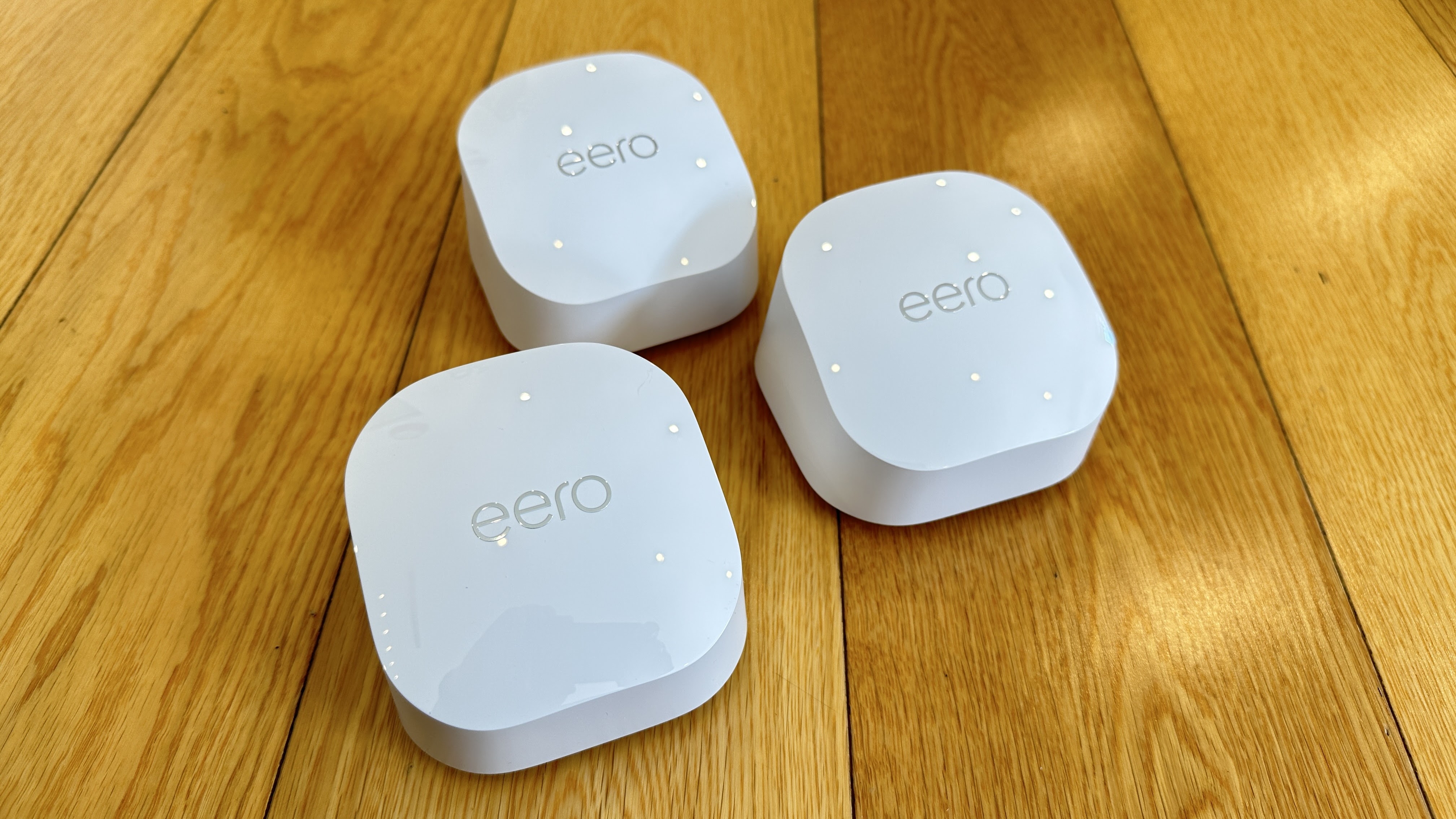
The eero 6+ system is Amazon's latest dual-band mesh Wi-Fi system; you can buy the units individually or in a three-pack, like the one I've been trialling. While the box they come in is fairly large, the eero+ units themselves are positively tiny - definitely the smallest home networking devices I've ever used.

Recently I've come to the conclusion bigger is definitely better when you're dealing with Wi-Fi routers and extenders. I've found more power, more bands and more antennae are the only foolproof solution to blanketing the whole house with fast, full-on, reliable coverage. So when I saw how small the eero 6+ routers were, I didn't have high expectations.

On the upside, being so mini, they're super easy to hide away and to be honest, even when they're sitting on a shelf in plain view, you don't really notice them as other than the eero logo across the top, they don't have any other distinguishing features. Even the USB-C power adapters are small and nestle in easily beside other plugs on a multiboard.

Setup is a complete doddle - especially if you already have an Amazon account. The eero app (obviously there's an app) guides you through each step of the process and I created my new home network in no time at all. Unlike some mesh systems, each of the three eero 6+ units is identical - any one can be used as the primary router. 

There are only two 1GB ethernet ports on the back of each device, so this might be a limiting factor if you were planning hardwiring a lot of gear into any of them - although interestingly they're described as "auto-sensing" ports so it doesn't seem to matter which you use for input or output.

Once set up, using the app you can deactivate the status LEDs on any of the three units, (yay!) update their firmware, test your connection speed and see exactly how many devices are connected to your network - and in most cases exactly what those devices are. This is very useful as you can then create different profiles and assign those devices accordingly. Interestingly, the eero app also monitors how much data each device is using and you can easily access that information if you're wondering where all your allowance is disappearing to.

And amazingly, it might be disappearing faster than you think. Because the big surprise for me was how effectively these three little routers provided my whole house with very fast connectivity - and not just fast but faultlessly stable too.

The main reason this was so unexpected is the eero 6+ setup is only a dual-band system - so there's no dedicated line for backhaul - this is how the modules communicate with each other. Tri-band and quad-band systems use dedicated backhaul to keep the rest of your Wi-Fi space free for your devices, preventing a clogged-up, slowed-down system.

And yet, all my devices functioned perfectly - many of them better than ever - especially IoT gadgets like my smart speakers, video doorbell and security cameras - not to mention my smart lights. I can't fully explain this, although Amazon claims the eero 6+ system can work as a smart home hub thanks to its built-in Thread and Zigbee capabilities. These are non-Wi-Fi wireless protocols that mean connected smart devices like lights, switches and sensors can carry on doing their thing without hogging any of your internet bandwidth.

The Matter protocol has also just fired up globally, the most brand-agnostic wireless technology yet. It's my understanding all the recent devices in the eero range are Matter enabled and as such will become an even more integral part of your home's IoT network once activated in future firmware updates (if they haven't been already).

I know all that sounds very airy-fairy and nerdy. My point is, I can't believe how good the connectivity of this network is. Just the fact it's Wi-Fi 6 means you're far more likely to achieve faster speeds with less congestion - adding in all those other smart home protocols also seems to keep things running super smooth and clear.

My intention with the eero 6+ system was to set it up, use it for the duration of this review, then put it back in the box again. But the truth is, it's working so well, I've left it up and running. The expression, "If it ain't broke, don't fix it," was never more appropriate. If I've learned one thing from my years of reviewing devices like these, if you find one that works, DO NOT MESS WITH IT.

Not only does the eero 6+ work, it works blazingly well and now there's no way I'm unplugging it.


Click here for more information and pricing on the Amazon eero 6+ dual-band mesh Wi-Fi 6 system.

Thursday, 3 November 2022

Huawei FreeBuds Pro 2 - Put Something Different In Your Ears

While we continue to wait for the return of Huawei handsets to our shores (we can only hope this will happen some day) there's no denying there's still plenty of other high-quality Huawei tech to try.

We've seen quite the selection of Huawei watches this year and now they've updated the top end of their earbud range, with the Huawei FreeBuds Pro 2.


From the instant you pull the compact charging case from the box, you can tell there's something unusual going on here; the hint is the reflective inlay on the case engraved with the names Huawei and Devialet.

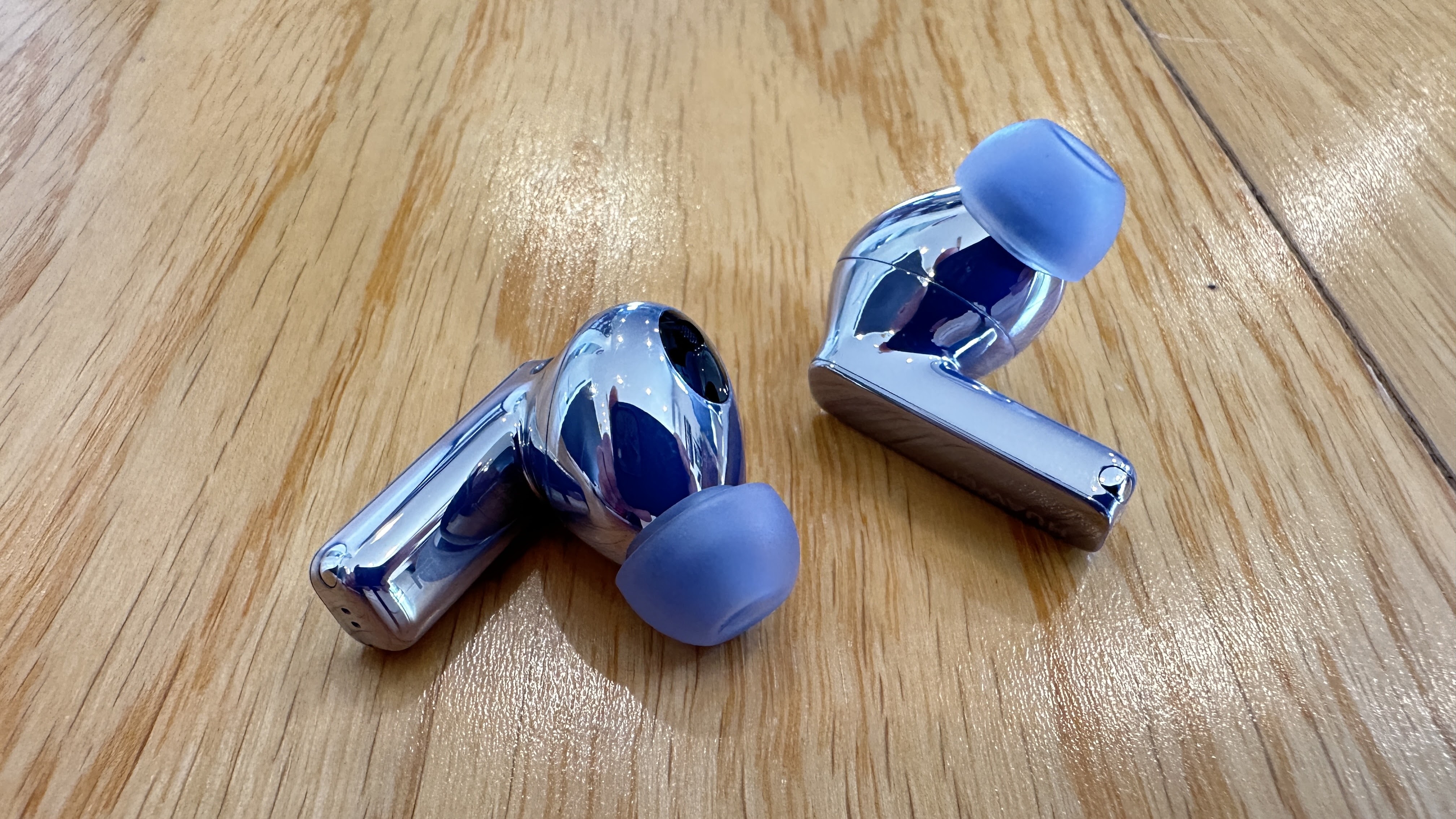
I've been sent the Silver Blue variant but the FreeBuds Pro 2 also come in an attractive Silver Frost. The case (other than the inlay) is a more muted continuation of the holographic-like earbuds themselves - my Silver Blue ones almost seem purple in some lights, or more icy in others. They're certainly unique and although they're nice and small, they're also quite eye-catching - in a good way.

I first encountered the Huawei/Devialet collaboration when I reviewed the rather superb Huawei Sound bluetooth speaker a while back. Devialet is a French audio manufacturer that creates speakers so high-end, I feel unworthy just looking at them, let alone listening to them. So to be able to access this level of audio excellence in my ears for under NZ$350.00 seems like a pretty good deal.

"Tranquillize" by the Killers is quite a complicated piece of production, starting with lead vocals over a fairly monotonous bass riff but quickly evolving into a much more intense combination of gang vocals, driving guitar and expansive keyboard backing - not to mention a drum performance that utilises the whole kit on demand. It's truly anthemic and thanks to the two completely separate drivers, an 11mm quad-magnet unit for bass and a UHF planar diaphragm for the higher frequencies, you can still pick out every element, even as the track reaches its ultimate crescendo.

On the other hand, Thirsty Merc's "Tommy and Krista" bobs along over a catchy electric piano groove. Although this is a far simpler pop song, again the clean, distinct reproduction offers a warm, accessible listening experience.

There are a few preset EQ's available in the Huawei AI app but you can also create custom EQ's of your own using a ten-band virtual equaliser - this level of aural tweaking ability is pretty rare amongst companion apps like these.

Huawei AI is also how you update the firmware, customise control gestures and conduct a fit test, so you can make sure you've chosen the correct-size tips. After years of struggling to find earbuds that fit comfortably, yet remain snugly in place when exercising, this year has seen a few brands finally nail it. Huawei's done a pretty good job with the FreeBuds Pro 2 as well - the unusual square-stem design helps keep the buds in place as they naturally tend to displace their (minimal) weight over several points of contact. They're not the absolute most secure-fitting earbuds I've worn but they'd easily make my top five.

Where the FreeBuds Pro 2 do push for number one contention is both in call quality and Active Noise Cancellation. This is due partly to the sheer number of built-in mics and mostly to Huawei's own "deep neural network" noise cancellation algorithm. This means they're capable of automatically sensing how noisy your environment is, as well as what kind of noise is trying to intrude on your listening or voice call experience. These new, smarter FreeBuds then decide between Ultra, General or Cozy ANC modes and adjust themselves accordingly. Or you can just choose manually using the app.

On-board controls all happen on the stems - a combination of physical pinches for things like play/pause/answer, long pinches to toggle between ANC on or off and Awareness mode, and finally swiping up or down the stem to adjust the volume. These gestures are all customisable in the Huawei AI app too and they quickly become very intuitive. Because pinching and swiping are quite specific gestures, this all but eliminates accidental pauses and skips when inserting, adjusting or removing the buds.

Battery life is excellent - which should be a minimum expectation for earbuds at this higher end of the market, as should features like wireless charging, IP54 water resistance and multi-point pairing - all of which the FreeBuds Pro 2 boast. There's also a low-latency mode for gaming and video streaming. In fact, I can't really think of anything these earbuds don't do.

Therefore, there's every reason to consider them if you're after a genuinely high-performance, in-ear solution. The noise cancellation is first-rate. Thanks to the colab with Devialet, sound reproduction is exquisite. And perhaps most importantly, these buds look dramatically different and are guaranteed to set you apart from the pack.