Tuesday, 30 March 2021

Keep It Clean. Really Clean

For a long time, moisture has been the arch-enemy of most gadgets.

Every morning I work in a radio studio and officially, all liquids are banned. Despite this, from time to time, various bits of that studio mysteriously stop working... well, mysteriously until those bits are taken to pieces and it's discovered someone's spilled half a can of Coke, a mug of coffee or a cup of tea into it.

At least if it's just water, sometimes things can be dried out and if you're lucky, plugged back in and fired up again.

But if it's softdrink damage, forget it. That stuff's like nuclear waste.

Then there's dust and crumbs. Is there anything more disgusting than tipping your keyboard upside-down, banging it on the desk a couple of times and seeing what falls out? Ick.

And those are just normal, everyday scenarios. Imagine trying to use a mouse and keyboard in a workshop... or a dental surgery... or a garden centre... I can only imagine the turnover in hardware.

So what if you could just run them under the tap?...


Imagine being so confident in the washability of your PC accessories, you make them in white as well as black? Well that's what Man & Machine does and in a sterile environment like a medical office or even on a kitchen benchtop, the white looks pretty great.

I'm not so enamoured with the name, I have to say. Sure, the company is thirty-eight years old but I'm pretty sure women needed machines like this back then too. Anyway, let's not get bogged down with that because we've got a pretty elegant solution to a fairly common problem here.

The Its Cool wireless keyboard and C-Mouse Wireless are IP65 washable, can be wiped down with a wide range of disinfectants and detergents and yes, you can literally rinse them off under running water.

And for even more hygienic spill protection, Man & Machine produces the Its Cool Fitted Drape, specifically for the keyboard, making it completely impervious to any spills altogether.

As a mouse, the C-Mouse Wireless is relatively unremarkable in everyday use - two buttons and a scroll wheel - what more do you need? It connects via a 2.4 Ghz USB dongle, not bluetooth and can be paired with the same dongle you use for the Its Cool keyboard. Pairing is quick and straightforward; simply a matter of pressing the right button and scroll wheel together then plugging in the dongle. I've found the connection to be instantaneous and reliable and the good news is, no batteries required.

The mouse is rechargeable via a micro-USB port at the front, sealed when not in use by a watertight plug. Normally, I'd be worried about losing a little rubber plug like this, especially given you can continue using the C-Mouse Wireless while connected for charging. Luckily, there's a made-to-fit cavity under the mouse to stow the plug when not in place. I like it when they think of little details like that.

There's a similar rubber bung on the back of the Its Cool keyboard, sealing up its microUSB charging port and on/off switch. This plug is longer and stays connected, swivelling around to fit tidily into its stowaway cavity while the keyboard is charging.

Other than that, like the mouse, the Its Cool keyboard functions exactly as you'd expect it to. It's essentially a full-sized keyboard with number pad and dedicated arrow keys, although I'm surprised they didn't make it a little wider to allow space for standalone Home, End, Page-Up and Page-Down keys - instead you'll have to release the Number Lock if you want to access these. The top row of keys - function keys, Insert, Delete etc - are also strangely cramped. Not sure why, given this is a wireless keyboard and surely you can basically make it any size and shape you like.

In saying that, I haven't found it much of a learning process to get used to the layout here; Delete and BackSpace seem familiar enough for me to avoid any mistypes and the keys are nicely spaced out to accommodate my fat fingers too. Of course, one reason the keys are spaced this way is because the Its Cool keyboard has been designed to be used with the Its Cool Fitted Drape, a custom cover that fits precisely over the keyboard, effectively sealing it off from any kind of spill at all.

Not only is the fitted drape wipeable and washable, it can be sterilised using hard surface cleaners and will even survive dishwashers and autoclaves. Perhaps best of all, it's easily replaced.

It's certainly easily fitted and removed and is a dramatically superior solution to the one-size-fits-all (but doesn't really fit anything) disposable option you may be currently using. I was initially concerned typing would be hampered by what is essentially a flat piece of rubber with keys printed on it but it turned out those fears were unfounded. I can't believe how responsive the keyboard still is with the fitted drape installed. The keys still feel quite clicky with good travel and I still only mistype as much as I usually do - so quite a lot... but that's nothing to do with the keyboard.

I'm not going to try and convince you this is a great keyboard for gaming - unless you're gaming under a waterfall - but it certainly fulfills all my everyday needs. I have no idea what the battery life is like for either the Its Cool Keyboard or the C-Mouse Wireless - it's not listed on the Man & Machine website - but I've been using both devices several hours a day for a couple of weeks now and only charged them when I first took them out of their boxes.

If you need to operate a PC in a wet, dusty or dirty environment, or you want to keep things sterile, or maybe you're just a hot mess and can't keep your coffee cups upright, I'd heartily suggest you give Man & Machine a try. Oh, and don't worry about the name... it's just a name.


Click here for more information on the Man & Machine C-Mouse Wireless

Click here for more information on the Man & Machine Its Cool Keyboard.

Thursday, 25 March 2021

A Bud for Every Ear

In a few short years the market for True Wireless earbuds has matured dramatically. In just the same way one size doesn't fit all, both the manufacturers and the consumers have come to understand no single pair of earbuds is likely to be the perfect solution for every situation.

Some customers use their earbuds primarily to make and take phone calls. Others listen to podcasts or music on the train or bus. Mobile gaming and streaming video require a personal audio solution and then there's video conferencing, just a fact of life these days in most businesses.

And obviously, plugging into your playlists while exercising is still a major focus.

Depending on the main use, the primary emphasis can shift from a good fit, to noise cancellation, to mic quality, to battery life, to durability.

Or maybe you just want them to look cool.

Expecting one pair of buds to excel in all those areas seems to be a big ask - yes, there are options that come close to doing it all but expect to pay a hefty premium.

JBL seems to be taking a slightly different approach...


If last year's entry into the gaming headset market showed us anything, it's that JBL isn't afraid to launch a whole heap of products all at once. Suddenly there were seven different options to choose from in its Quantum range - from budget-friendly entry level options up to premium headsets with all the bells and whistles you could possibly ask for.

Now JBL has done something similar with a choice of nine - yes nine - new "Truly Wireless" options.

Ranging in price from $119 right up to $349.95, once again JBL is offering you everything including the kitchen sink.

At the tippy-top of that pile is the Club Pro+ TWS.

These are the flagship earbuds in JBL's "Lifestyle" range - but in fact, they're so full-featured they'll probably suit most scenarios. 

To start with, thanks to JBL's My Headphones app and its Dual Connect + Sync technology, setup is very easy. In much the same way Samsung phones automatically sense Samsung earbuds, or iPhones pick up on AirPods waiting to be paired, the My Headphones pairing notification pops up as soon as you flip open the lid on the Club Pro+ case. The difference here being it doesn't matter which brand of phone or device you are pairing the Club Pro+ with.

The app gives you access to a lot of customisation - not just EQ  and noise cancellation settings but firmware updates, different modes depending on whether you're listening to music or watching video - you can even adjust the time after which the buds will automatically turn themselves off once they are idle.

Oddly, I've read reviews where people claim there's no volume control on the Club Pro+ buds themselves. Quite the opposite is true. You can configure either bud to control either playback, ambient sound, volume or voice assistant - the only issue being obviously you can only run two of the four options at any given time. So in fact, this makes the controls on the Club Pro+ the most programmable I've come across.

Build quality is first rate, both the buds and case feel sturdy and the buds look stylish bot not show-offy. This is important because they do protrude from your ears a bit more than some, so you don't want them to be too eye-catching. This may feel a bit out of balance to some users but I've actually found the shape combined with the choice of small, medium or large eartips to be a very comfortable and surprisingly secure fit.

Sound-wise, it's very difficult to find anything to complain about here. As I've already pointed out, the My Headphones app offers a lot of customisations, especially when it comes to EQ options. You can choose from preset settings curated by famous DJ's or create and save your own - as much or as little treble, mids and bass as you prefer. My general  impression is an decent sense of space from such small speakers, combined with plenty of warm bass response - but not so much it overwhelms.

The pill-box case is one of the smallest around, charges wirelessly or via USB-C and the dimpled profile of the buds themselves make them far easier for my fat fingers to remove them from the case than other JBL buds I've used in the past. You'll get up to eight hours play time from the buds alone with another three full charges in the case - basically you don't really have to think about charging them, just do it when its convenient and you'll probably be fine.

The Active Noise Cancellation is also impressive. In my testing it doesn't block out the whole world but it certainly works well on the most annoying things around you, like traffic and conversations you aren't part of. I keep being freaked out by the way I can't hear my own footsteps when I run so yeah, it's pretty good.

The Club Pro+ are even IPX4 rated for water resistance - weirdly, this isn't even referenced on the JBL website although it is printed on the box. The point is, yes, you can wear them running and I have. The comfy, tight fit means they're very secure and require very little fiddling with from start to finish.

However, for the most secure earbuds I've ever used, JBL has another option on offer. (Remember, there are a lot of options)

The Endurance Peak II are easily the weirdest-looking earbuds I've tried in a long time. They look like they've been built for one thing and it's all in the name; peak endurance. There's a rubbery knobbley-ness to these things that makes you suspect they've been constructed from old truck tyres. Most weirdly of all, they're actually super comfortable.

The Endurance Peak II are not the easiest buds in the world to put in - there's a bit of prodding and twisting involved - but once they're in, they're in. And they're in for good. Every time I've worn them running I haven't had to adjust them - not once. Despite their size, they are superbly balanced and the magnetic hook system means it's simply impossible for them to fall out.

Unfortunately, none of the EQ, ANC or customiseable control settings are available on the Endurance Peak II as they don't connect to the My Headphones app, so you'll be left with whatever sound settings your phone offers in terms of adjusting the EQ. Don't be too concerned, there's still plenty of bass and volume on offer here - these are JBL earbuds after all.

In terms of controls, I've found them surprisingly easy to get a handle on (pun intended). Again, this is due to the large, oblong shape of the buds working as easily accessible touchpads. I thought sliding my finger backwards and forwards to adjust the volume might be a bit clumsy while running but it's ended up working well.

If you thought the buds were big, the case is enormous, kind of like half a sunglasses case. It's curved so it will fit in your pocket but not without a very conspicuous bulge. On the bright side, you'll get almost as much playback time as with the Club Pro+ - six hours from the buds and another 24 in the case.

These are not a fashion statement, although they do come in white as well as black but if you lead an active lifestyle and you're sick of your earbuds falling out at the gym, on the road or even in the garden, I highly recommend the Endurance Peak II. I was blown away by the comfort and the dependable, secure fit.

Oh, and they're IPX7 sweat and waterproof, so pretty indestructible.

And that's just two out of nine. If there isn't an option in the new JBL True Wireless range for you, you must have extremely specific tastes. After all, I've only tried a couple and now I think I'm set for anything.


Click here for more information on the new range of JBL True Wireless earbuds.

Tuesday, 16 March 2021

A Confusing Step Sideways

There's no doubt smart lighting isn't for everyone - after all, what's wrong with the old switch on the wall? Flick it on - light. Off - dark. Simple, right?

Bit boring though.

So now we've definitely got options and plenty of them. All kinds of smart bulbs offering limitless colours, a range of brightness settings and depending on which one you choose, the ability to link with virtual assistants and connect with smart hubs.

Nanoleaf stepped up the game with a selection of shapes, flat panels... squares, hexagons, triangles... to create not just funky lighting effects for your spaces but genuine art installations. Or in my case, a Christmas tree for my holiday entranceway.

So what now?...


If you were expecting more shapes - maybe circles or stars - you're out of luck. The Nanoleaf Essentials range is billed as being "Your Smart Lighting Basics" and the range begins with a bulb and a lighting strip - at first glance, perhaps nothing too crazy to see here.

Look a bit harder, or at least turn them on and set them up, and you'll soon discover there are indeed a few things that set these new Nanoleaf products apart, justifying the slightly (but only slightly) higher price than the stock-standard competing products available.

Let's start where I did, with the Bulb. On closer inspection, straight away you can see this isn't just a round globe as we've grown used to for generations. In fact, the Essentials Bulb has been shaped into a 62-sided rhombicosidodecahedron... you know? That classic 3D shape made up of squares, triangles and pentagons. Why on earth Nanoleaf decided to do that, I have no idea. But because they did, it makes the Bulb quite a bit more interesting to look at than a traditional round one - meaning it instantly adds character to more exposed light fittings.

However, that'll also depend on how brightly you run the Bulb and which of the more-than sixteen-million colours you choose. You see, at the lighter end of the scale and at maximum brightness, you won't be able to discern any of the Bulb's 120 edges because you'll be blinded - this is easily one of the brightest smart bulbs I've encountered.

Likewise, the Lightstrip is capable of glowing extremely brightly - in fact, brighter than might be your preference if you're using it for subtle highlights under a benchtop or behind a display or cabinet.

Of course, settings like brightness and colour can be altered via the Nanoleaf app, which you'll need to set these devices up with in the first place and this is where things get rather convoluted. Setting up and controlling previous Nanoleaf products has always been a bit hit and miss and I don't really know why. The lighting panels connect to your home Wi-Fi network and then you can adjust them via the app, from a connected smart hub or speaker, or even from the desktop app on your PC. That works eventually but I've always had issues connecting - especially when trying to install firmware updates and often I've had to perform multiple factory resets to get the Nanoleaf controllers to co-operate.

Well, things have got decidedly weird with the essentials range. I actually had no issues at all using the Nanoleaf app on my Android phone - for the Bulb and Lightstrips no Wi-Fi is required, it all happens via bluetooth. Knowing this, I was surprised how quickly the devices responded, although I was disappointed to discover a lack of functionality compared to the previous lighting panels I've used before. Yes you can choose any colour at all, using the colour wheel or manually typing in specific codes if you already have a favourite. However, you can't opt for animated, preset scenes like you can with the panels and you can't schedule the Bulb or Lightstrip to turn on or off automatically either. This is odd because I've seen screenshots from other markets where the app does offer these options, so perhaps an update is coming.

What's really strange is you can also set up the Essentials through Google's Home app or with Apple Homekit. Except... to use the Apple option you'll need a smart hub like the Apple Homepod or the new Homepod Mini, neither of which are currently widely available in New Zealand. This is because the Essentials are Thread-enabled. I hadn't even heard of Thread before using these products so I did a bit of research on your behalf. Thread is a kind of bluetooth alternative but works more like a mesh Wi-Fi system; the more Thread devices you have set up the stronger and more responsive your network becomes but because you can't really buy a Homepod Mini right now, we'll have to leave that to one side.

Google Home is better news. Most of us have used this to set up our Chromecasts and if you have Google Assistant smart speakers or even Google Nest Wi-Fi points, you'll be all over Google Home and you'll know how easy it is to add and set up new devices, naming them and assigning them to various rooms around your house. Once again, I had to factory reset the Nanoleaf Lightstrip to get it to respond to my Home app but I had no issues at all connecting to the Bulb. Now the fun can really begin, as you create Google routines to turn these things on and off when you want, changing colour and brightness too. They'll also now respond to voice commands via Google smart speakers or Google Assistant on your phone. Great.

Have you noticed something missing?

That's right; Alexa hasn't been invited to this party which is a bit inconvenient for me, not just because I have a lot of Amazon gear set up around the house but my existing Nanoleaf devices are Alexa-enabled and that's how I control them.

Again, maybe this is a feature that's still to come but only if the Wi-Fi-dependent Amazon Alexa chip has been built into the devices already and given their small form factors, I don't think this is a given.

What I do really like is the versatility of the Lightstrip. The starter pack is a simple, two-metre length with an adhesive backing. Installation is as simple as cutting the strip to length, and sticking it where you want it. There are one-metre expansion packs available and you can drive up to ten metres from a single controller. (You can go longer still but it will cost you some brightness) That controller lets you turn the Lightstrip on and off, adjust the brightness and cycle through a selection of colours too. The only minor design flaw here is the Lightstrip can easily slip out of its socket in the end of the controller but I can live with that, given once it's in place, you're unlikely to be fiddling with it too much, especially if you're using Google Assistant to operate it and not the manual option instead.

So I'm torn. The hardware is indisputably high quality and is definitely more practical, more "useful" than the previous Nanoleaf panels which were a bit of fun but didn't really serve any actual purpose. The Bulb and Lightstrip are both economical, simple ways to add striking (or subtle) lighting accents to any indoor setting. Unfortunately, the setup is all a bit of a mess, with limited options available in the Nanoleaf app itself, no Alexa option and a focus on Thread technology that hasn't really arrived in the country yet.

If you're running Google Assistant at your place, then Nanoleaf Essentials should definitely be your go-to smart lighting solution. If you're not a Google gal or guy, you may need to do a bit more research.


Click here for more information on the Nanoleaf Essentials Bulb and Lightstrip.

Thursday, 25 February 2021

VR SO GOOD, IT'S SICKENING

A lot can happen in six years.

It's been six years since I last spent any time inside a VR headset. That was the Samsung Gear VR; a colab between Samsung and Oculus that enabled you to insert your Galaxy handset into an Oculus headset to experience all the wonders of 360-degree gaming and viewing... well, all the wonders available back in 2015.

To be honest, there weren't many wonders.

It was fun to watch movies in a virtual, 3D theatre and there were a few purpose-filmed surround-videos to sample but any games on offer were super limited and it only worked with a few specific models of phone.

Since then, Oculus has been busy. Very busy...


I have to admit, I haven't really been paying attention. I was vaguely aware you could buy expensive Oculus headsets that plugged into even more expensive, high-powered gaming PC's. I assumed this was the niche realm of the ultra gamer geek and I left them to it.

But somewhere along the way, the Oculus Quest was born - no longer tethered to a PC, a standalone, totally self-contained device. Sadly, one I never took any notice of.

Now there's a new generation; the Quest 2 and believe me, Oculus, you've definitely got my attention now.

To start with, it looks more friendly than some of the all-black, multi-cabled options we've seen before. The Quest 2 headset and its Touch Controllers are an attractive off-white colour, with a comfortable, three-way adjustable, fabric head strap. There's really not much to see from the outside; other than the four small cameras, there's a power button with tiny status LED on the right-hand side, USB and 3.5mm AUX-in sockets on the left and a volume rocker underneath - all easily located by touch when wearing the headset.

The Quest 2 is one of those rare pieces of design excellence that just works like it should, straight out of the box, with virtually no setup required, short of signing in with your Facebook account. Some people go crazy about this, worried about having to hand over all their private details to Mark Zuckerberg just to play a few games. I don't get all the fuss; for starters, Facebook owns Oculus anyway so if you have an original Oculus account, Zuck's got your deets already. Secondly, it just makes logging into stuff and buying things so much more seamless - you need to pair the Quest 2 with the Oculus app on your phone for example - this happens pretty much automatically once you've logged in with your Facebook profile. What's more, you can actually use apps like Messenger inside the VR, so that's helpful, not harmful. Besides, if you're that worried about it, it's not exactly the hardest thing in the world to set up a separate, gaming-only Facebook account. People need to chill out.
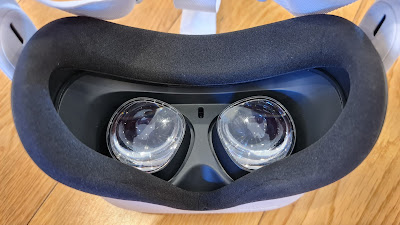
Logging in really is the most complicated part - assuming you can get the headset to fit right in the first place. I found the combination of velcro and plastic sliders on the head straps simple to adjust to where I wanted them and the device feels perfectly balanced when in place. Apparently it's lighter than it's predecessor and I certainly found the foam padding comfy as. My issue is my glasses. While the Quest 2 ships with a glasses spacer in the box (again, easily attached) my glasses are too wide to fit in the headset. Although you can adjust the space between the lenses, glasses-wearers need to know it'll only accommodate your specs if they're less than 142mm wide and under 50mm tall. Elton John may be out of luck. Thankfully, I found an old (less fashionable) pair that just fit. I would have been screwed otherwise as the experience isn't calibrated for the shortsighted.

But what an experience.

Firstly you're asked to mark out your virtual Guardian boundary - you're shown your surrounds via the passthrough cameras and you paint where the clear area is with your touch controller - recalibrating the height of the floor if need be. You also have the option of a stationary Guardian if you prefer to stay seated. Ingeniously, you can choose to change to the passthrough view if you break through the virtual walls of your Guardian while playing, thereby avoiding smashing into furniture or real walls. But even more ingeniously, the Quest 2 remembers the position of your Guardian area between each session, so you don't have to mark it out again. See? Pretty clever.

Long gone are the handful of low-res, half-hearted, pretend games I first tried out six years ago. The Home screen is jam packed with game and viewing options, many of which you can jump straight into. That home screen is fully customiseable of course, with a choice of backgrounds to suit your tastes. I was really blown away by the explosion of content now on offer, with the promise of much more to come. There's an extensive library of games for sale, which we'll get into shortly but there's an amazing amount of viewing available, mostly free of charge.

In the last few days I've been swimming with sharks, ridden a rollercoaster while in orbit above the earth, hung out with elephants - even jumped out of a helicopter in a wing suit and flown over snow-capped mountains at breakneck speed - all in totally immersive, 360-degree wonder.

There are more and more live events to attend too, although my schedule didn't allow me to get to Snoop Dogg's live DJ Snoopadelic set the other day.

Oh, you can definitely spend a lot of time in here.

There are apps like Bigscreen and Venues where you can create your own avatar, meet other users and watch movies, concerts and seminars together. Bigscreen is particularly versatile. Here you can watch movies, either stored locally on the Quest 2 itself or via a DLNA media server on your Wi-Fi network, or even join one of dozens of live TV rooms - from Nikelodeon to Rocketlabs. You can also share your PC desktop to Bigscreen, potentitally meeting clients or work colleagues for presentations or to collaborate on projects.

There's a native Netflix app, complete with virtual home theatre or you can go online via the browser to access any other content out there.

Then there are the games. Oh boy.

Obviously, you can play sports. And because it's VR, you can do things like play tennis with a fish and a football. Yup, Sports Scramble is crazy... or you can just go bowling. Obviously you can scythe your way through floating targets with dual light-swords to a funky soundtrack in Beat Saber, or you can shoot cyborgs in the head while dodging their bullets in the arcade-style Pistol Whip.

It's hard to accurately describe just how intuitive using the touch controllers is playing these games; more than just a deconstructed gamepad, the addition of a side trigger on the inside of each controller handle means actions like picking things up, opening doors or taking items out of your backpack seem totally natural. In Population: One, a classic first person shooter, when you do things like climb up drain-pipes hand over hand, there's no learning how - you already know how.

Perhaps the most brilliant execution of a 360-degree VR gaming experience I've tried yet has got to be The Walking Dead: Saints and Sinners. You have a torch in your harness which you have to grab and shake to keep charged. If you're lucky enough to find an axe, you'll need to hold it with both hands to kill the zombies. This game is unreal. No wait... it's seems really real.

All these incredible visual illusions are enhanced by the Quest 2's speakers, subtly built-in to the side straps on the headset. You can also choose to plug in your own headset via the 3.5mm jack or you can even pair bluetooth headphones or buds... the surround sound effects are spot on but be warned; once you're in this virtual world, it really is very convincing - and not just on an audio/visual level. Your whole body is fooled into thinking you're on the tennis court or fighting zombies for a gun on a boat in a flooded New Orleans.

On the bright side, this can be quite a workout - in fact, using Oculus Move, you can set up a virtual display to tally calories burned and time spent playing. On the downside, I've had to end several sessions using the Quest 2 due to motion sickness. I'm not making this up. Spend too long jumping off buildings and dodging robots and you might actually puke! Some games even let you adjust the "reality level" to avoid nausea, so if you have a weak stomach, this device might not be for you.

I've read people questioning the Quest 2's battery life; between two or three hours depending on how hard you're pushing it but take it from me, if you can last two hours of non-stop zombie stabbing, you deserve a medal.

As a standalone mobile device, the Quest 2 does not have the processing power or graphics ability of a dedicated gaming console or PC - this means some games are a little slow to start up and picture screen quality, while awesome, is far from 120Hz-4K-gaming-monitor awesome. However, the processor is among many other hidden upgrades from the original quest, a 90Hz screen refresh rate update is on the way and I found operation to be super smooth with very few stutters, lags or crashes.

None of those technical details matter much once you're using it, it's just so fun.

By the way, there's also an optional Oculus Link Cable available to connect you to a compatible PC. This opens up an even bigger world of more powerful VR games if you really want to get carried away.

At $569 for the 64GB version and $739 for the 256GB model, I think the Quest 2 is fantastic value. It's a unique, multimedia experience that's easy to set up, it's totally self contained and all for less than the price of a modern gaming console.

I'm sure the nausea will wear off eventually. Totally worth it. I wonder if motion sickness pills would work?


Click here for more information and pricing on the Oculus Quest 2.

Monday, 22 February 2021

NO FRILLS, JUST BIG SOUND

Speakers are smarter than ever.

No longer just the way we listen to music, they've become the centre of operations for the modern connected home. With a simple command, we can now fire off whole routines to activate air-conditioning, turn on lights... even water the garden.

Oh... and we can play music of course.

So where does that leave speakers that only play music? Is there still a market for them? And even if there is, why would you try and get into that market now?...


I've never met a Huawei I didn't like.

When it comes to delivering premium tech hardware, there are few other brands that do it as consistently. From enterprise infrastructure technology right down to developing some of the best performing smart phones the world has ever seen, Huawei usually gets it right.

More recently, we've seen personal audio products like true-wireless earbuds and frankly, stunningly good over-ear, noise-cancelling headphones.

Now it's time for a speaker, named simply, the Huawei Sound.

Initially I was pretty intrigued... I didn't really know Huawei had any kind of AI voice assistant to put into a speaker - then I realised that wasn't an issue; this isn't a smart speaker. (last year's Huawei P40 phones actually do offer a virtual assistant option named, Celia - but only in a limited number of countries)

That is to say, the Sound isn't particularly smart... but we'll come to its more clever features shortly. It certainly looks smart - similar in size and shape to other stand-alone bluetooth speakers on the market, about the size of a small indoor plant pot. It's all black - with a speaker grill circling the base and a super shiny cover on top that definitely does show the slightest fingerprint, so keep a soft cloth handy if you're moving it. The Sound's most distinctive feature is the pair of oblong openings on each side that let you see into the two SAM powered passive speaker modules that are key to the audio performance of this particular device.

There's a simple LED control panel on top, that only lights up when its nearfield detection senses your hand is close. This features just four touch controls, Mute, Play/Pause, Volume Up, Volume Down and Multifunction - or just hold your hand over the whole thing to play or pause - talk about a minimalist design ethic, which definitely resonates with my personal tastes.

While I'm sure the Huawei design team can take plenty of credit here, it's significant to note this speaker is in fact a collaboration with French sound engineering pioneers, Devialet; an innovative company with a guiding principle of providing distortion-free sound reproduction that looks pretty funky too.

There's certainly plenty of hardware packed into the Huawei Sound; three high-end, full-range tweeters in the base, pointing in every direction to capitalise on Devialet's SPACE technology and creating a 360-degree surround-sound effect if the speaker's in the middle of the room. This triple-tweeter array is teamed with a big 4-inch 40 watt woofer mounted right in the centre of the device. This really provides "punchy bass" as advertised, especially given it works in unison with those passive side units I mentioned earlier to suppress any distortion at all, no matter how loud you run the speaker. What's more, it's fun to watch the bass pulse in and out through those side cutouts.

The Sound definitely does pump out some serious volume for its size and thanks to all that Devailet tech inside, it truly is free of any rattle, vibration or buzz, even on the thumpiest of dance tracks.

While this isn't a smart speaker as such, there are three ways to connect. Yes, you can simply use the Sound as you would any other bluetooth device - it's easy enough to pair, either manually or via NFC. There's also a 3.5mm AUX-IN port concealed under a rubber flap at the back if you want to keep things old school and hard-wired. Interestingly, there's a third connection option - UPnP.

In theory, this means the Huawei Sound will appear on your Wi-Fi network as an available device for music streaming apps like Tidal, Deezer or Spotify. To set it up, you'll need to use Huawei's AI Life app, which also offers a few preset EQ effects and is how you install firmware updates. Unfortunately, it's not quite that simple, as you may also need to download a third-party plugin to stream from certain apps. For example, to use Spotify over UPnP there's an app called HiFy that shows the Sound as a speaker you can cast to. Unfortunately, I couldn't get it to work. A bit frustrating as the full version of HiFy isn't free. I had more success with another app called Hi-Fi Cast. This one is free and lets you cast any music stored locally on your device directly to the Sound.

Is all this trouble worth it? In theory, yes - because streaming over Wi-Fi means higher quality audio than streaming via bluetooth. In reality though, no. It's too damn fiddly and to be honest, the Sound does a pretty decent job of reconstituting compressed audio and bringing it back to its original, room-filling glory. (Or close to it, anyway) It's a shame Huawei hasn't been able to develop its own universal plugins that download automatically when you connect the Sound to your home network. That'd make its UPnP functionality much more viable.

Not to worry, as I say, the bluetooth performance is excellent. In fact, it's so good, I came up with a little hack. Just because the Sound itself isn't smart, that doesn't mean you can't pair it with another smart device, say a smaller, cheaper smart speaker you might happen to have lying around to control things like your lights. That's exactly what I did and the bluetooth connection proved so strong and stable I never had any issues.

Of course, to enjoy the full benefits of the Sound's impressive 360-degree performance, it's best placed in the middle of the room. One problem; it still has to be plugged into the wall. On the bright side, the cable from the external power supply is quite long, very thin and plugs in as inconspicuously as possible, right underneath the base of the device. Technically, this means if you were prepared to drill a hole in your table-top, you could conceal the lead completely.

Priced at $399 and given its lack of smart abilities (and finickity UPnP), you'd want to be assured this speaker delivers audio-wise. It does. Its "upscaling" tech does a great job of recreating compressed audio and it's stylish to look at too. What's more, if you have another little $70-$80 smart speaker to pair it with, you can send it voice commands anyway. I'm surprised Huawei has entered the wireless speaker market in this somewhat limited way but it's possible this is just the first of many, bigger, smarter things to come.

As a collaboration with Devialet and as a standalone piece of high-end audio hardware, the Sound is a success.


Click here for more information on the Huawei Sound.

Wednesday, 17 February 2021

GOOD SOFTWARE. GREAT BRANDING

There's a whole virtual economy out there.

It's one built on skill, experience and reputation.

People have established significant careers over years, honing their talents, establishing networks and yes, making money.

Gaming.

Whether you're into it, or you've never really tried it, there's no denying gaming is one of the fastest growing industries in the world and depressingly, that's made it an attractive target for identity thieves and other cyber crime organisations.

Depending on which game or platform you're playing, you could be handing over a lot of private information for the privilege - from your unique gamer tag right up to your address, credit card or even your Facebook login. More worryingly for parents, your kids are probably doing this every day - perhaps without you even realising it.

Obviously, investing in a reputable suite of online security products is the best way to keep you and your family safe and sound.

But if that software is going to get in the way of your ability to game uninhibited, forget it.

Well now you can join the melee and be cyber-safe at the same time...


When I first heard NortonLifeLock had released a gamer-specific version of its proven and popular Norton 360 security suite, I could immediately appreciate the goal of the exercise. Recent studies suggest up to two-thirds of New Zealanders are gaming and a Harris Poll commissioned by NortonLifeLock claims a third of those people have had a gaming account hacked - some more than once. 

Now, it's not just your high scores and game progress at risk here. As I've already highlighted, identity theft is a real threat but more specifically, for gamers, upgrades and addons you've paid real money for are up for grabs, not to mention the most fundamental threat of all; someone logging into your game, changing your credentials and locking you out. Bit of a bummer if you've just handed over ninety bucks to download Red Dead Redemption II and now you can't play it.

And yet many gamers opt to run the bare minimum of online security for two main reasons; connection slow-down and annoying pop-ups.

I've tested it. Using the VPN included with Norton 360 for Gamers seems to have little to no effect on my internet speeds - certainly I can't see any impact on the way any of my games operate, either on PC or my phone.

Of course, it's virtually impossible to assess exactly how effective the "less intrusive notification" thing really is - how do you measure something that literally isn't there? What I can tell you is I haven't been bothered by notifications at all. Remember though; I'm no professional gamer. I'm not spending hour after hour trying to level up or earn my next weapon upgrade - but from what I've experienced so far, Norton 360 for Gamers is going about its business quietly and effectively in the background - very quietly.

Unfortunately, there's no way to install Norton 360 for Gamers on a console - that'd be the ideal scenario. In saying that, Xbox and Playstation users haven't been left completely out in the cold, thanks to Norton's Dark Web Monitoring. I've been using Norton cyber security products for years now and I've found them to be totally effective, with the recent addition of features like Dark Web Monitoring offering even more peace-of-mind. This is where you can load in various pieces of your identity to see if you're being traded on the internet black market. From details like your email address and credit cards through to the answers to common security questions like your mother's maiden name, this is all stuff cyber-crims are looking to hoover up. Now, to make things more inclusive for gamers, you can also task Norton 360 to keep an eye on your gamer tags - up to ten different ones in fact. If someone in the virtual underworld has nicked your tag and is trying to trade it without your knowledge, Norton will let you know so you can take the appropriate action. (I guess that means coming up with a new name... glennzbII?)

The upshot of a feature like this is it protects you regardless of what device you're using - even if you're gaming using someone else's gear. It's your online identity and details being protected, 24/7.

Great. Except...

Most of this stuff is already available with a non-gamer subscription to Norton 360 and in fact, once installed, it's almost impossible to tell the difference. Remember, normal 360 still offers Dark Web Monitoring, even the Gamer Tag option. You also already have the ability to silence notifications in the original version with a right-click on the Norton icon in the system tray. Yes, Norton 360 Premium is a bit more expensive than the Gamer edition but it covers up to five devices while Gamer will only do three.

I'm not saying don't buy Norton 360 for Gamers - quite the opposite; I think it's an elegant and effective solution to keep yourself safe while gaming. I'm just suggesting if you're responsible for more than three Macs, PC's or phones, another few bucks for Premium is probably worth considering too.


Click here for more information and pricing on Norton 360 for Gamers.

Thursday, 11 February 2021

SAMSUNG IS FIRST AGAIN

So far it looks like Samsung's early product launch strategy has paid off big time.

By all reports, pre-orders and sales of this year's Galaxy S21 range of handsets are outperforming those of both the S10 and S20 lines.

Given they're the only new flagship phones around, they're certainly getting all the press.

But phones aren't the only devices on offer...


Along with the S21 range, we got some new true-wireless earbuds too; the Galaxy Buds Pro.

Before we dive into the important features of these new buds, just a quick comment on Samsung's naming policy... The original Galaxy Buds? Simple, makes sense. Then came the Galaxy Buds+ - I can go along with the "Plus" up to a point - they were the same but different, better, so... plus. Then things get screwy - the Galaxy Buds Live??? As I pointed out at the time, they're beans, not buds at all. Why weren't they just called that? What's more, if Samsung is committed to bringing out new a generation of buds every year, surely we're going to have to go with numbers eventually.

Anyway, now we've ended up with the Pros.

This is a different form factor again; more like the first two models than the beanie versions from last year. More like but not exactly like. While the Buds Pro are definitely a return to the original sealed, in-ear design and a departure from the open-ear Buds Live, they're quite a different shape; more contoured and streamlined than the Buds and Buds+ although a similar size. Available in Phantom Black, Phantom Violet or Phantom Silver, they come with three ear-tip sizes to ensure a secure, comfortable fit. I've found all the Samsung Buds to be a great fit and although the Pros don't come with swappable fins this time, their new shape takes that into account and they're still super snug, even when exercising.

Yes - they're IPX7 water resistant so they'll endure sweaty workouts with no harm done.

The big benefit of a tight fit is passive noise cancellation, something we missed out on with last year's open-ear Buds Live. They did offer active noise cancelling though and now the Pros capitalise on both, taking it a step further again with two levels of noise cancelling, depending on your preference. Set to high, the ANC does a fine job of blocking out most things, especially mechanical hums, transport noise and other annoying sounds like construction and your kids. Actually, voices still cut through to a degree, which isn't the worst thing if someone more important (like your spouse) is trying to attract your attention. Just as an example, I was using my waste disposal just now while listening to Spotify and I could hardly hear the orange peel gurgling away at all. Of course, you can set the Buds Pro to Ambient Mode for when you want to hear the outside world and now there's another feature called Voice Detection, which automatically turns your music down and activates Ambient Mode when you start talking, so you can have a conversation without having to remove your buds.

There's certainly a lot of tech packed into these tiny things - microphones of different kinds inside and out. Not only does this help make the active noise cancelling so effective, voice calls and video chats also sound super clear to whomever you're speaking with. In my testing the difference in the amount of room / background noise between, say, my laptop's built-in mic and using the Buds Pro is remarkable. This makes them a great option to use as your default mic when videoing with your phone too.

There's also a mesh covering over the exterior mic cavity to reduce wind noise as well.

It's not just about microphones, of course. The Buds Pro pack a 6.5mm tweeter and a grunty 11mm woofer in each ear. This means powerful, clear performance with plenty of low-end kick.

"Private Show" by Pink sounded punchy, bassy - but not too much - and lots of space for the interplay between lead and backing vocals. Jamie Cullum's "In the Wee Small Hours" is a much more personal, acoustic jazz number - yet the Buds Pro bring you right into the same room with Cullum - to the point you can easily hear the breath flowing through the saxophone as well as the notes. Some of the more full-on, sonically-crowded rock tunes seemed slightly flat and less lively to my ear but overall there's a warmth and intimacy to the sound I really appreciate. I'm a massive podcast consumer so anything that puts me in the studio with the hosts is a winner for me.

I've also been most impressed with the lack of lag, given these are only bluetooth earbuds after all. Watching movies on my smart TV is completely immersive, with dialogue totally in sync. Paired with my laptop, I was able to edit audio effortlessly - most other bluetooth buds and headphones frustrate with half-second delays when playing and pausing making editing impossible.

The case looks identical in shape and size to 2020's Buds Live - on the outside, although this year it's a matte finish so it won't get so fingerprinty. Open it up and you'll see the Buds Pro don't actually use all the space. I assume the rest is filled by battery, as these buds definitely last a long time on a single charge; up to 5 hours with ANC turned on and another 13 hours in the case - more than you can possibly use in a day. Like previous Samsung buds, you can charge the case wirelessly and now they charge quickly too; a five minute boost will provide another hour's listening.

As usual, settings like the Equaliser, control customisation and firmware updates are accessed through the Galaxy Wearable app. Here you can adjust ANC levels, set which apps you want to hear notifications from - even block touches if you're finding the touch controls a bit sensitive. I really like the touch controls though, yes they are very responsive but that means you're not pushing the buds into your ears, just the lightest touch will do the trick.

The Buds Pro are probably the most feature-packed earbuds I've used to date - certainly in the Samsung line. They look great - compact and subtle, the mic performance is right up there and the sound quality is definitely deserving of their premium price tag. Battery life is first rate too, with convenient fast charging and wireless charging capabilities. In fact, it's hard to see how Samsung will top this effort... or indeed what the next Buds will be called if they do.


Click here more more information and pricing on the Samsung Galaxy Buds Pro.