Regardless of whether you've been naughty or nice, if you're looking to shout yourself or someone close to you a cool device this Christmas, once again I've compiled a list of my best gear of the year.
The weird thing about the 2023 list is I had to put three (technically four) phones on it - just because it was too hard to choose. What's more, some stuff on here is already out of date, with replacement models already announced. Not to worry; the ones I've reviewed are still stellar and because they're on their way out, you might even pick them up at a discount.
1. JBL Authentics 500

Come on. How cool is the JBL Authentics 500? Just look at it. It's as though JBL was commissioned to create the illustration for the picture dictionary definition of "Retro."

When it comes to sheer power, you'd be hard-pushed to find another smart speaker that crams so much into one enclosure; there are three aluminium tweeters, three mid-range woofers and a big, juicy, downward-firing sub that'll definitely get the floorboards rumbling if you really crank up all 270 watts.
And you can definitely fill a room with this speaker alone. The Authentics 500 is Dolby Atmos-rated for high-res ("lossless") streaming services like Tidal or Qobuz. What's rather unique about the Authentics 500 is it'll connect to virtually anything, via any connection. Want to play audio straight from your phone via Bluetooth 5.3? Too easy. Airplay from your Apple device? Yup, got that covered. Or maybe you're more of a Google/Android kind of person? No problem - you can Chromecast too.
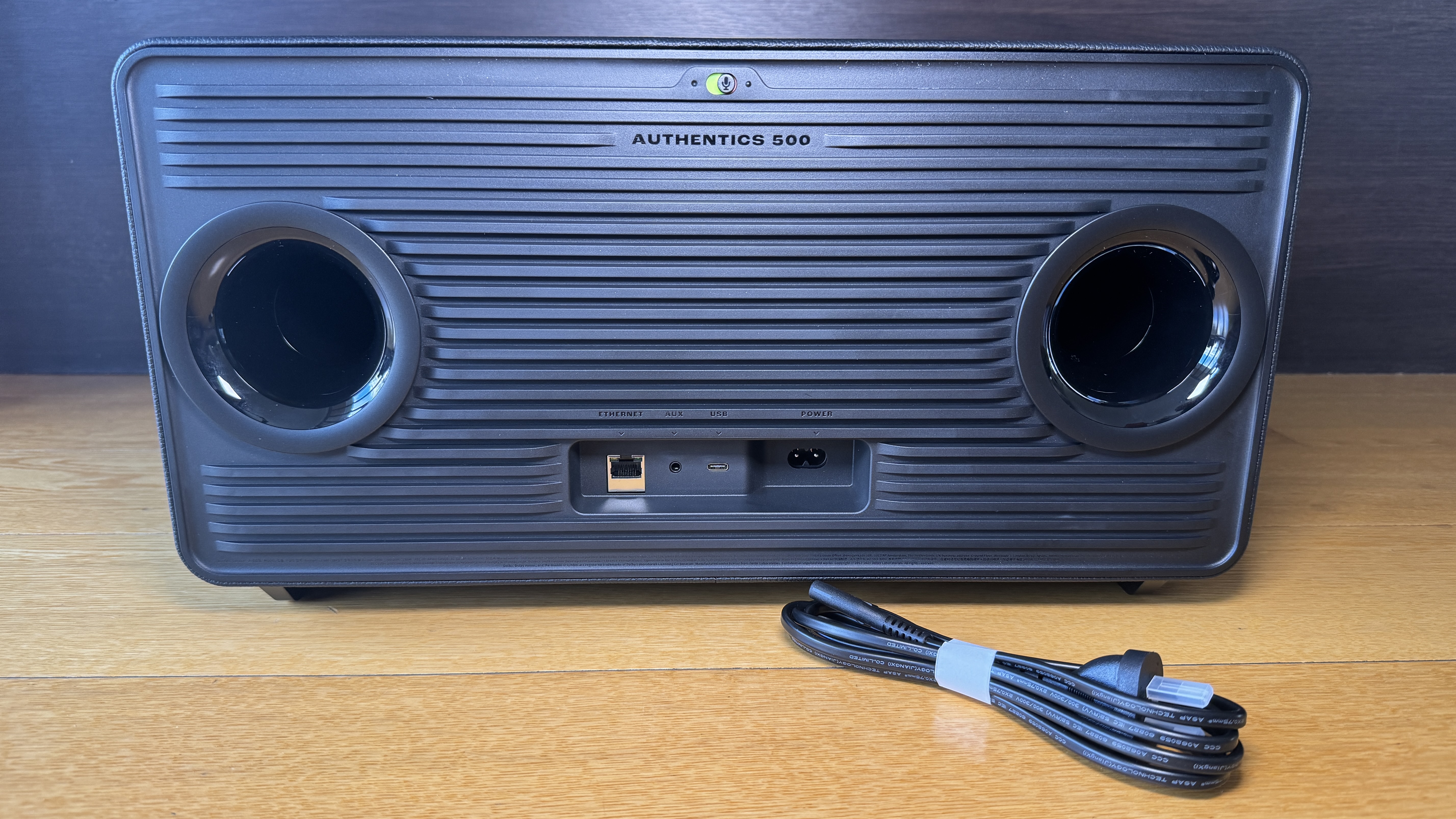
But that's only the beginning of how connected the Authentics 500 can be - not just bluetooth and Wi-Fi - there's even an ethernet port at the back so you can hardwire into your home network. This ensures a more reliable link to your preferred streaming services - especially for the high data transfer rates required for more lossless formats.
You can use both Alexa and Google Assistant to control the speaker and ironically, I've found the built-in mics on the Authentics 500 to be even more sensitive and responsive than most of the Alexa or Google branded speakers I've tried. Even when the volume is up fairly loud, I can generally get the speaker's attention with just my voice.
But all of this is a waste of technology and design if it doesn't sound good, right?
No worries there. The Authentics 500 sounds every bit as great as it looks. Warm. Rich. Deep. Roomy. Intimate. Powerful. Think of an adjective, I'll add it to the list.
By perfectly blending a combination of the latest connectivity technology, the most iconic retro aesthetics from JBL's long history and truly great audio design, this is easily my favourite device of the year. Perhaps ever.
Click here for more information and pricing on the JBL Authentics 500.
2. Apple Watch Ultra 2

I didn't have the opportunity to test the first Apple Watch Ultra last year, so it was with eager anticipation I unboxed the 2023 version, Apple Watch Ultra 2.

The Watch Ultra 2 is also titanium, in its natural, silvery-grey colour with a brushed finish that seems very tough and scratch-resistant - as is the sapphire crystal display. This is one of the few smartwatches I've tested I haven't managed to damage in any way within the first few days of wearing it.
It isn't just swim-proof, like the other Series 9 Apple Watches, it's rated water resistant to 100m, can be used for scuba diving down to 40m and has been militarily tested against shock, vibration, freezing and extreme heat. The Watch Ultra 2 carries an IPX6 dust resistance rating (which I haven't even heard of before) and can withstand altitudes of up to 9,000 metres and down to 500 metres BELOW sea level. In short, this watch is many times tougher than I am.

Just like the iPhone 15 Pro and Pro Max, the Watch Ultra 2 has an Action Button - except this one is big and orange. It can be programmed for any of a growing list of functions and shortcuts, or perhaps just to launch your favourite app. In some cases, the Action Button has multiple uses. For example, it can fire off your favourite workout with a single press. You can then mark each new segment of your workout with another press. This is great news for multisport athletes who now no longer have to try and control their watch with wet or sweaty fingers on a small touch screen.
This is a genuine marvel of modern technology and it all fits comfortably on your wrist - well, hopefully. Sadly, the Apple Watch Ultra 2 still only comes in one size, so if you're not into a chunkier bit of wrist-wear, you might be out of luck here. For everyone else, there's a lot to like. A whole lot. And you don't have to be a free diver or a mountaineer to get your money's worth; who doesn't want a tougher watch with better battery life and an extra button?
Click here for more information and pricing on the Apple Watch Ultra 2.
3. Nespresso Vertuo Creatista

The Vertuo Creatista takes capsule-coffee to genuine cafe-level heights, as the machine sports its own steam wand - not an automatic frothing tank the likes of which I've used in the past. As I soon discovered, this is no ordinary steam wand, it's actually automatic after all - fantastic news as I can only be trusted to steam my own milk correctly about once in every three attempts. Conversely, the Vertuo Creatista gets it right every time and that's what I want more than anything; consistency.

What's more, not only are there three different settings for texture but there are also three settings for heat; yes, this is the first home espresso machine I've used that automatically produces hot - actually hot - frothy milk. That's worth the purchase price on its own.
This machine is so smart, it reads the barcode on the underside of every pod and customises the extraction accordingly. Again, just like with the milk, take my judgement out of the equation and I'm far more likely to get a consistent brew every time.
It's been a while since I seriously tried the capsule coffee thing. I'd given up on it as all too often the results were weak and watery - usually requiring at least two capsules to achieve a robust, long cup of full-flavoured coffee. Admittedly, the system has always been fast and efficient but I always ended up reverting to beans for a more authentic taste.
After the bowl I chugged down this morning I've realised I'm now officially a capsule convert. A pod-person. And this time I don't see any reason to go back.
Click here for more information and pricing on the Nespresso Vertuo Creatista.
4. Samsung QN900C

The Neo QLED 8K QN900C is the culmination of years and years of Samsung's determination to produce the best display possible. Many of its features are refinements of relatively new technologies while some are more of a heritage thing - the One Connect box for example.

This is key to the QN900C's ability to be one of the slimmest TVs I've ever set up. the One Connect box moves all the ports, processing and power supply away from the panel and puts them in a separate unit - connected to the display by a single cable. Although these days, if you prefer, you can still attach the One Connect box to the back of the TV, out of sight, clipped to the stand included in the box. There's even a special clip-on cover to keep any cables as concealed as possible.

Yes, other than the picture itself, perhaps the most striking thing about a Samsung Neo QLED is the "Infinity One Design." Not only is the stand-alone panel a mere 15.2mm thick but the screen is virtually borderless.
Some people seem determined to choose OLED over QLED (or Neo QLED) and it's great Samsung now offers the choice. However, I've seen both TVs in the same room and there's something about the 8K QN900C that gives it a significant edge as far as I'm concerned. Since the advent of Samsung's first 8K QLEDs, some years back, I've found the depth of image to be quite mesmerising. I've often described this effect as being the closest thing to 3D you can get - that feeling you can almost reach into the screen and become part of the action, Tron-style. This sensation, this sense of depth has only intensified over the years, becoming even more tangible once Samsung moved from QLED to Neo QLED, due to the dramatic increase in resolution.
All in all, this is a sublime home entertainment experience.
Added extras like Philips Hue integration and Xbox Cloud Gaming make this such a total package you may never leave the house again.
Click here for more information and pricing on the Samsung Neo QLED 8K QN900C.

The EAH-AZ80 earbuds represent the next evolution for Technics.
Technics has made several crucial upgrades that result in a genuinely transcendent audio product - starting with the fit.

Active Noise Cancelling really is first-rate - and amazingly tweakable using the Audio Connect app. Here you can not only adjust how much noise you cut out but customise the level of ambient sound you let in and how much noise is eliminated when you're on a call to someone else.
But it's Technics' legendary true-to-life sound reproduction we're really here for, right? And that's where the biggest improvements come to the fore.
Each AZ80 bud contains the all-new, 10mm aluminium alloy diaphragm and a surprisingly large acoustic control chamber which together claim to deliver genuine Technics hi-fi sound. I support that claim.
There is no distortion here. No muddy, overlapping of different elements. Just the pure mix as expert studio engineers could only hope to be reproduced on an audio device as good as this. Congratulations, Technics; the AZ80 takes the crown for my new favourite buds.
Click here for more information on the Technics EAH-AZ80.
6. Samsung Galaxy A34 and Samsung Galaxy A54

For the sake of comparison, I've been trialling both the Samsung Galaxy A34 5G and the A54 5G - A big selling point with both phones is storage; both ship with 128GB of internal space, not to mention the option of adding a microSD (assuming you're not utilising the second available sim tray instead). The 2023 A-Series phones also feature "RAM Plus" - this actually draws on available internal storage to enhance the installed physical RAM (8GB in the A54 and 6GB in the A34).
The result is both these phones work much more smoothly and reliably than similar models of just a few years ago. Most of us have experienced the compromised performance of a "cheap" phone with not enough storage or power. That's simply not the case anymore - not with these two, anyway.

In fact, (although I said I wasn't going to be surprised anymore) I've been surprised how much using both these phones feels just like using a more "high-end" Samsung device. One big part of this is the FHD+ Super AMOLED displays - in true Samsung style colours are vibrant and bright, and the 120Hz refresh rate makes for an extremely responsive screen, although the extra processing power and slight bump in RAM on the A54 gives it a noticeable advantage over the A34 in this regard. Meanwhile the A34's display is technically a bit bigger; 6.6-inches compared with 6.4 - this is because the aspect ratio is slightly wider.
The major difference between these two handsets is camera performance. The camera setups on both phones are very good, it's just that the hardware on the A54 is significantly "gooder". Both phones sport a triple-lens, macro/main/ultra-wide rear camera configuration but the A54 sensors are higher specced and do a better job, particularly in low light.
There seems to be a bit of oneupmanship going on between phone makers when it comes to software updates these days and I'm not complaining, Samsung is promising four years of OS upgrades and five years of security updates so these phones are certainly built to last, inside and out.
And genuinely great value. At NZ$649.00 for the A34 and NZ$799.00 for the A54, unless you're determined to have the absolute best camera on the market, or a flashy folding phone, I don't know why you'd pay more. I'd be inclined to splurge the extra $150 for the superior photo performance of the A54 but neither of these handsets will disappoint. Unless you're addicted to wireless charging. But that might just be me.
Click here for more information and pricing on the Samsung Galaxy A34 5G.
Click here for more information and pricing on the Samsung Galaxy A54 5G.
7. Kenwood MultiPro Go

The Kenwood MultiPro Go has given all the unnecessary attachments the chop and sliced away a lot of the bulk of conventional food processors. Oh, don't worry, Kenwood still has other options with all the options but the MultiPro Go is definitely more my style.

Even when it's out on the bench, the MultiPro Go takes up only the minimum amount of space. 20% smaller than Kenwood's next smallest food processor, its 360° design means you can use it right in the corner if you have to.

It comes with just two blade attachments - a standard double knife blade for chopping, pureeing and even kneading dough and a reversible slicing/grating blade. I can assure you these blades are extremely sharp. The reason I can assure you of this is that I cut my finger on one just getting it out of the box. This is why I can't be trusted with actual knives and need to rely on machines to do my chopping for me.
There's no doubt I'm saving a significant amount of time and fuss (and possibly fingertips) by using the MultiPro Go as my primary chopper. We tend to buy cherry tomatoes as they're more available all year round but if you've ever tried to slice one, you'll know they're pretty fiddly. The whizzing blade of the MultiPro Go takes care of this in about a second - resulting in the thinnest tomato slices I've ever seen. Nobody likes chopping onions either - and now I don't have to.
Best of all, there's only one control. Slide one way for On. Slide the other way to Pulse. You don't need to be licensed to drive this one. That works for me.
The price also definitely works for me. NZ$129.99 to get all my food prep done in seconds? Bargain.
Click here for more information and pricing on the Kenwood MultiPro Go.
8. Apple MacBook Pro (M2 Pro)
-7.jpg)
Now I'm just going to come right on out and say it; the MacBook Pro is not the world's most sexy-looking laptop. (Cue gasps of horror from Apple acolytes across the globe) It just isn't. It's only available in Space Grey or Silver - so none of the fun colours we often see with iPads or iMacs. It's not a particularly cool shape - the rounded corners are very Apple-esque but it's actually quite thick and boxy by modern laptop standards. While the lid and screen are super slim, the main body of the MacBook Pro is not and unlike the MacBook Air, it doesn't taper away to a narrow edge when closed.
-12.jpg)
Oh, and it's pretty heavy. I'm used to reviewing laptops that claim to be the lightest thing going. MacBook Pro does not make that claim. It's 1.6kgs - but you know what?...
I don't care. I don't care about any of that stuff because that stuff is fluff. The main thing you need to know is this is the best laptop I've ever used.
The MacBook Pro with M2 Pro silicon is an excellent solution for pretty much anything you care to throw at it. I've enjoyed working on it so much I keep trying to find new reasons to use it. I'm thoroughly looking forward to upcoming accessory reviews because I can connect them to this laptop and rest assured I'll be editing all my videos on the MacBook Pro from now on. Just like the one below.
This configuration is certainly pricey; the 14-inch, 1GB M2 Pro model I'm using right now is NZ$4,599. In saying that, from what I've experienced so far it's definitely a "you get what you pay for" situation. Yes, that's a lot of money but man-oh-man, this is a heck of a lot of computer. And now the M3 version has been released and I can only imagine what a rocket ship that is.
Click here for more information and pricing on the Apple MacBook Pro (M2 Pro).
9. Satechi GaN Chargers

What is GaN? Have you heard of it yet? Do you even know what it's replacing?
Everything has its limits and more recently we've begun to reach silicon's limits; Moore's law is no longer accurate and the advance of silicon-based technology has started to slow.
This led scientists to look for something else - something better, more efficient. Gallium Nitride was already being used for lighting, lasers and even TV displays. It turned out GaN was also able to conduct electrons up to 1000 times more efficiently than silicon. This meant dramatically more speed and power with a lot less heat.

The upshot of all this as far as you're concerned is Satechi can now offer a multi-purpose wall charger, capable of delivering up to 100W to any USB-C-connected device - from phones to laptops. The key advantages here are size and safety; it's not much bigger than any conventional power brick and is definitely smaller than any laptop power supply. It also runs much cooler; this is the peace-of-mind many of us are seeking after hearing so many stories of overheated chargers damaging batteries and even causing fires.

Satechi also offers the 165W USB-C 4-Port PD GaN Charger. Only slightly bigger than its single-port stablemate, the 4-Port version ups the available wattage so you can literally charge a laptop, a tablet, a phone and your watch simultaneously. That means you now need just one wall socket instead of four and because it comes with a conventional, figure-eight external power cord, the wall socket you do use won't be crowded out with a massive brick, preventing you from plugging other things in next to it or placing furniture in front of it.

The efficiency and performance of these chargers are faultless and I'm sure it won't be long before all wall chargers are GaN-based like these. The maths is simple; do you want four bricks in the wall or just one? (Note, Satechi also has a six-port Gan charger now too)
Click here for more information on the Satechi 100W USB-C PD Wall Charger.
Click here for more information on the Satechi 165W USB-C 4-Port PD GaN Charger.
10. OPPO Find N2 Flip

When OPPO embraced the more pocketable "clamshell" form factor, it became apparent it was getting pretty serious about foldables. So serious in fact, this year OPPO is marketing the Find N2 Flip as its New Zealand flagship - if you were hoping for a local release of the Find X6 and Fnd X6 Pro this year, you're out of luck. This makes the Find N2 Flip Oppo's only premium offering for 2023, so it had better deliver. No pressure.
The Flexion hinge allows the Ultra Thin Glass (UTG) screen to unfold with what OPPO describes as "an almost invisible crease." In reality, this is somewhat of an overstatement; depending on the light you can just make out the crease and you can just feel it - but only just. I never notice it at all when using the phone on a day-to-day basis. It's certainly the most crease-free experience I've enjoyed on any foldable device I've tried so far.

OPPO's unique Flexion hinge also means the phone folds together without any gap. This may sound like a small thing but one thing that's really peeved me with other foldable phones I've kept in my pocket is when I get them out and open them, invariably the internal screen is covered in dust and other pocket lint. That simply doesn't happen with the Find N2 Flip as there's no gap for such detritus to penetrate.

Another major win for the OPPO device is its external screen; a 60Hz display that measures in at 3.26-inches - big enough to be genuinely useful - not just a tiny notification window but an auto-rotating AMOLED display that gives you access to large, readable widgets (weather, calendar etc) and most importantly, lets you frame photos and videos at the same orientation you're shooting them in.
Interestingly (well, for me anyway) the Find N2 Flip is powered by the Dimensity 9000+ octa-core chip from MediaTek - not a Snapdragon as other recent OPPO flagships have contained. Although not quite the highest-specced phone brain available in 2023, it's not far behind and I've certainly had no complaints while using the Find N2 Flip.
Without a full-featured camera and options like wireless charging, I'm not convinced this is a genuine, high-end flagship but it has most things people want in a phone and what's more, it'll fit in any pocket or purse. Just when you thought there was only one name in foldables in town, OPPO has definitely joined the party. (Oppo has since launched the Find N3 Flip but that isn't yet available in New Zealand)
Click here for more information on the OPPO Find N2 Flip.
11. Belkin Connect Pro Thunderbolt 4 Dock
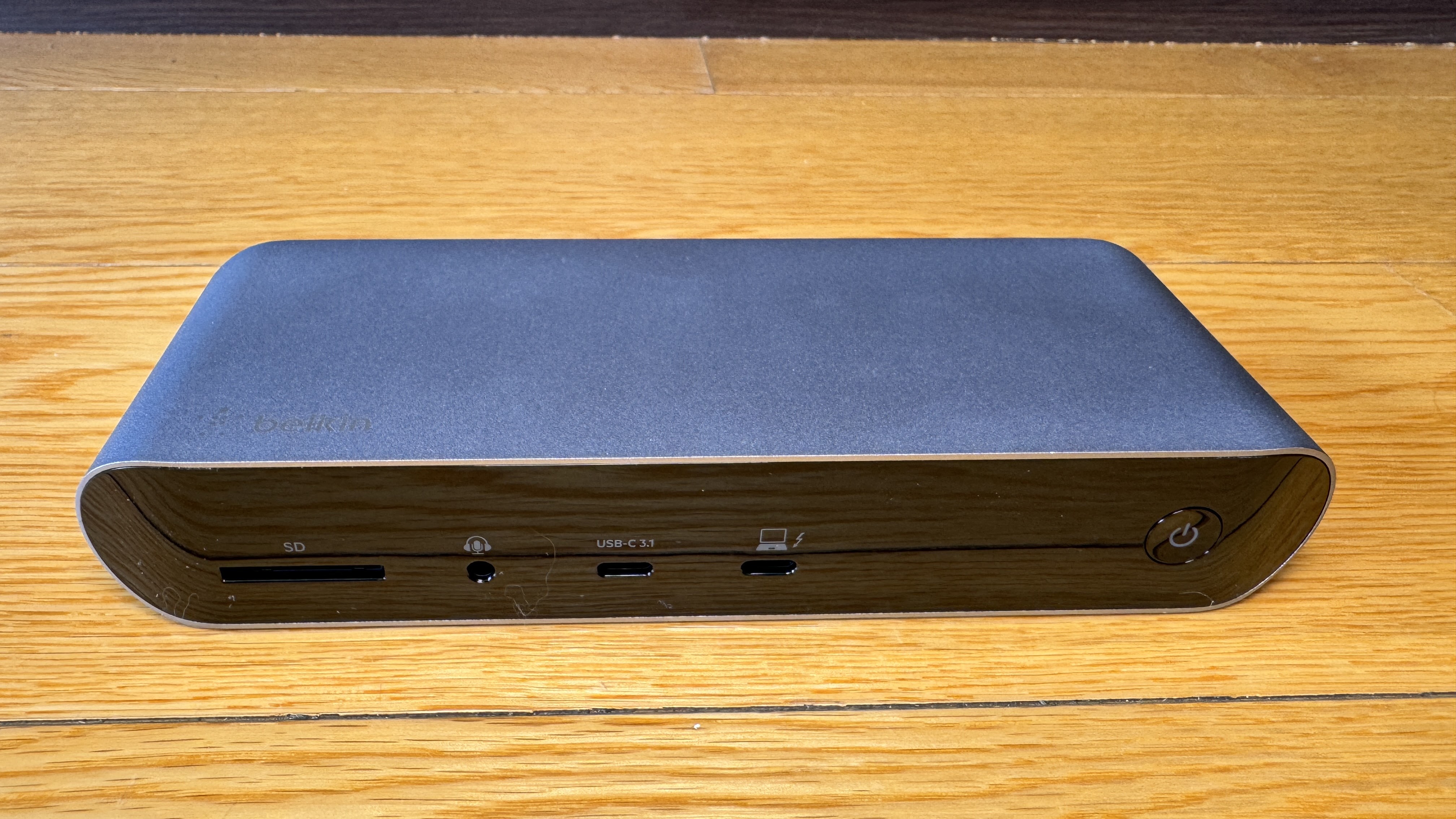
I've tried a few external hubs over the years but unless they have their own power supply, any connected accessories end up relying on the Macbook itself to power them - a problem that's only exacerbated if you want to connect an ethernet LAN line for better internet connectivity.
The Belkin Connect Pro Thunderbolt 4 solved all that instantly and all I had to do was plug it in.

The Connect Pro Thunderbolt 4 is essentially perfect. Let's cover off exactly what you're getting here; an SD card reader, audio jack, 2x HDMI ports, 2x USB-A 2.0, 2x USB-A 3.1, 2x Thunderbolt 4(USB-C), gigabit ethernet and perhaps most importantly, a 3.1 USB-C Gen 2 port with QuickCharge. That last slot will deliver up to 90W of power to your laptop or tablet.

This is a crucial distinction between this dock and other portable hubs that don't come with their own power supply; the Connect Pro Thunderbolt 4 will literally charge your laptop while connecting it to up to 11 other gadgets. Talk about a productivity boost.
The Connect Pro Thunderbolt 4 Dock has streamlined my desk setup with a single cable - I now need fewer chargers and when I get my laptop out I only need to plug in one thing to access eleven. First-world problem solved.
Click here for more information on the Belkin Connect Pro Thunderbolt 4 Dock.
12. Apple iPhone 15 Pro

This year's Pro-model iPhones are significant upgrades if for no other reason than they address some of my personal pet peeves head-on.

Perhaps most well-publicised is the move to a USB-C charging port for the first time. While Apple's MacBooks and iPads have been using the same USB-C standard as everyone else for some time, the iPhone range has been mysteriously holding out, their old-school lightning ports stubbornly incompatible with any convenient USB-C cables lying around the place and also depriving users of the opportunity of shorter charging times and much faster data transfer speeds.


Another feature I've been missing on iPhone over the years is a proper telephoto lens. Again, this year Apple has well and truly stepped up with a 5 X zoom on the iPhone 15 Pro Max and 3 X on the Pro I'm reviewing. This seems to be a matter of simple physics; the Pro Max is just plain bigger, so it can accommodate a larger telephoto sensor. Either way, it now means an extra quick setting in the camera app; .5 for Ultra Wide shots, 1 X, 2 X and now 3 X (or presumably 5 X on the Max? Not sure). This is fantastic news and makes a massive difference for both video and stills - crisp clear shots from distance and also, a new macro setting for extreme close-ups.
This is easily the best iPhone I've used to date. Physical upgrades like the telephoto lens and USB-C charging port combine with software tweaks like StandBy mode and interactive widgets to alleviate the few final frustrations I still harboured when switching between Android and iOS.
For once, don't believe the hype - well, not the negative hype anyway. As far as I'm concerned, this is a very cool phone.
Click here for more information and pricing on the Apple iPhone 15 Pro.