Tuesday, 7 November 2023

Twelve South AirFly Pro - No Upgrade but Still Essential

Today's review is one of your classic, elegant solutions to an old, enduring problem.

It's most definitely a first-world problem but a problem nonetheless. If you've ever flown long-haul, you will have experienced it; I call it the Great A.V. Inconvenience.

What is it with in-flight entertainment systems? The airline-provided headphones/earbuds are often terrible quality - and that's if they work at all. So you bring your own, high-quality headphones only to discover you need a special adapter to plug them in. Then, even if you have all the requisite hardware, you still have to deal with a tray table, meals and passengers in adjacent seats wanting to push past to get to the loo.

This hardly makes for an enjoyable viewing experience,

That's why the little white dongle from Twelve South was always such an ingenious idea.


The AirFly Pro bluetooth transmitter is a tiny tool that converts any standard audio jack into a wireless connection. It couldn't be easier to set up; it charges via USB-C, then you just hold down the power button to enter pairing mode. (For subsequent connections add the extra step of pressing the pairing button on the side)
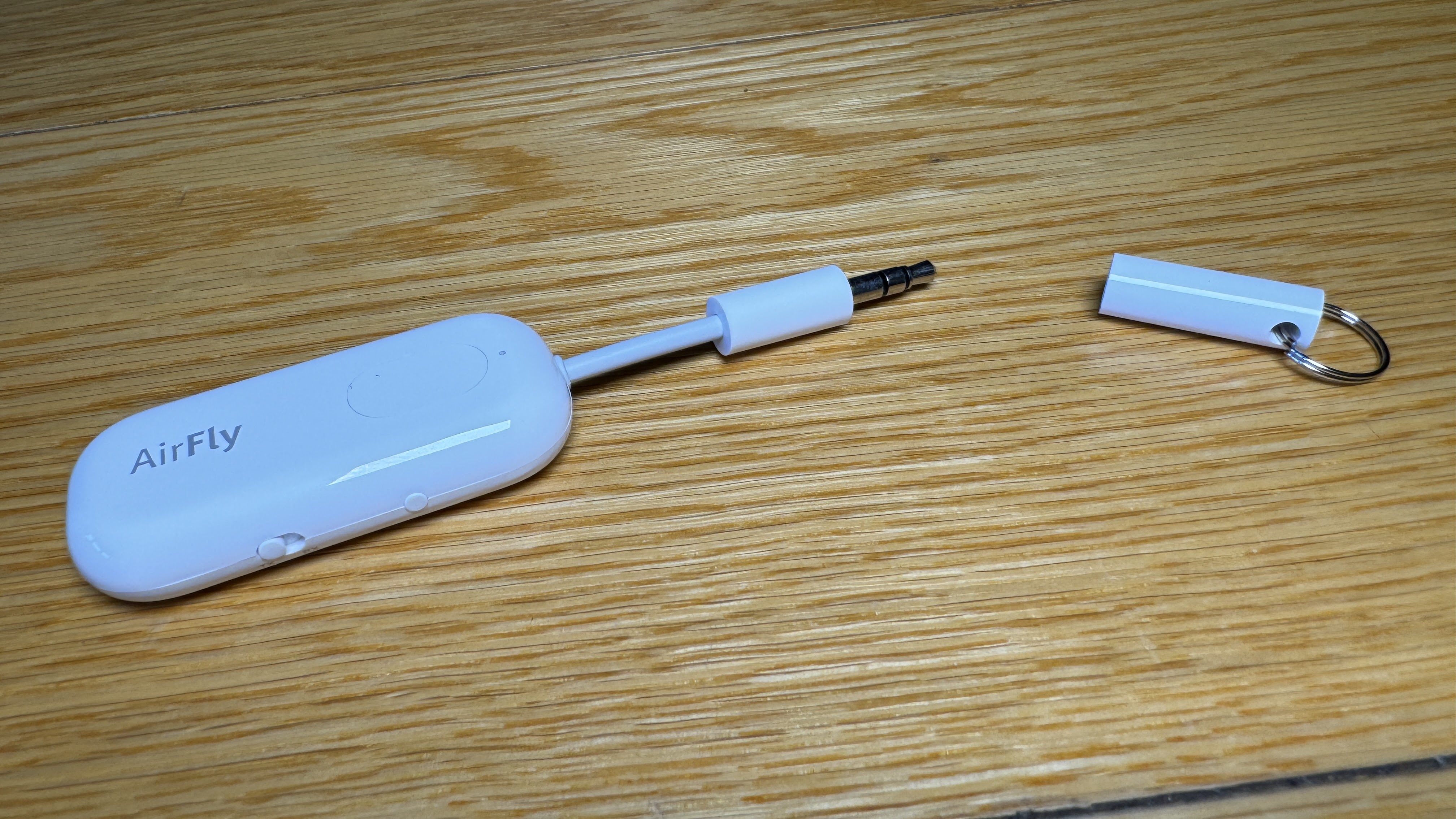
Once you've paired your headphones or earbuds with the AirFly Pro you can then plug it into anything with an audio jack; laptops, tablets and yes, obviously the screen on the back of the aeroplane seat in front of you. No re-pairing every time you swap devices; just plug it in and you're good to go.

The big advantage of the AirFly Pro over Twelve South's other AirFly models is it's not just a transmitter but with the flick of a switch, it can work as a bluetooth receiver instead. This is particularly useful for regular travellers who are often using different rental or business vehicles.

Once again, who wants to learn how to set up the bluetooth on a strange car you might only be using for the day? Plug in your pre-paired AirFly Pro and you're instantly good to go. Your playlists, podcasts and GPS voice-directions all coming through the unfamiliar vehicle's stereo, just like that.

See? Simple, yet genius.

But you knew all this already.

It's actually been three-and-a-half years since I initially reviewed the AirFly Pro so I was anticipating some kind of significant upgrade - either to the physical design or perhaps a performance boost under the hood - but as far as I can tell, this is the exact same device I first trialled back in March of 2020.

I don't have a massive problem with that, given I considered it to be a brilliant piece of minimalist design then and I still do now. However, at the core functionality of the AirFly Pro lies bluetooth connectivity and from what I can tell, this hasn't been upgraded either - and yet over that time, Bluetooth has.

These days, pretty much every set of noise-cancelling headphones or true-wireless earbuds I test are Bluetooth 5.3-enabled. This not only makes for a much stronger, more reliable connection over a larger distance but also allows the latest audio codecs to provide practically lag-free (and in some cases lossless) audio.

This is so important when it comes to watching video because any slight audio delay means dialogue and sound effects don't sync exactly with the images. It's potentially even more crucial when gaming, because if you don't react instantly you could wind up dead - well, virtually dead, anyway.

Unfortunately, after testing my new AirFly Pro with a number of devices; laptops, tablets, sound desks, earbuds and headphones I'm pretty certain there's been no update with the Bluetooth protocol since the Bluetooth 5.0 unit I was using back in 2020.

I've tried to find more details on the Twelve South website but the most I've been able to glean is it's "at least Bluetooth 5.0" and latency is "generally 30 milliseconds or so." To be fair to Twelve South, most people should be able to live with that level of delay - especially on a plane. To be fair to Twelve South's customers though... you'd think they might have spruced things up a bit over the last three years.
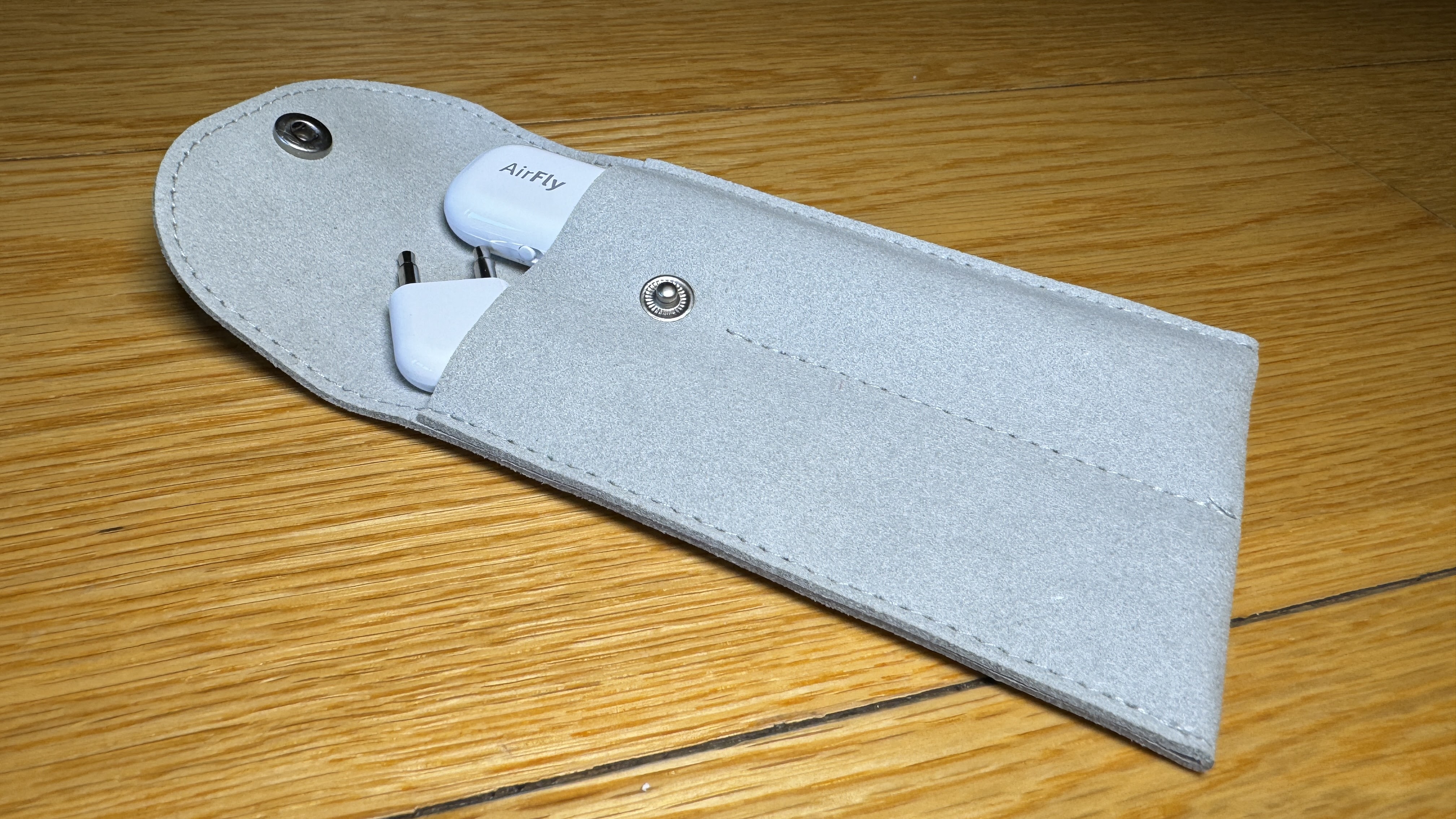
What is now available is the AirFly Pro Deluxe package. While the AirFly Pro itself remains unchanged, when you go Deluxe you get a rather streamlined international airline adapter (you know, for those weird dual-sockets you only find on aeroplanes for some reason) and a classy suede bag to keep the transmitter, adapter and power cable in.

This is a good idea because the AirFly Pro is very small and I imagine quite easy to lose (although I've managed to hang onto mine so far). Oddly, while well-made, the suede case doesn't seem particularly purpose-built. It has two longish but narrow pockets which don't easily accommodate the airline adapter - if you stuff it too far down one of the pockets you just about need a pair of long-nose pliers to extract it again. This is an uncharacteristic design oversight from Twelve South who usually produce only the very best and most elegant of accessories.

Ultimately, that's a small niggle and the price gap between AirFly Pro and AirFly Pro Deluxe probably justifies the addition of the adapter by itself, let alone the suede case as well.

As we've established, the AirFly Pro remains essentially unchanged so there's no need to rush out and get a new one if you haven't already got one. However, as we've also established, if you haven't already got one, definitely rush out and get one. I consider this accessory just as essential for any regular traveller as their suitcase and passport.


Click here for more information on the Twelve South AirFly Pro.

Thursday, 2 November 2023

Fitbit Charge 6 -Bridging the Gap Between Watch and Tracker?

When it comes to the wearables market, you could probably label Fitbit as a heritage brand. That's assuming you consider the wearables market to have been around long enough to have a heritage anything.

Certainly, years ago when only the nerdiest of the super-nerds (like me) were wearing actual smartwatches, plenty of people were already using Fitbits to track their exercise and monitor their workouts.

However, towards the late 2010s, the smartwatch began to become more widely adopted and fewer people felt the need for a specialised, more activity-focused device - especially when many, if not all of those functions could be taken care of by the watch they were already wearing.

Fitbit evolved too and began to offer more smart features in more watch-like form-factors.

Then the Google behemoth swallowed Fitbit up and we waited to see how this would affect future Fitbit products.

A tricky business because in many countries around the world, Google markets its Pixel Phones and now Pixel Watches are two generations on. The trouble is, we don't get those here.

So where does that leave Fitbit?


The latest answer to this complex question is the Fitbit Charge 6 - which looks surprisingly similar to its predecessor, despite Google's influence. 

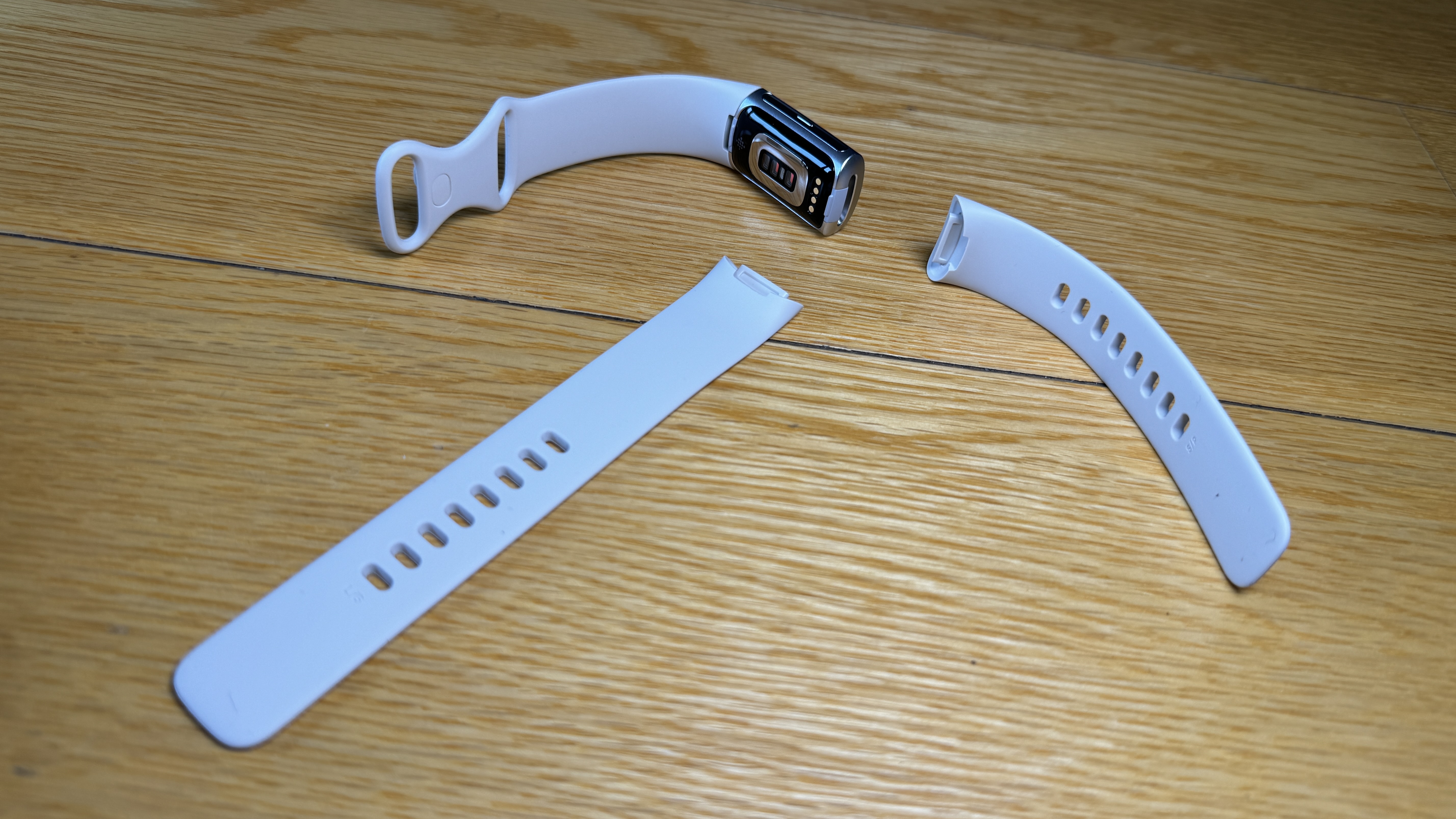
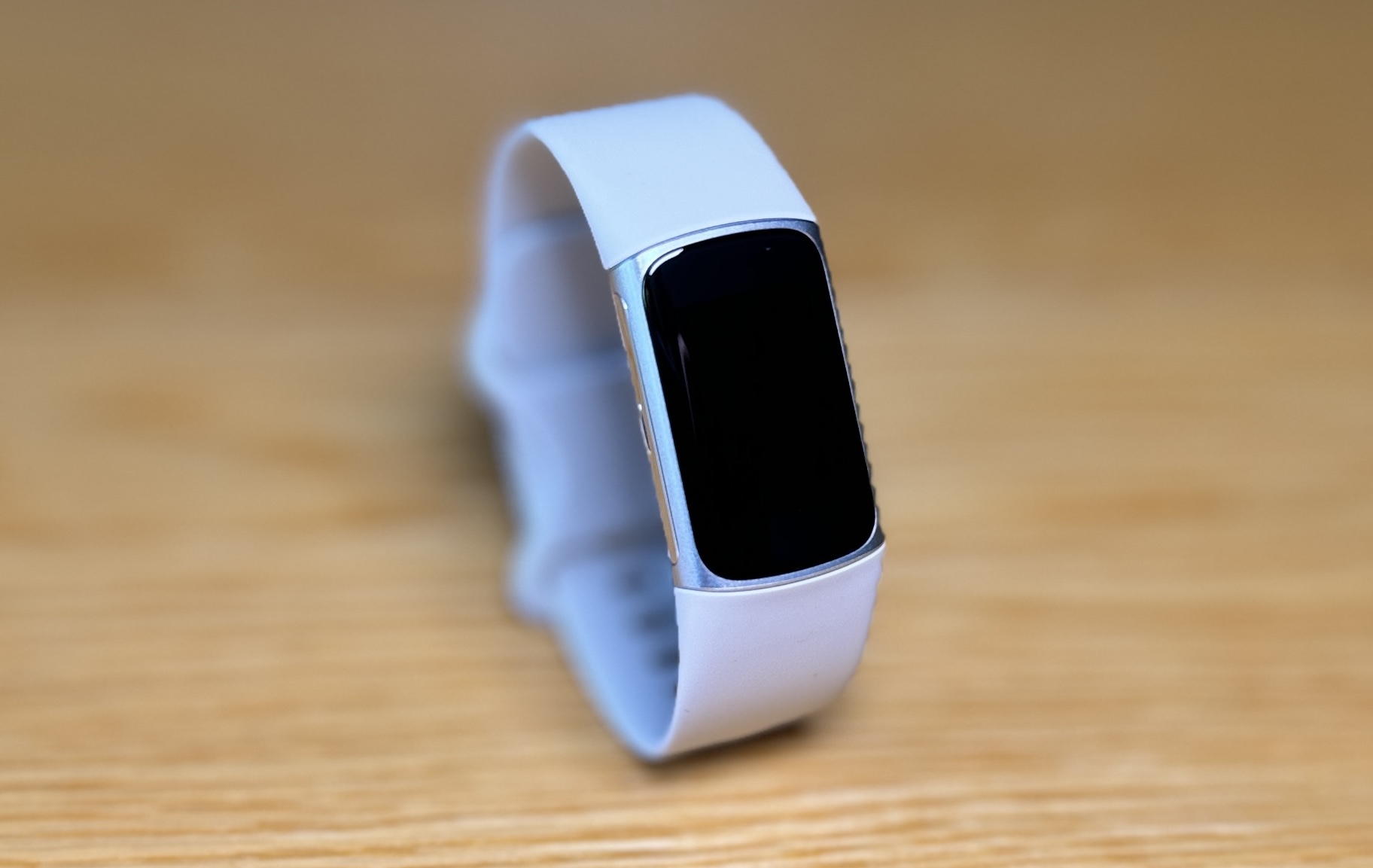
Aesthetically, the Charge 6 definitely looks more like a tracker than a watch - it's quite slim and the display is small, although with an elegant choice of band, someone with more delicate wrists than me might be able to make it look more watch-like.

Bands are easily swapped out; simply click off and push on. My review device is the Porcelain with  Silver Aluminum casing but the Charge 6 also comes in Obsidian/Black Aluminium and Coral/Champagne Gold Aluminium.

It's certainly easy to wear and comfortable everywhere; while exercising, in bed, swimming, in the shower - it's water resistant to 50 metres and there's plenty of battery life to make the most of Fitbit's excellent sleep-tracking abilities.

In fact, even with daily GPS workouts and notifications running, I can easily get through five days on a single charge. The Fitbit website's suggestion of seven days may be a little inflated under what I consider to be "typical usage." In saying that, five days is still about four days better than most smartwatches can do.

Unfortunately, yet again, there's a model-specific charging cradle. This has always been one of my bugbears with Fitbit. Every new model means a new cable - flying in the face of other tech companies desperately trying to reduce their carbon footprints.

Another odd thing about the Charge 6 is, like some other Fitbit devices, you can't actually turn it off. If you want to power it down for any reason you have to do just that; let the battery run down. This is kind of annoying because it means you then have to charge it up again the next time you want to use it. Like I say... odd.

At least it charges quickly, although again, as usual, firmware updates take forever - which Fitbit just never seems to make much improvement on. This is pretty frustrating as you usually have to update the firmware when first setting the Charge 6 up via the Fitbit app.

Like other Fitbits, purchasing the Charge 6 earns you a six-month upgrade to Fitbit Premium. This isn't compulsory but it does give access to guided workouts and your Daily Readiness Score. This is essentially Fitbit's way of working out your recovery time and suggesting what level of activity you should be considering next.

Apart from all the exercise, health and sleep tracking features we've come to expect from most Fitibit devices, with the Charge 6, we definitely start to see Google giveth... and Google taketh away.

As part of the Google ecosystem, the Charge 6 now offers Google Maps integration for turn-by-turn navigation, Google Wallet for contactless payments and YouTube Music controls. These are all fabulous features - especially Google Wallet, which works flawlessly every time. However, in order to use Google Wallet on the Charge 6 you have to set a pin for security. This needs to be entered when you put the tracker on or if you haven't opened Google Wallet for a while. That wouldn't be such a hassle except because the display on the Charge 6 isn't big enough for a full number pad, entering the pin involves scrolling through all ten digits and selecting one four times. A bit time-consuming and fiddly but at least you can leave your wallet at home when you're out for a run.

YouTube Music is the real smokescreen here though. Most previous FitBits had some form of media controller - giving you the ability to play/pause and skip whatever you were listening to on your phone. That's gone now and you're left with YouTube Music or nothing. This kind of pushy, brand-specific user software really rankles me and I uninstalled the YouTube Music app as a protest.

What has impressed me most about the Charge 6 is how well the notifications now work. Over the years I've always been quite critical of Fitbit's inability to ensure timely and consistent notifications from the apps on my phone. I don't know if it's due to Google's influence but the connectivity is now perfect. Every email, text, social media message and security camera notification buzzes my wrist instantly. Great work, Fitbit.

The brightness of the colour display has also improved out of sight, excuse the pun. Even when I leave the settings on Medium, I still have no trouble reading the always-excellent workout display out in bight sunshine - another big improvement on an area where previous devices have come up short.

So does that mean the Charge 6 is now more watch than just a mere tracker? Ultimately, I think the answer remains no. I still don't think this device is quite smart enough to be used as a watch 24/7. Unless I can take calls on it, answer messages and yes, pause and play my podcasts, I have to leave this one in the activity tracker category. Oh, it's a high-end tracker - and at NZ$289.95 it's certainly priced that way too - but even diehard Fitbit fans would have to admit there are much smarter devices out there.

Google makes some. Pity you can't buy them here.


Click here for more information and pricing on the Fitbit Charge 6.

Wednesday, 1 November 2023

Belkin Connect Pro Thunderbolt 4 Dock - Supercharge that Single Port

USB-C is now officially everywhere. Thanks to EU regulations and just the fact it's what everybody wanted, it's now pretty hard to find a tech device that doesn't run on USB-C.

And yet, despite this increasing universality, many laptops and most tablets only have one or two ports to plug things into.

This means if you want to be anything like productive, you're going to need some kind of dock. But be warned; not all docks are created equal. Hell, not all USB-C cables are even created equal.

Sheesh...

The Belkin Connect Pro Thunderbolt 4 Dock is pretty much exactly what I've been looking for.


Here's my problem - and it doesn't get any more first-world than this; I have too many gadgets. I'm sure this comes as no surprise, after all, I do review them every day. However, it turns out it can be a bit of a challenge if you want to use several of them at once.

Specifically, I've found if I want to connect an external camera, a mic, headphones, a mouse, a keyboard and a streaming mixer to my MacBook all at once, not everything gets its own port. My MacBook only has three USB ports and they're all Type-C. Limiting, to say the least.

I've tried a few external hubs over the years but unless they have their own power supply, any connected accessories end up relying on the Macbook itself to power them - a problem that's only exacerbated if you want to connect an ethernet LAN line for better internet connectivity.

Generally, the camera is the first device to stop working - usually right when I want to film something.

The Belkin Connect Pro Thunderbolt 4 solved all that instantly and all I had to do was plug it in.

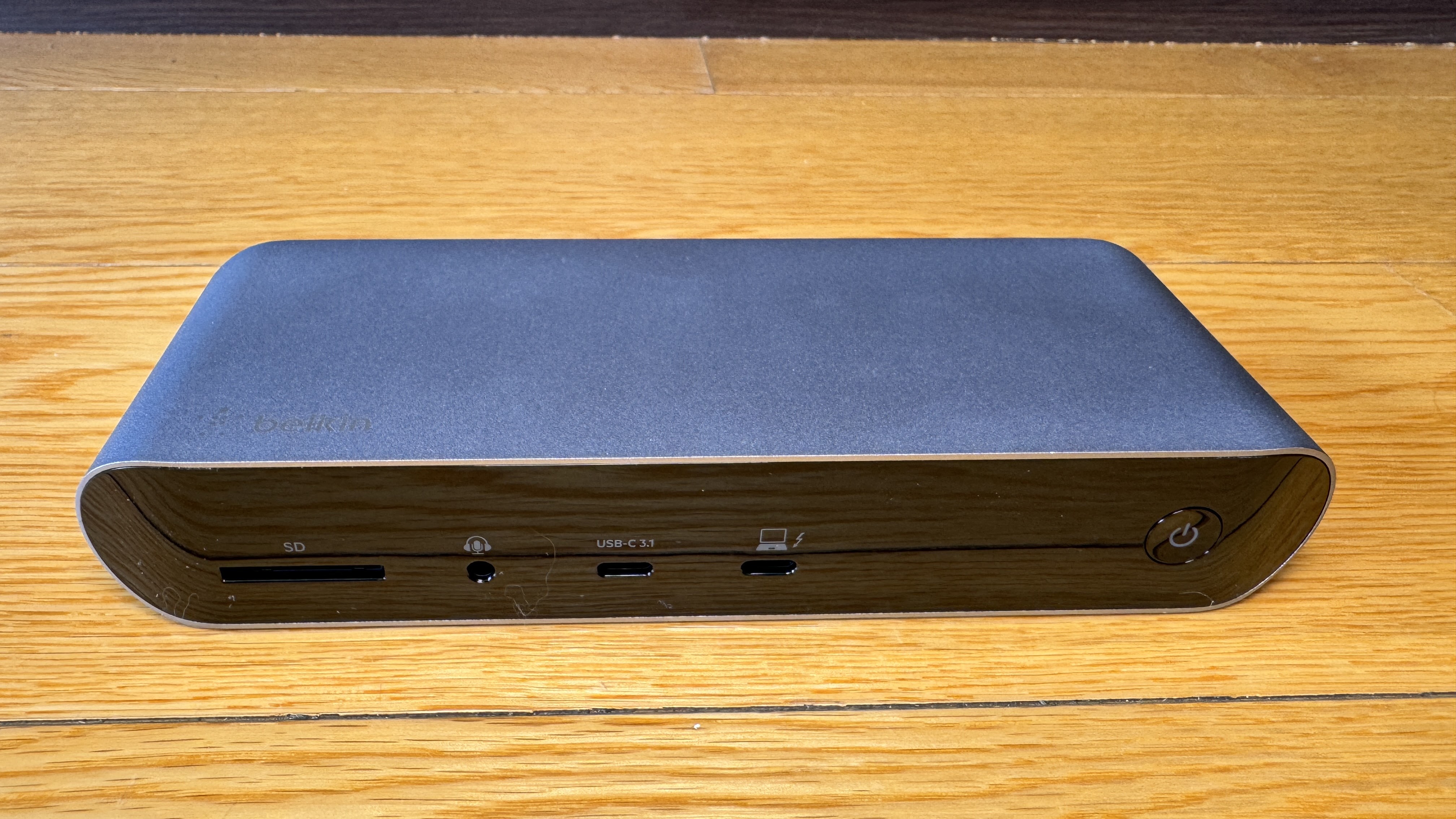
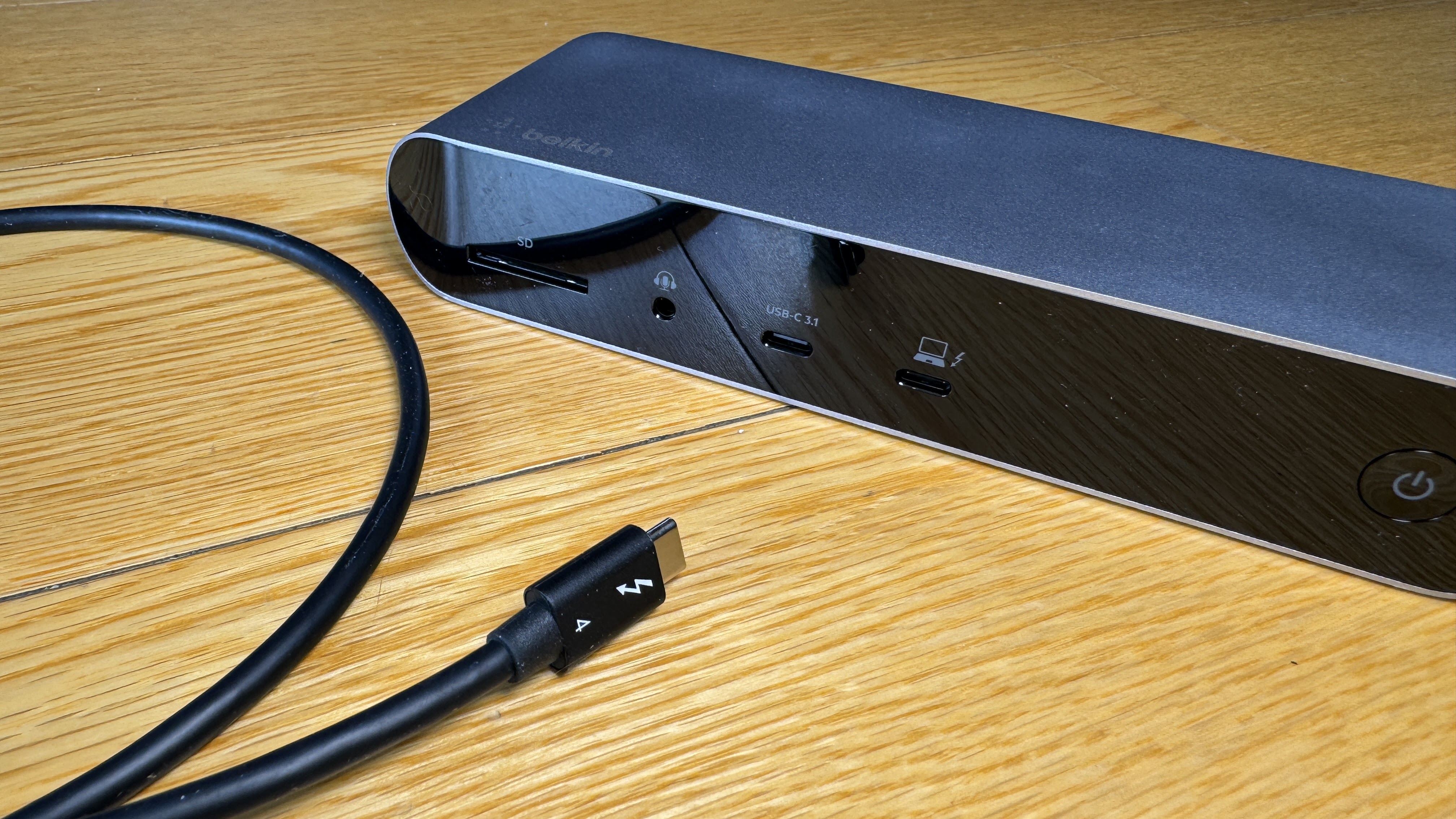
Physically, it's a reasonably solid device - a little larger and heavier than some of the portable docks I've used but attractive enough with its brushed metal casing, curved ends and glossy front and rear panels. That glossy finish is a slightly flawed concept though, because with 12 different ports to plug things into, you're not going to get the right plug in the right slot first time, every time. Metal plug VS glossy plastic means scratches - and plenty of them. I've trialled a few other Belkin products with a similar finish and they're also pretty scratched up now. Hey Belkin design team? Please take note.

That minor cosmetic criticism aside, in every other way, the Connect Pro Thunderbolt 4 is essentially perfect. Let's cover off exactly what you're getting here; an SD card reader, audio jack, 2x HDMI ports, 2x USB-A 2.0, 2x USB-A 3.1, 2x Thunderbolt 4(USB-C), gigabit ethernet and perhaps most importantly, a 3.1 USB-C Gen 2 port with QuickCharge. That last slot will deliver up to 90W of power to your laptop or tablet.

This is a crucial distinction between this dock and other portable hubs that don't come with their own power supply; the Connect Pro Thunderbolt 4 will literally charge your laptop while connecting it to up to 11 other gadgets. Talk about a productivity boost.

I'm sure I don't need to sell you on the advantages of having an ethernet connection or dual HDMI displays sitting there, ready to go. All those extra USB-A ports will certainly come in handy too - especially for Mac users who probably don't have any on their devices at all.

But it's the latest Thunderbolt 4 technology where the Connect Pro really comes into its own.

Now that this year's iPhone 15 range - and even the latest AirPods Pro - have all converted to USB-C, pretty much everything can be charged or connected with the same cable. But please heed this warning; just because two USB-C cables look the same, they may be worlds apart in terms of what they can actually do. In fact, some USB-C cables are only for charging - they won't transfer data at all.

The best of the best right now is Thunderbolt 4. Unless you're being scammed, you'll be able to tell it's a Thunderbolt 4 cable by the lightning symbol and the number 4 on each plug. What's the difference? Only Thunderbolt 4 is capable of transfer rates of up to 40Gbps - and that's while fast charging devices up to 100W.

This makes it the perfect link when it comes to connecting your device to eleven other things at once.

Perhaps you like to use your tablet with an external storage device? A physical keyboard? Maybe even a monitor? While you might be able to plug one of those things into your tablet's single USB-C port, you then lose the ability to charge it while you're using it. This issue is compounded by the fact it usually uses extra battery to run external devices so your productive time will be severely curtailed.

Alternatively, you could go with the Connect Pro Thunderbolt 4.

Not only are USB ports in short supply on laptops and tablets but most tablets now rely on their single USB-C connection if you want to plug in headphones too. How handy having that audio jack on the dock instead?

This is yet another example of why I love this device. You plug it in and everything just works. I know that sounds basic but in my experience, it doesn't always turn out that way. The Connect Pro Thunderbolt 4 Dock has streamlined my desk setup with a single cable - I now need fewer chargers and when I get my laptop out I only need to plug in one thing to access eleven. First-world problem solved.


Click here for more information on the Belkin Connect Pro Thunderbolt 4 Dock.

Tuesday, 31 October 2023

Amazon Fire TV Stick 4K Max (2nd generation - 2023) - You're Too Pushy for Me

I'm a big fan of streaming sticks. I really like the way you can essentially upgrade your whole home theatre by plugging a reasonably inexpensive dongle into an available HDMI port and turning it on.

All your favourite streaming services are ready and waiting, along with the latest audio and video protocols.

These days you'll usually get a pretty decent remote to control it all too - and thanks to the wonders of HDMI ARC, that remote will likely run your TV and your sound system as well.

The only question that remains is which one to choose? Supplementary question; if you're already using the original Amazon Fire TV Stick 4K Max, is there any reason to upgrade to this year's version?


Physically, it's a little tricky to spot the difference between the first and second generations of the Amazon Fire TV Stick 4K Max. They're both fairly featureless black sticks - apart from an Amazon logo engraved into one side and they both come with an HDMI adapter for TVs with limited space around the rear ports and an external power supply with a microUSB cable to plug into the dongle itself.

Yes, you read that right. Even though pretty much every other device in the known universe now connects via USB-C, for some bizarre reason Amazon has stuck with the very outdated and limited microUSB port on this one. This probably won't affect most users that much, unless they want to do something crazy like connect external storage or perhaps an ethernet adapter for more reliable connectivity. There are ways to do this via microUSB but they require very specific adapters.

The 2023 Fire TV Stick 4K Max looks so similar to its predecessor, I had a nervous moment at one stage when I couldn't immediately figure out which was which and was at risk of setting up the same device I'd only just removed. Luckily, a quick image search confirmed the new model has curvy corners while the old one has nasty, pointy, square ones.

The included remote controls, on the other hand, are a lot easier to differentiate. The new remote is longer and has several extra buttons; a physical up/down channel button, a dedicated settings shortcut, a recent apps button and a shortcut to take you straight to your apps library (this replaces the Disney+ button on the earlier model, although there are still shortcuts for Prime Video, Netflix and Amazon Music.)

Personally, I'm not particularly energised by the inclusion of a channel-changer - I never watch live TV so have no need for it. However, the Apps shortcut and Recents button are an absolute godsend and here's why; I hate FireOS 8.

From the moment you fire up this device (pun intended) the home screen assaults you with a bewildering array of viewing recommendations. Previews of mostly Amazon Original shows scroll across the top of the screen - that's fine, I get this is an Amazon device and Prime Video has some fantastic content; The Peripheral, The Boys, Gen V, Jack Reacher, Jack Ryan... they've got all the Jacks covered and I'm into it.

What I'm not into is all the junk below the tiny row of favourite apps, most of which I can't access because I either don't have a subscription for it or it simply isn't available in this part of the world. I really, really despise being given the hard sell on content I can only rent or buy separately from my existing subscriptions. Some people may prefer to browse their viewing options that way but to not even have the option to turn this suggested content off drives me nuts.

The FireOS home screen has the option to display "Free" content only - except when you click on many of the suggestions they might only be free if you sign up for a trial period with a provider that again, may or may not be available in New Zealand.

As a result, I resolutely ignore all these suggestions as hard as I can which luckily, is now made oh so much easier with the new buttons on the Alexa Voice Remote Enhanced; with a single press of either the Recents or Apps buttons, I can avoid the infuriating home screen altogether and go straight to my streaming preferences - like Prime Video, Disney+, Netflix or Plex... or indeed plenty of other things too.

This is one advantage the Fire Stick TV 4K Max has over many other options - there's a lot of content out there. Not just streaming services but useful tools like VPN apps too. And the good news is this year's model brings you twice the storage; 16GB to house all those extra apps and utilities. (Still modest... but better than 8GB)

You also get a slight bump in processing power - which is always welcome - and a connectivity upgrade to Wi-Fi 6E. This is the very latest Wi-Fi protocol and offers the opportunity for dramatic download speed increases and a more reliable connection due to less congestion from surrounding networks. Assuming you're linked to a W-Fi 6E router that is. Otherwise, things will stay pretty much the same.

Despite the fact I am indeed connected via Wi-Fi 6E, I've been a little frustrated with how long some apps take to boot up - especially Plex which I'm only using to stream content from my own server on the same network. I guess these things aren't necessarily network-related. It could just be the app developers need to do a bit more work to make their software respond as quickly as the native Prime Video app does.

There's a new Fire TV Ambient Experience - which is a fancy name for screensaver. This is surprisingly customisable and you can use it to display a rotating selection of art and photography - pretty cool if your TV is wall mounted, or better still, one of Samsung's ingenious Frame TVs.

Ambient Experience can be set to launch automatically after a period of inactivity or you can ask Alexa to start it straight away. You can even add widgets to this screen like calendar entries, sticky notes or a shortcut to control your smart home accessories.

Speaking of which, one last way you can make the most of the very latest home cinema protocols built into the Fire TV Stick 4K Max is to connect to other Amazon Echo devices. Dolby Atmos audio isn't much fun through most TV speakers but add a couple of Echo Studios and perhaps an Echo Sub and you'll be able to blast out the soundtrack of any great blockbuster to compliment the fantastic picture you'll be getting via the stick's Dolby Vision, HDR and HDR10+ wizardry. Unfortunately, I don't own a matching pair of Echo speakers or an Echo Sub - but I can certainly imagine the result. 

There's no question the Fire TV Stick 4K Max is a powerful and useful streaming device - especially priced less than NZ$130.00. It's a great way to access better storage, the latest Wi-Fi 6E connectivity and new features like Ambient Experience. But until it stops trying to sell me stuff I don't want every time I start it up, it can't be my first-choice recommendation.


Click for more information on the Amazon Fire TV Stick 4K Max (2nd generation - 2023).

Wednesday, 25 October 2023

Apple Watch Ultra 2 - Ultra Is No Exaggeration

I'm a relatively recent but super-enthusiastic convert to Apple Watch.

The more I use it, the more I love it and the less I enjoy changing to other wearables when it's time to review them.

Like any well-designed piece of tech, what makes Apple Watch so great is the way it makes your life easier - not more complicated.

By seamlessly integrating with your phone (and other devices) the many features on offer just work... and work well. Even something like swapping out bands is just so easy - and has been for generations.

This inevitably poses the question; when you have a near-perfect product, do you risk ruining it by trying to improve it?

Let's find out.


I didn't have the opportunity to test the first Apple Watch Ultra last year, so it was with eager anticipation I unboxed the 2023 version, Apple Watch Ultra 2.

My review device was equipped with a choice of bands; Alpine Loop (in Blue) and Trail Loop (Orange and Beige). While both these options are designed specifically for the Apple Watch Ultra, any band from the 44/45mm Apple Watch range is compatible and vice versa. The carbon-neutral Alpine Loop is particularly impressive - a comfy combination of polyester and spandex with a titanium G-hook to hold it in place. There's no stitching to come apart; the entire band has been woven together into one continuous piece. You know those action movies where the hero is thrown off a building and he's miraculously saved by his watch strap catching onto something and somehow supporting his entire body weight? I reckon this is probably the one you want to be wearing.

The Watch Ultra 2 is also titanium, in its natural, silvery-grey colour with a brushed finish that seems very tough and scratch-resistant - as is the sapphire crystal display. This is one of the few smartwatches I've tested I haven't managed to damage in any way within the first few days of wearing it.

It isn't just swim-proof, like the other Series 9 Apple Watches, it's rated water resistant to 100m, can be used for scuba diving down to 40m and has been militarily tested against shock, vibration, freezing and extreme heat. The Watch Ultra 2 carries an IPX6 dust resistance rating (which I haven't even heard of before) and can withstand altitudes of up to 9,000 metres and down to 500 metres BELOW sea level. In short, this watch is many times tougher than I am.

Like the Series 9 Watch, the Ultra 2 is run by Apple's latest S9 SiP processor in combination with its 4-core Apple Neural Engine and 64GB of onboard storage. And yet, it seems to run even faster and smoother than the standard Apple Watch - although perhaps that's just my imagination. And like the new iPhone 15 series, there's a second-gen Utra-Wideband chip for enhanced connectivity and to take full advantage of Apple's new Precision Finding feature.

The extra battery life you get by moving up to the Watch Ultra 2 is definitely impressive. The Apple website suggests you'll get through 36 hours under "normal use" and up to 72 hours in Low Power mode. As we all know, there's no such thing as "normal use" - but I've been wearing it constantly, with Always On Display activated, using GPS for daily exercise and all my notifications activated. The battery life claims stack up - perhaps not a full three days if you're really hammering it but you'll coast through a weekend no problem. The included USB-C magnetic fast-charger seems to top things up pretty rapidly too.

Speaking of GPS, that's another Ultra boost over the standard Series 9 Watches - the Ultra 2 uses dual-frequency GPS for more precise positioning. This should give you the confidence to trust the compass app completely and let it guide you back to your starting point using Retrace Steps if you do get lost. In fact, if you're out in the wild and things go really sour, not only do you have all the safety features Apple Watch has already made famous - fall and crash detection, automatically calling emergency numbers - but there's even a siren that'll blare from the Watch Ultra 2's dual speakers. I've tested it. It's both loud and annoying.

The Depth app comes pre-installed on the Watch Ultra 2 and can be set to launch automatically when submerged. This clearly displays not only current depth but also maximum depth, water temperature, duration underwater and current time. It's not a full-featured dive computer, although you can easily download one - for either scuba or free diving.

The great thing about the physical design of the Watch Ultra 2 is the controls are bigger - the scroll wheel especially. You can use them underwater or with gloves on and... oh yeah; there's a whole other button.

Just like the iPhone 15 Pro and Pro Max, the Watch Ultra 2 has an Action Button - except this one is big and orange. It can be programmed for any of a growing list of functions and shortcuts, or perhaps just to launch your favourite app. In some cases, the Action Button has multiple uses. For example, it can fire off your favourite workout with a single press. You can then mark each new segment of your workout with another press. This is great news for multisport athletes who now no longer have to try and control their watch with wet or sweaty fingers on a small touch screen.

Let's not forget Apple's ingenious new Double Tap gesture I've been trying out on the Watch Series 9. The Ultra Two can do this trick too and as I expected, more and more developers are making use of this new feature in WatchOS 10 - pinching your thumb and forefinger together now activates the primary control on dozens of apps with more to come I'm sure.

The much larger 49mm watch means a much larger display and Apple has definitely made the most of it with the new Modular Ultra watch face - rows and rows of customisable complications, including the option of a real-time compass widget which can be swapped out for all kinds of other useful options like Google Maps, a Now Playing media controller or maybe just your calendar. Not only can you physically fit more info on this bigger screen, it's brighter too - brighter than ever. Up to 3000 nits in fact. If you think that sounds like a lot of nits, it sure is. 50 per cent brighter than the original Watch Ultra and it also gets nice and dim when it's dark. The Modular Utra watch face makes use of this to automatically enter a preset night mode if you like.

Or you could go with Apple's much more simple Snoopy watch face and get a laugh every time you check it.

This is a genuine marvel of modern technology and it all fits comfortably on your wrist - well, hopefully. Sadly, the Apple Watch Ultra 2 still only comes in one size, so if you're not into a chunkier bit of wrist-wear, you might be out of luck here. For everyone else, there's a lot to like. A whole lot. And you don't have to be a free diver or a mountaineer to get your money's worth; who doesn't want a tougher watch with better battery life and an extra button?


Click here for more information and pricing on the Apple Watch Ultra 2.


Friday, 20 October 2023

JBL Authentics 500 - This Is the Coolest Speaker I've Ever Seen... and Heard

Well I guess I've kind of blown it all in the headline, haven't I?

Before I even got my hands on this speaker I had a feeling we were going to get on... a bit like online dating.

What I didn't realise is it would be love at first sight - and double love at first listen.


Come on. How cool is the JBL Authentics 500? Just look at it. It's as though JBL was commissioned to create the illustration for the picture dictionary definition of "Retro."

It shouldn't be too much of a surprise; JBL is a genuine heritage brand, powering a long list of significant rock'n'roll moments in history dating right back to Woodstock in 1969.

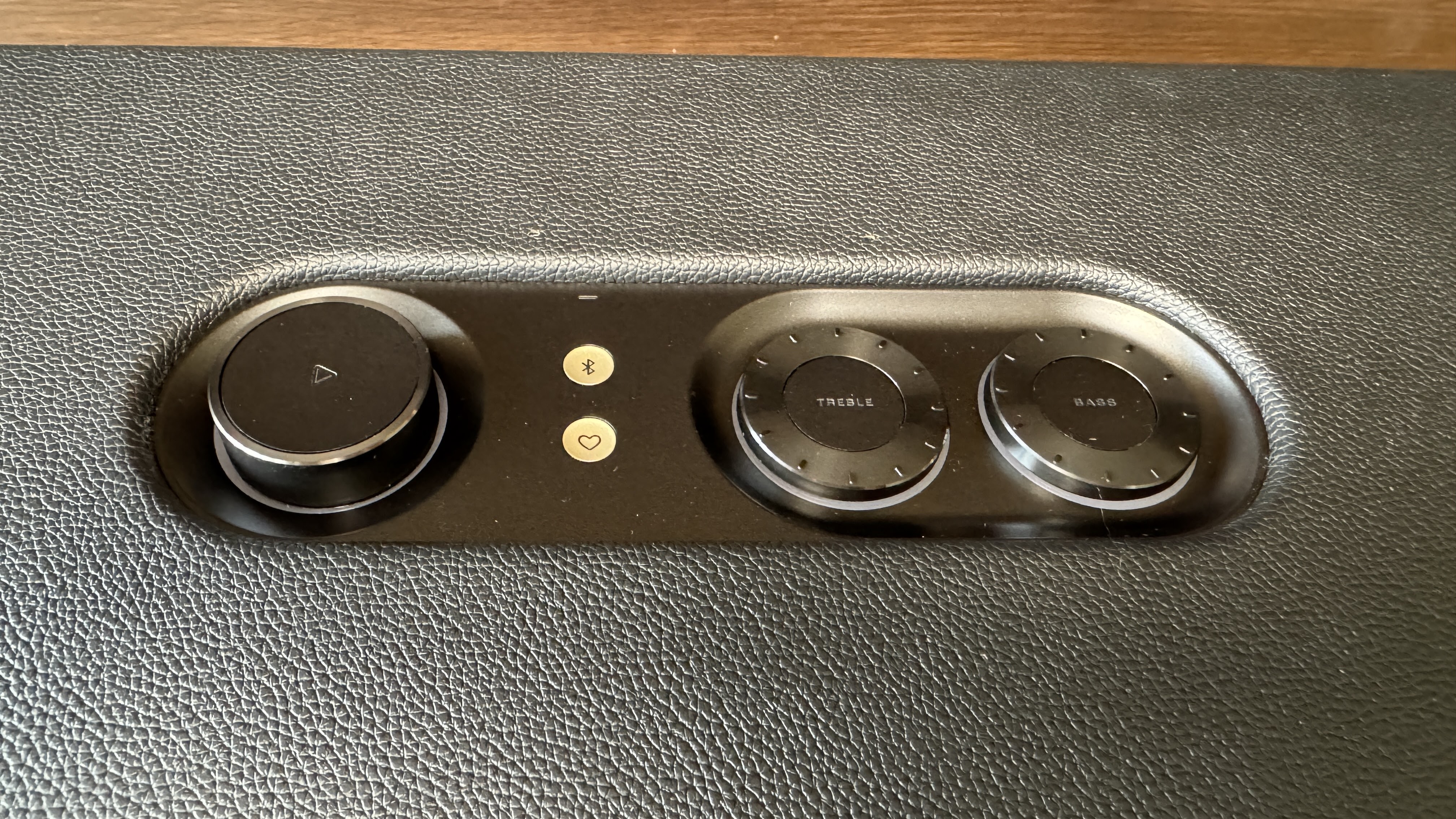
Everything about the Authentics 500 is organic and tactile and screams, "Vintage." With its leather-feel outer surface, big, chunky volume, bass and treble knobs and trademark Quadrex front grille, this chillybin-sized box of wonder looks more like something you might find gathering dust in a hidden corner of a second-hand store than a cutting-edge example of smart speaker technology.

And boy is it solid. That's not a criticism, by the way - I was raised to believe the heavier the speaker the better. Basically, there's nothing about the Authentics 500 that bears any resemblance to JBL's other brightly-coloured, cylindrical, splash-and-tumble ranges of bluetooth speakers - although to be sure, they're all fine products in themselves.

This is a different beast altogether. This is a work of art.

When it comes to sheer power, you'd be hard-pushed to find another smart speaker that crams so much into one enclosure; there are three aluminium tweeters, three mid-range woofers and a big, juicy, downward-firing sub that'll definitely get the floorboards rumbling if you really crank up all 270 watts.

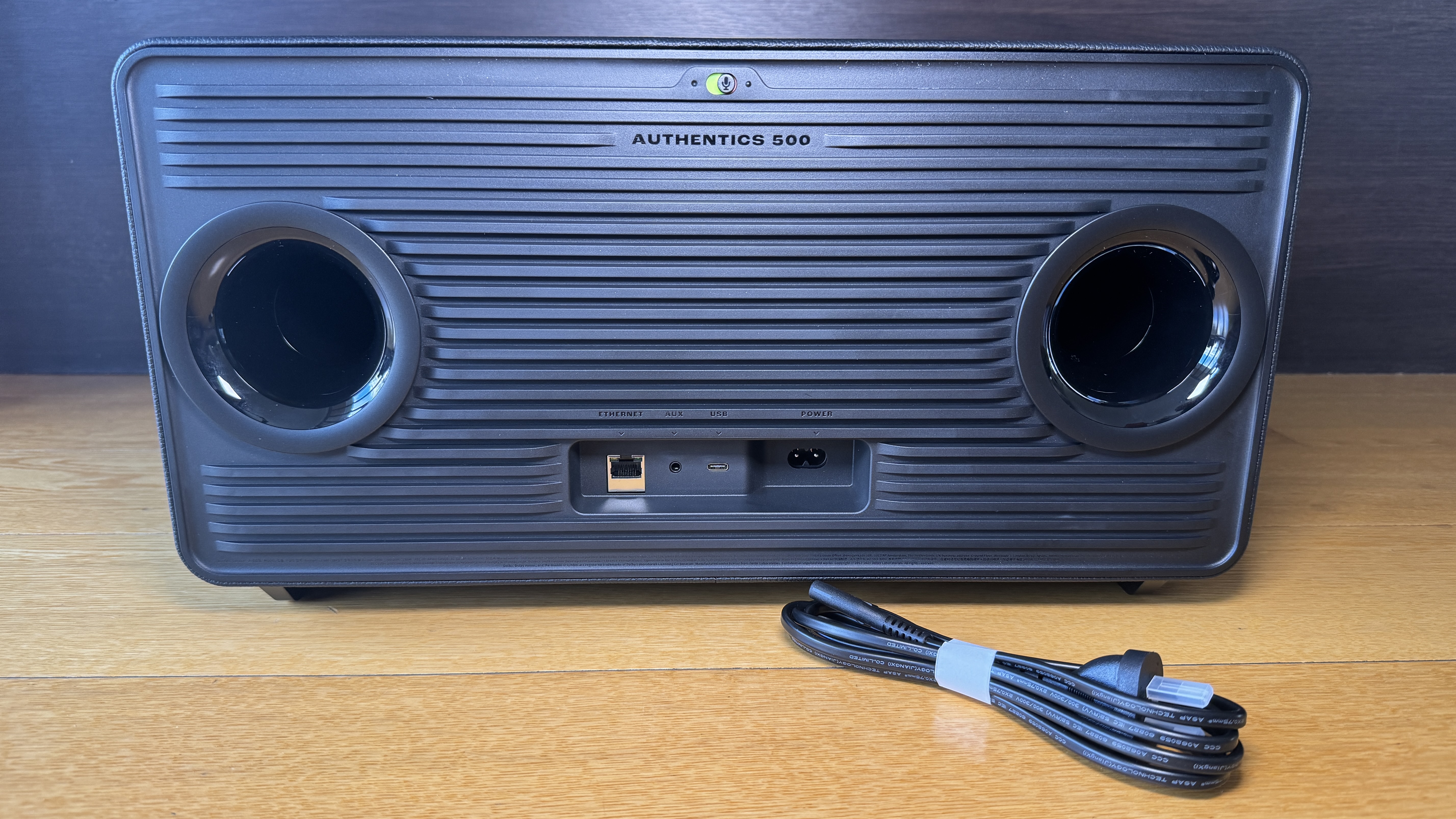
There are even a pair of JBL's patented Slipstream Ports - the horn-shaped holes in the back panel that ensure there's no distortion, vibration or "chuffing" from low frequencies played at high volume.

And you can definitely fill a room with this speaker alone. The Authentics 500 is Dolby Atmos-rated for high-res ("lossless") streaming services like Tidal or Qobuz. What's rather unique about the Authentics 500 is it'll connect to virtually anything, via any connection. Want to play audio straight from your phone via Bluetooth 5.3? Too easy. Airplay from your Apple device? Yup, got that covered. Or maybe you're more of a Google/Android kind of person? No problem - you can Chromecast too.

But that's only the beginning of how connected the Authentics 500 can be - not just bluetooth and Wi-Fi - there's even an ethernet port at the back so you can hardwire into your home network. This ensures a more reliable link to your preferred streaming services - especially for the high data transfer rates required for more lossless formats. 

You can use both Alexa and Google Assistant to control the speaker and ironically, I've found the built-in mics on the Authentics 500 to be even more sensitive and responsive than most of the Alexa or Google branded speakers I've tried. Even when the volume is up fairly loud, I can generally get the speaker's attention with just my voice.

There's also another way to get your party going straight away, with the "Moment" button. This is a button with a loveheart on it below the bluetooth button in the middle of the control console. Using the JBL One app, you can choose a specific playlist from a selection of subscribed services to start playing when you push that button. When you program the Moment button, you can even set your preferred volume level.

Unfortunately this feature doesn't work with Spotify playlists, which is odd as you can select Spotify as your default music service. Perhaps this is something that will change with a future firmware update - also something you do via the JBL One app.

This app also features an on-screen EQ setting - although as I've already mentioned, there are manual jog-wheels for bass and treble on the speaker itself.

So as you can see, however you prefer to access your music library, the Authentics 500 has you covered - there's even a mini-jack input at the back if you want to physically connect another device.

But all of this is a waste of technology and design if it doesn't sound good, right?

No worries there. The Authentics 500 sounds every bit as great as it looks. Warm. Rich. Deep. Roomy. Intimate. Powerful. Think of an adjective, I'll add it to the list.

My favourite playlist at the moment is "Gregory Porter Radio" on Spotify. This is a varied and mellow mix featuring artists like Jamie Cullum, Stevie Wonder, Katie Melua and of course, Porter himself. It's the perfect, retro sounding jam to compliment the style of this speaker and I can't get enough of it.

As I always say, for me, the true test of a speaker is not so much how it sounds when you wind it up loud. I'm more interested in how it fills the room when you're using it down low - you know; for a bit of background atmos. This is where the Authentics 500 absolutely reigns supreme. The good vibes and retro grooves reach every corner of the room, no matter the volume.

There's an organic, home-cooked feel to the sound of this speaker that's made me fall in love with music again. The sterile, repetitive and formulaic nature of streaming music over cheap, bright, plasticky speakers had slowly turned me off over time, to the point some days I wouldn't even bother listening to anything.

That's all changed now. Now I can't wait to get home and ask for a mix of my favourite artist as soon as I walk in the door. By perfectly blending a combination of the latest connectivity technology, the most iconic retro aesthetics from JBL's long history and truly great audio design, this is easily my favourite device of the year. Perhaps ever.


Click here for more information and pricing on the JBL Authentics 500.

Wednesday, 18 October 2023

Apple AirPods Pro (2nd generation) - Now Only One Thing Holds These Buds Back

Apple doesn't make rubbish. It simply doesn't. So a few years back when I first started using Apple products on a more regular basis, I was hardly surprised to discover how good AirPods were and I began to understand that people weren't just wearing them to look cool, they actually sounded cool too.

There have been a few upgrades over the years - but only a few. In its usual style, Apple doesn't change for the sake of it - only when the changes are deemed important and necessary.

As we've seen with this year's iPhone 15 series, the change to USB-C charging has definitely become important and necessary. So inevitably, that change has come to AirPods too.


The AirPods Pro (2nd generation) are essentially still the same devices I reviewed this time last year, when I declared them the "true stars" of 2022's big September launch.

I was blown away by what the new H2 chip was capable of - not just running its Adaptive EQ to perfection but offering standout Active Noise Cancelling and extended battery life.

None of that has really been tweaked here - although I did recently read one review where the author suggested he could hear a slight improvement in sound quality between the '22 and '23 models. 

Either way, yes, the charging case is now USB-C and both the case and AirPods are IP54 water, dust and sweat-resistant. Most people have been wearing their AirPods to exercise with anyway but now it's nice to know they are officially rated for it.

As convenient as USB-C is, wireless charging is even more so and I'd completely forgotten you can also charge using via MagSafe using an Apple Watch charger. You still get about 6 hours on a full charge - 30 including the case. This is good - not the best on offer but I haven't accidentally gone flat yet.

Other features well worth a mention (or a re-mention if we've already covered this before) include Adaptive Audio, which lets the H2 chip decide on a mix of Transparency Mode and ANC - depending on the environment. Conversation Awareness automatically lowers the volume of what you're listening to if you start talking to someone - hopefully, this'll save some of those pesky, "Stop ignoring me!" comments. 

Then there's Personalised Volume - a feature I only discovered because it was toggled on by default when I set the AirPods Pro up. This uses "machine learning" (whatever that is) to learn your listening preferences and fine-tune your audio - mostly volume - to adapt to your environment. It took me by surprise because I couldn't figure out why the volume kept turning itself down every time I started listening to my podcasts. It was because I was usually alone in a quiet house and the H2 chip had decided the podcast didn't need to be so loud.

I've turned that feature off. I hate being told what to do.

In saying that, I don't really mind that I can't manually EQ the AirPods Pro like I can on other earbuds. This is because Apple's already done such an amazing job for me.

As I sit here listening to "Zoltan" by Larry Young, the duelling sax and trumpet desperately play against each other, mixed in opposite ears and it sounds so clean, so precise. Although this is a small jazz combo, there's a lot going on in the background with organ, bass and drums - so subtle you might miss it, except the AirPods Pro bring out every little detail.

This precise reproduction absolutely zings on Herbie Hancock's "Man-Child" - not just sax and trumpet this time but a full horn section in concert with some of the best-mixed funk guitar and Fender Rhodes piano you'll ever hear... and what a great way to hear it.

Of course, it's not just music that'll take you on a magical mystery tour using the AirPods Pro - I've started using them to watch Apple TV. The Spatial Audio provides absolutely convincing surround sound effects - creating realistic impressions of distance and direction. This is aided by intelligent head-tracking which means the audio stays in the right place even if you don't. It's so good sometimes I watch Loki with my AirPods in even when there's no-one else home.

Lossless audio is another bold new world and with the introduction of the Vision Pro headset next year you'll literally be able to transport yourself to that world, with the AirPods Pro already tuned to take you there.

I only ever really had two significant pain points with the AirPods Pro (2nd generation) - the first being the lightning charging cable which we've now kissed goodbye.

Unfortunately, there remains a rather large elephant in the room... or at least, in my ear. While you get four sizes of eartips in the box - including XS for more petite earholes - they still don't stay in. I know I've chosen the correct sized tips because I've run the tip size test in the settings menu on my iPhone. While this means they sound incredible and are ultra-comfy, when I'm digging in the garden, scrubbing windows or heaven forbid, exercising vigorously, the AirPods wiggle around, get looser and looser and eventually one falls out. Usually the left one. (I've started referring to that ear as "Lefty Loosey.")

I can't understand why Apple has let its competitors get the jump on it in the fit department. I can't be the only one to run into this issue and yet for years, other than changing to a more oval tip shape, the basic form factor has remained essentially the same and essentially too fally-outy. One can only hope the next generation meets this challenge and gets more of a grip.

In short, as much as I love my AirPods, all the clever audio features and the new USB-C charging port, there's no way I'm going to risk wearing them next time I go hand-gliding or extreme downhill snowmobiling. Just as well I don't do either of those things, so for now, I'll keep them in.


Click here for more information and pricing on Apple Airpods Pro (2nd generation) with USB-C.