Why do I keep doing it?
Replacing one cheap lawnmower with another?
More to the point; why do I complain when, as usual, everything rusts, breaks and dies?
Well no more. I've entered a new life. A Stihl life...
I work with a guy who's always been Stihl crazy. I assumed he was just crazy. I assumed if you bought a Stihl, you were paying a premium for a hyped-up brand. I assumed there were cheaper options that'd do the job just as well. I really need to stop assuming things.
Sadly, it hasn't been that long since I last bought a mower. Last time I was considering a battery-powered option, but they were either really expensive or gave me no confidence they had the power or battery-life to do the job. The idea of a rechargeable mower is so damn appealing though - no running out of petrol, no oil spills. Less noise.
So this time, I took the plunge.
The Stihl RMA 410 C is a funny looking thing.
The first unusual feature is the one-sided handle. Although it looks like it can't possibly work, it turns out the German design team at Stihl know what they're doing. This asymmetrical configuration means more convenient access to the catcher - which has its own unique design feature; it comes apart at the back... on purpose.
So instead of trying to shake your clippings out of a small opening at the front... and shaking... and shaking... the rear of the catcher opens up completely to release all its contents in one single dump. Genius.
There are simple and yet brilliant design features like that all over the RMA 410 C. Starting couldn't be easier - or more safe. No throwing your shoulder out as you yank and yank a starter cord. You just hold a button down while you push the safety bar and the mower instantly swings into action. That bar has to stay pushed against the handle to keep the mower running - meaning you can't go anywhere near the blades without the whole thing shutting down automatically.
The height adjustment is just as easy, with a simple squeeze-release to raise or lower to your preferred setting.
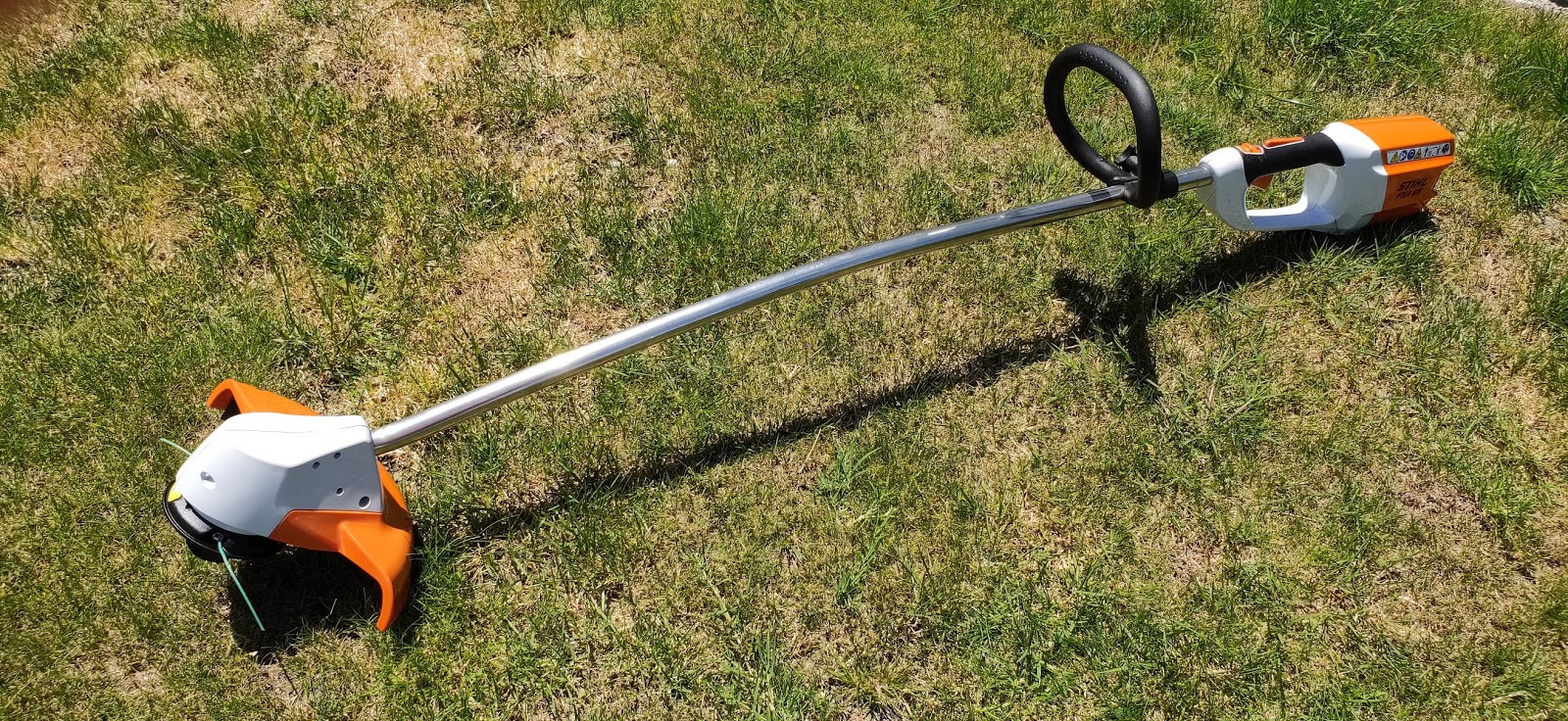
But of course, the hero feature of the RMA 410 C is the 36V Lithium-Ion battery and the unbelievably fast, fast charger. The same battery can be used across a whole range of Stihl power tools, including the FSA 65 linetrimmer which I kind of accidentally bought when I bought the mower.
Just as well the battery works so amazingly, or I would've felt pretty stupid.
Luckily, not only does the battery work, it exceeded every expectation. It seems to run the linetrimmer forever.
Running a whole mower is a slightly different proposition, obviously. But as long as the grass isn't too out of control, most mows I get almost an hour's running time out of a single charge, even on my sloping section. In fact, because the RMA 410 C is so light, it's perfect for my angled terrain, especially given its conveniently placed carry handles front and back.
The sheer power is remarkable - the mower absolutely scythes through my spring growth without breaking a sweat. (I sweat, but I'm not in nearly as good nick as the RMA 410 C)
Unfortunately, the battery isn't actually magic and does require charging about halfway through my mowing and trimming routine. This is actually not too much of an inconvenience as a) it gives me an excuse to stop for lunch and b) incredibly, the charger only takes about 75 minutes to get the battery back to full.
Of course, now I know it works so fantastically, I should probably just get another battery. Swapping it from one device to another couldn't be easier.
But if I did that, would I still get a lunch break?
One thing's for certain, I'm never going back to petrol. And right now, it's hard to imagine anything working as well as a Stihl.
Click here for more information and pricing on the Stihl RMA 410 C cordless lawnmower.
Click here for more information and pricing on the Stihl FSA 65 PRO cordless linetrimmer.
When was the last time you were forced to negotiate with international cyber-criminals?
For me, it was just a few weeks ago.
It was one of the worst things that's ever happened to me...
I consider myself a pretty techie kind of a guy. In fact, technically, I'm Technical Director on the Mike Hosking Breakfast at Newstalk ZB - a pretty technical role.
I write tech reviews for the ZB website. Sometimes I'm interviewed as a tech expert for the New Zealand Herald.
Turns out, I didn't know squat.
I thought I did. In fact, I was arrogant about it - especially in terms of my personal cyber security. I don't feel that way anymore.
We have a pretty decent desktop PC at home. Over the years I've pimped it up with lots of RAM and massive amounts of storage for things like music and photos. Important things.
Obviously you need to protect important things like those and yes, I had an external backup drive so I could regularly copy all that important stuff across. But here's my big mistake; I left that backup drive plugged in. Turns out, even a drive connected by USB is vulnerable to attack.
When I type that, it's so obvious but at the time, I never gave it a second thought. Arrogant.
My arrogance extended to my browsing and downloading habits. Sure I would go incognito to keep my browsing private (it doesn't really). And of course I was using an up to date antivirus (provided by my ISP for free)
That didn't protect me.
Turns out, visit the wrong site, download the wrong file, next thing you know, you're encrypted.
The first sign something was seriously wrong was a series of browser windows opening themselves all at once. It was astonishing how fast it all happened. While I was trying desperately get control of my browser back, everything else was being taken away from me; photos, pictures, the lot.
The sense of instant regret was overwhelming. How could I have been so stupid? Why wasn't I running a proper cyber security suite like Norton Security? More importantly, if I'd been running cybersecurity software like Norton Secure VPN and Norton Security Premium, I wouldn't have been able to download this cyber chaos into my life in the first place.
Unfortunately, Norton didn't send me Security Premium or Secure VPN to review until after this had happened!
I spent days researching what to do. I tried everything to restore those precious files. Recovery programs that can undo recent modifications. I ran about every decryption tool available. I consulted specialist data recovery experts. I even notified government agencies.
Nothing worked. The Hermes 2.1 ransomware I was doomed by is relatively new and therefore completely uncrackable. Sure I could rebuild my PC from scratch. My 15 year-old gaming daughter wouldn't be happy about it, she'd lose her progress in a lot of her virtual spaces. But she'd get over it. My music library would be mostly retrievable from the cloud. I'd have to re-catalogue everything, but again - that's just time, not the end of the world.
What made me sick to my stomach though, what was keeping me awake day and night, was losing all those photos. Not just photos, but memories.
Priceless, priceless memories.
Why oh why hadn't I been running better security software and a VPN?
There was nothing else for it. I had to ask the price.
Fearing it might be thousands, the demand via untraceable email was $500USD, to be paid in Bitcoin.
Still a lot of money and the obvious question was, "How do I know you'll decrypt my files once I pay?"
Apparently, international cyber-criminals have systems in place to answer such concerns. I sent them an encrypted photo and they returned it to me, back in it's original state.
As luck would have it, it was a photo of the birth of one of my daughters. I pleaded my case, pointing out how important these pictures were to us. Somehow I managed to negotiate the price down to $300USD. I took a deep breath and decided to pay.
I figured given the bad guys had already programmed their software to unlock my files, there was really no reason for them not to send it to me.
Then I had to figure out how to buy Bitcoin. That's a whole other story that involved a very dark moment when I thought I'd lost all my money with no Bitcoin to show for it at the other end. Luckily, that was just a verification issue and after one of the most stressful afternoons of my life, the transaction was complete.
I notified my friendly extortionist and waited. And waited. And waited.
Another sleepless night passed.
After almost 24 hours I had all but resigned myself to losing the money when finally, after about 15 increasingly desperate emails from me, I was sent a link to the decryption software.
I was using a VPN and a more sophisticated anti-virus now, let me assure you.
Was it all over?
Sadly, decrypting hundreds of thousands of files takes a long time and, as it turns out, doesn't always work.
The sleepless nights just kept stacking up.
After a few more begging, pleading, groveling messages, I was sent a revised app to try.
Hallelujah! I could access my files again, although they had all been renamed and I would have to spend many further hours using specialised software to restore them to their previous forms.
Of course, a lot of damage had been done in the meantime, much of which I'm still cleaning up now, weeks later.
This really was one of the worst things that's ever happened to me. It may sound over dramatic to compare it to a death in the family, but losing thousands of memories of the people closest to you feels like that in so many ways.
And as for being forced to deal with anonymous criminals in the dark corners of the internet, that ain't no picnic either.
Heed my advice, it's so damn simple.
Back up your precious stuff. Either in the cloud, or even better on a separate drive YOU CAN DISCONNECT!
Don't download dodgy files. It's simply not worth it.
And most importantly, run a decent cyber security suite and keep your browsing safe and invisible with a VPN like Norton Secure.
Norton Secure VPN let's you choose your region, including New Zealand, which is important for streaming services like Netflix. You can subscribe up to 5 devices and best of all, it didn't slow me down at all - I've tested my download and upload speeds and there's not issue - in fact, many of my streaming services work better with Norton Secure VPN activated.
Avoid my nightmare. Practice safe net.
Click here for more information and pricing on Norton Secure VPN.
Not another bluetooth speaker!
Well, yes... but if you've ever been impressed by someone else's speaker, because it does something yours doesn't - it might be time for an upgrade.
For those of you suffering from a bit of speaker envy, there is an option that packs a lot of features into one small box...
The Sony SRS-XB31 is the everything, everywhere, every time speaker. Waterproof, dust-proof, small enough to pop into a bag, big enough for Sony's Extra Bass technology to do its thing.
Sony really has made a lot of noise (deliberate pun) about the Extra Bass feature - and justifiably so. The SRS-ZB31 is not large - just 23cm across - yet the bass response is big, warm, clear and powerful. Whether it's the acoustic double bass of a jazz trio or a more oonce-oonce dance beat, it all booms out of this little box.
In fact, I've been impressed with the sound quality generally - and not just playing music. I actually paired the speaker with my telly to use as a kind of mini-soundbar. It worked surprisingly well, producing a much wider dynamic picture than my TV's built-in speakers - especially bass-wise. Unfortunately I couldn't squeeze quite enough actual volume out of it to keep this as my TV sound setup in the lounge - the room is just too big for one small speaker to fill.
Of course, the SRS-ZB31 can link to other Sony speakers via the "Party Chain" function - so that could still work.
This is also Sony's poolside/on-the-beach option. The SRS-ZB31 carries an IP67 water and dust resistance rating. Now be warned; that's not an IPX rating which would make it legitimately submergeable, but you can't actually listen to music underwater anyway... unless you're a whale. I've tried pretty hard to break this thing. I've showered with it. I've cooked with it. I've dropped it in the sink. This kind of behaviour goes against all my natural instincts of course, I was born with an innate sense of respect for technology. Luckily, water, flour, crumbs, soapsuds - pretty much everything I've thrown at the SRS-ZB31 has bounced right off.
It even has flashy lights. Coloured LEDs. Strobes. The whole works. All of this can be controlled using Sony's Music Center app, which allows you to tweak things like EQ and connected apps too.
Oh, and you can hit it to make your own drum sounds. Yup, basically a whole party in one package. While other speakers may do some of these things better, there aren't many that do them all. It's pretty fun.
Click here for more information and pricing on the Sony SRS-XB31.
Okay, this is one for complete nerds, but bear with me.
In case you weren't up with the play, modern laptops don't use hard drives anymore. In fact, most of them don't even use the traditional hard drive form factor, even as a solid state drive. No point in a box when you can just slot in a tiny circuit board, right?
If you thought your laptop was fast already, you won't believe how changing to the Crucial P1 can still improve things.
The primary consideration here is storage space. While your shiny new laptop may well utilise the benefits of an NVMe PCIe SSD chip (many times faster than a conventional hard drive) it seems to have taken a long time for drives any bigger than 250GB to become more commonplace.
These days 250GB is just not enough space, especially if you're editing pictures, audio or video. Oh, I know everything's supposed to be up in the cloud by now, but if, like me, you're working on the same project in different locations, it's still hard to beat having all your raw files stored safely on your hard drive - or now, your Solid State Drive.
Enter the Crucial P1 - Available in 500GB, 1TB and a massive 2TB version coming soon. With desktop-level storage like that, you'll eliminate the need for external drives and sticks - cumbersome accessories that mitigate the portability of your laptop in the first place.
So how hard is it to upgrade? Cloning one drive to another and swapping them out sounds rather technical. Well, it is and it isn't.
The good news is, the Crucial website has a whole library of easy-to-follow instructional videos on exactly what to do, including a free download of Acronis cloning software which is very easy to set up and use.
The bad news is, most laptops only have one slot for ROM storage, so it's not like you can just plug in your new Crucial P1 module next to your existing memory chip and copy everything across.
Using an adapter cable, I had to plug in another hard drive, clone everything to that, create a bootable USB with the cloning software on it, then install the Crucial P1 and clone the hard drive back onto it.
I just wrote that myself and I'm struggling to follow the process.
It was made even more complicated by the fact the Acronis software only works if one of the drives involved is a Crucial drive. Because I wasn't cloning from a Crucial drive and the hard drive I was cloning to wasn't a Crucial one either, I had to find another program to do my cloning for me. Luckily there are quite a few around and most seem to do a pretty good job. I feel like Crucial should include some kind of access code in its packaging so you can use their software all the way through the process.
Once I swapped out the existing NVMe module for the Crucial P1, then I could use Acronis to clone everything back.
If you don't know what the hell I'm talking about, you might want to ask your tech-savvy nephew/daughter/next door neighbour to take care of this for you.
Back to the good news; physically replacing your existing NVMe module with the P1 is really easy - much less complicated than swapping out a whole hard drive like the old days.
On most motherboards the module is easily accessible and usually only held in place by a single screw.
So is it worth it?
Of course it is. My boot time improved straight away and most programs seem to fire up a bit quicker too. Best of all, I get the benefit of all that extra storage space.
Remember, extra space isn't just for storage, it also makes it easier for your computer to save things because it doesn't have to look so hard for the right-sized spaces. This becomes quite evident when saving large audio or video projects.
Of course, any gamers out there will know you usually have to spend a lot of money for a laptop with the speed and space to support most modern games. Now, by simply upgrading to the Crucial P1, as long as your laptop has reasonable graphics capabilities, it's quite feasible you've just turned it into a half-decent gaming rig.
Most importantly, it's a space issue. Right click your C: drive. Click on Properties. If that "Capacity" circle is nearly full, it's time to upgrade.
If there's a gadgety gal or guy in your life, you may be looking for some suggestions to help fill their stocking this Christmas.
I've compiled a list of the latest and greatest tech toys available. Some of these I've used and reviewed, some I'm using right now, some I'll go into more detail with in the new year.
Let's start with my absolute favourite...
1: SAMSUNG GALAXY WATCH
Samsung has been making genuine smart watches longer than just about anyone, so they know what they're doing. The 2018 range of Galaxy Watches picks up from where last year's Gear S3 Frontier left off; close to perfection. Available in 3 models - a big, sporty 46mm version, or the more elegant his and hers 42mm. Unlike other smart watches, these conventional round faces are well protected by a raised bezel which also serves as the navigation controller.
In terms of functionality, the Galaxy Watch takes what was already working brilliantly even further - longer battery life, swim-proof, faster processing, more fitness tracking options, more versatile band choices... these watches work with most phones but pair it with a Samsung device and you'll never wear another watch.
Click here for more information on the Samsung Galaxy Watch.
2: 360PRO
Nothing says I love you this Christmas like, "Clean those teeth properly, you slob."
The 360PRO is not just another toothbrush.
Some toothbrushes have a couple of different speeds. The 360PRO has five. Count 'em; FIVE.
Some toothbrushes will last a few days, or maybe a week between charges. The 360Pro keeps brushing for a month.
Oh, and did I mention it's black? (Also available in white if you're boring)
Click here for more information on the 360PRO sonic toothbrush.
3: HUAWEI MATE 20 PRO
If you just want to give that special someone the best present ever, hard to go past this.
World leading tri-lens camera technology, but that's not all.
To be honest, I'm struggling to come up with something another phone does that this one doesn't. From wireless charging to unbelievable battery life to the in-screen fingerprint sensor, it really does have every feature going and here's the clincher; in the cut-throat battle for market share, Huawei has priced the Mate 20 Pro lower in New Zealand than just about anywhere in the world. At under $1500 (including bundled accessories from most retailers) it's such a good buy, it's almost an international tourist attraction.
Click here for more information on the Huawei Mate 20 Pro.
4: JBL JR POP BLUETOOTH SPEAKER
One for the kids. Great sound, cool colour options and built to take a few knocks.
Waterproof (so presumably, spill-your-drink-all- over-it-proof too) and what's more, it lights up when it's playing.
The Jr Pop even comes with a set of stickers for kiddie-customisation.
Click here for more information on the JBL Jr Pop bluetooth speaker
5: HARMAN KARDON ALLURE PORTABLE
On the other hand, if you need a more grown-up speaker, the HK Allure Portable is probably the best around.
I haven't tried this one yet, but I have used the original Allure and the combination of premium sound quality and Alexa voice control was unparalleled.
The Allure Portable is essentially the same, awesome speaker, but a bit smaller and now includes a convenient charging cradle, so no more plugging and unplugging.
Click here for more information on the HK Allure Portable.
6: SONY SRS-XB31 BLUETOOTH SPEAKER
...or maybe you're looking for something in between.
The Sony SRS-XB31 is the everything, everywhere, every time speaker. Waterproof, dust-proof, small enough to pop into a bag, big enough for Sony's Extra Bass technology to do its thing.
It even has flashy lights. Oh, and you can hit it to make your own drum sounds. Yup, basically a whole party in one package.
Click here for more information on the Sony SRS-XB31.
7: CRUCIAL P1 NVMe PCIe SSD
Okay, this is one for complete nerds, but bear with me.
In case you weren't up with the play, modern laptops don't use hard drives anymore. In fact, most of them don't even use the traditional hard drive form factor, even as a solid state drive. No point in a box when you can just slot in a tiny circuit board, right?
If you thought your laptop was fast already, you won't believe how changing to the Crucial P1 can still improve things like start up times. Besides which, maybe you just need the extra storage.
Available in 500GB and 1TB with a massive 2TB version coming soon.
Let your geek geek-out on a superfast storage upgrade.
Click here for more information on the Crucial P1 SSD.
8: JAYBIRD RUN TRUE WIRELESS SPORT HEADPHONES
Proving Apple isn't the only one who can cut the earbud cord, Jaybird Runs look way cooler. (in my opinion)
You'll get 4 hours play on a full charge - with another 8 hours charging in the case.
Best of all, they come with an incredible range of ear tips and fins to ensure the best fit you've ever had from a pair of earbuds.
Just as well - they're not cheap. Extremely well designed though.
Click here for more information on Jaybird Run wireless sport headphones.
9: SONY WH-1000XM3 WIRELESS NOISE CANCELLING HEADPHONES
These aren't cheap either, but that's fine because they may well be the best headphones I've ever worn.
A love-at-first-listen affair from the second I put them on - the cushions are the softest yet, which doesn't just mean sublime comfort, but a tighter seal - the first part of Sony's masterful noise cancelling solution.
They've developed a whole new chip dedicated solely to keeping noise out and it's pretty astounding. So is the battery life - days, not hours.
This is a great gift for any business traveler in your life.
Click here for more information on Sony WH-1000XM3 wireless noise cancelling headphones.
10: REDMI NOTE 5
Now for something inexpensive...
If you or someone you know is a recidivist phone dropper, dunker or loser - paying close to two grand for a replacement might seem a bit O.T.T.
So don't.
At just $398.99, the Redmi Note 5 is priced at the lower end of the mid-range market, but it has the features and performance of a handset at the upper end of that same market. I think that makes it a very good buy.
Decent camera, very fast processor and amazing battery life.
What more do you (or they) really need?
Click here for more information on the Redmi Note 5.
11: LOGITECH CRAFT KEYBOARD
Another slightly geeky one, but not really.
Not all keyboards are created equal and using cheap, nasty, little ones is frustrating and counter-productive.
The Craft keyboard features programmable function keys, a useful crown/dial you can also customise and it can be paired with up to three different devices simultaneously.
It's so much more than just another bluetooth input device; it's a powerful tool that I'm finding thoroughly indispensable the more I use it.
At $369.90, you're paying an absolute premium for a mere keyboard... but there's nothing "mere" about this keyboard. It's feature-packed, precision engineered and solid as a rock. If you're a premium user, you won't regret paying that premium price
Click here for more information on the Logitech Craft Keyboard.
12: DYSON CYCLONE V10 ABSOLUTE+
Yup, I saved the best for last.
Some would argue a vacuum cleaner should never be given as a present. Those people have obviously never used a Dyson.
I vacuum my whole house with this. No cord. Maximum power. A huge selection of heads and attachments.
Functional design really doesn't get any better than this.
My cars, stairs, ceilings and floors have never looked so spotless and I no longer dread my Friday morning chore. Is it going too far to say I now look forward to it?...
Click here for more information on the Dyson Cyclone V10 Absolute+
Recently, Xiaomi opened its first Mi Store in the Oceania region, right here in New Zealand.
There was a lot of publicity around the Mi Home electric scooter - which does look pretty amazing - and as a result they sold out almost straight away.
But the other big impact of Mi opening its bright orange doors at Sylvia Park is now we have access to a whole new range of phones...
The Redmi Note 5 is full of surprises, even for a phone junkie like me.
At first it's hard to know what to expect from the Note 5, especially since I haven't reviewed a Xiaomi-manufactured device before. Also available in a powder blue, the black version I have takes minimalist design almost to an extreme. From the matte-finish metal back cover to the reinforced shock-absorbing corners of the device, this phone is really black. Even the transparent case included in the box is tinted black. The Redmi Note 5 is almost the complete opposite of some of the gaudy, multicoloured devices we've seen on show throughout the year.
It's a solid piece of kit, quite weighty in the hand. Unusually, the seams, joins and edges are all slightly raised - almost as if to create a tactile experience that suggests industrial usability rather than something that'll slip out of your hand onto the floor.
The large, 5.99inch display seems even bigger than it is, due to sizable bezels top and bottom. The top bezel holds a speaker, the selfie camera and a selfie-light - the bottom one doesn't hold anything so I guess it's just for aesthetic balance.
The bottom edge of the Note 5 is the main physical clue about which part of the phone market it slots into; just the single downward-firing speaker, a real live, physical earphone jack (soon to be extinct I think) and most telling of all, a microUSB port - very old-fashioned at this end of 2018.
So it might not scream style and elegance, but once you fire the Note 5 up, functionality rules supreme. The Snapdragon 636 octacore processor, combined with a respectable 4GB of RAM really keeps this phone flying along with very few pauses, jumps or stutters.
As this was my first experience with the MIUI 9 operating system, I decided to jump in head first, get rid of the buttons off the display and learn the Redmi range of gestures. I actually found this to be very intuitive on the whole, my only real frustration coming when scrolling through photos; the go-back gesture is a swipe from the side of the screen - easily confused with a swipe to the next picture. It's a muscle memory thing, I guess.
Not every phone handles split screen functionality well, if it offers it at all. The Redmi Note 5 makes it easy. It's stable and the screen is certainly big enough to handle it. In fact, the screen is great for all kinds of content - browsing, video whatever.
The cameras were the other big surprise for me. A 15MP + 5MP dual camera on the back combined with a 13MP selfie-cam. No, theses won't win any photography awards up against the big brand flagships, but the low light performance was actually not too shabby - especially from the front-facing camera due to its own built-in selfie light. There are a good selection of beauty settings too, quite customisable compared to many other phones I've tried. I'm still not actually beautiful at the end of it, but a bit closer than usual.
Battery life is the hero feature of this phone. There aren't too many others around with a massive 4000mAh battery like this. Yes the charging cable is old-fashioned, but you'll get a couple of days use out of this phone easy.
At just $398.99, the Redmi Note 5 is priced at the lower end of the mid-range market, but it has the features and performance of a handset at the upper end of that same market. I think that makes it a very good buy.
Click here for more information and pricing on the Redmi Note 5.
There are some things I guess I always assumed were pretty much the same.
Electric toothbrushes.
Different from normal toothbrushes, sure. But how different from each other could they really be?...
Well for a start, it's black. I mean; come on.
The 360PRO is not just another toothbrush.
Some toothbrushes have a couple of different speeds. The 360PRO has five. Count 'em; FIVE.
Some toothbrushes will last a few days, or maybe a week between charges. The 360Pro keeps brushing for a month.
Oh, and did I mention it's black?
What would you expect from a tooth brush designed right here in New Zealand?
If you're some kind of crazy person who doesn't think black is just the coolest colour ever for a toothbrush to be, you can still get it in white. But seriously, why would you?
Remember, there's a big difference between conventional electric brushes and sonic devices like the 360PRO - about 10 times the difference. While an electric brush might vibrate anywhere between 2,500 and 8,000 strokes per minute, the 360PRO can get up to 40,000! There's really no comparison.
So about those five modes; Clean, White, Polish, Soft and Sensitive... how great is it to have those last two modes to cater for people with sensitive teeth and gums? Before the 360PRO, options were pretty limited for those seeking a more gentle clean.
I'm at other end of the scale, of course. When I brush, I want to know I've brushed. White mode is a more pronounced, slightly pulsating sensation - almost violent, but in a good way. This is recommended for dealing with coffee and other similar stains. I just like it because after my 2 minute cycle, I can physically feel my teeth shining... even with my eyes closed.
The handle is reasonably thick and because it's more square than round, its very easy to hold which is obviously important in wet, slippery environments like bathrooms. The 360PRo comes with two heads in their own case with a lid. These are straightforward to attach and remove but at first I was surprised to see a slight gap between the base of the head and the handle. Then I realised this is to ensure clearance for the 360PRO's powerful brush strokes. The other advantage is it allows space to rinse between the head and handle. I've seen gunge build up under other toothbrush heads and it ain't pretty, let me tell you.
Like other brushes, the 360PRO runs for two minutes at a time, pausing every thirty seconds to remind you to move on to the next bit of your mouth. As I mentioned though, unlike other brushes the battery life on this thing is pretty astounding. The wireless inductive charging base (also black) is very compact, so it won't take up much space on your bathroom vanity but to be honest, I use the charger so rarely I keep it in the drawer. In fact, I've been brushing with the 360PRO for a couple of weeks now and I've only charged it once, when I first got it. This makes it a viable option to take with you if you're going away for weeks, not just days.
Ideally you'll want to take it with you if you're going to be staying in some kind of communal bathroom situation, because you'll have the coolest toothbrush of anybody there, hands down.
Did I mention it's black?
Oh yeah... and the button is silver.
Come on.
Click here for more information and pricing on the 360PRO sonic toothbrush.