Surprise! It's Christmas time again. No, I didn't see it coming either.
A few of the following gift ideas a seasonally appropriate, while others are just some of my favourite gadgets of the year.
But if you really want to make the whole family's Christmas morning, why not treat them to a new telly?...
1. Panasonic Z95A with Fire TV

The Z95A is the flagship of Panasonic's new Fire TV range and it's clear proof that in one fell swoop, those old, retro settings menus are officially dead and gone.
Physically, it bears a striking resemblance to other, recent Panasonic OLEDs; once again the panel itself is super slim but the whole TV is actually quite bulky by modern standards.
 This is mostly due to Panasonic's enduring (and endearing) commitment to providing quality sound to match premium picture quality. I've been pretty complimentary of the sound from previous Panasonic TVs and things have only gone up another level here. There are a lot of built-in speakers of various sizes and abilities, pointing in many directions. Most notably, the soundbar-like array across the bottom which obviously pretty much eliminates the need for an actual soundbar.
I've been using various Fire TV sticks in various TVs for a while now and like most Amazon devices, I've found them to be nicely-designed, easy to use and most importantly, they work really well. In other markets, particularly in the U.S., its not uncommon to find televisions for sale with Fire TV built-in but this a first for New Zealand.
 Finally, lets talk about the most important thing of all; the picture.
OLED panels have crossed a rubicon in the last few years. Until relatively recently, they weren't the best option for daytime viewing in a bright room. That just isn't true anymore and the Z95A is a prime example.
At first I thought, "What a great TV." Then I soon stopped thinking about that and just enjoyed the show. That's how truly immersive the viewing experience is with the Z95A. An experience that has been enhanced immeasurably by the addition of Fire TV, finally, a user interface that is now only helpful and hardly ever frustrating.
2. WiZ Smart Outdoor String Light and Smart Fairy Light

WiZ has a wide range of smart lighting for most situations but it seems like a good time of year to focus on the Smart Outdoor String Light and Smart Fairy Light.
 The String Light is specifically designed for outdoor use, with the lights carrying an IP65 rating for weather resistance and the power adapter rated at IP44.
Both sets of lights are rated for about 15 years use. The String Light seems particularly robust, with a solid moulding above each light complete with convenient hole for hanging on a hook or nail.
 As for the Fairy Light set - 20 metres is fairly generous and I was able to trim pretty much my whole deck with those.
But these aren't just any decorative lights, of course. Being smart lights, you have all the colours in the world to choose from, at any level of brightness. There's a host of preset static and dynamic themes too - everything from Candlelight and Sunset to Christmas and Diwali.
Even smarter again, both the Fairy Light and String Light are compatible with just about every smart home system known to humankind; Google Home, Amazon Alexa, SmartThings, IFTTT, Apple HomeKit - in fact, because they are Matter enabled, there aren't many IoT hubs that won't control them. This means I can use voice commands with any smart speaker, phone or even my watch and my new party lights on the back deck will respond accordingly... even if I'm not home.
If you're considering updating or adding to your Christmas light collection this year, I'd definitely consider smartening up your nightscape with either or both of these options. At around NZ$180 each, they may be a little more expensive than your standard set of lights but they're very durable, super easy to set up and they're pretty much guaranteed to be compatible with any existing smart home.
3. HoverAIR X1

The HOVERAir X1 had my full attention before I even opened its box.
I knew I was being sent a drone to review... but what sort of drone would fit in such a small package? I've made toasted sandwiches bigger than this thing. When it's folded up, it literally fits in my jacket pocket.
 The HOVERAir X1 comes in white or black and has its own soft carry-bag, a spare battery and a double charger included in the box.
Amazingly, this drone, this tiny little drone, is quite capable of flying itself. There are only two buttons to worry about; the big one turns it on and the little one toggles through the six Flight Modes; Hover, Zoom-Out, Follow, Orbit, Bird-Eye and Custom.
Choose one, rest the HOVERAir X1 on your palm, push the big button again and away it goes. Yes, you can be filming yourself from a flying drone in a matter of seconds. The first time I used it it seemed far too easy but the results spoke for themselves.
 Once the HOVERAir X1 is flying in the selected mode, it starts recording - as indicated by the LED above the camera turning red. The camera is on a fully automated gimbal mechanism that always keeps you in shot and makes up half of the hybrid image stabilisation system which guarantees the smoothest footage possible - even in fairly gusty conditions.
Furthermore, once you've flown the HOVERAir X1 a bit, you'll unlock several custom flight modes, including Dolly-Track, Side-Track and manual control.
As a first-time droner, I couldn't have asked for a better option than the HOVERAir X1. The wide range of automated flight modes accessible at the touch of a button make a potentially over-complicated device so damn easy to use. The fact you can literally take it out of your pocket and have it up and flying and filming in under a minute, makes this my favourite gadget of the year to date.
Click here for more information and pricing on the HOVERAir X1.
4. Dyson Airstrait

This is what the Dyson Airstrait promises; regardless of whether your hair is wet or dry, two or three passes should be all you need for a shiny, healthy, salon-straight result.
As excited as my willing lab-rats were to try the Airstrait out, I think it's safe to say they were pretty skeptical about Dyson's claims. After all, even I know hair takes time. I know this because I'm usually spending that time waiting in the car when we're supposed to be going out.
At first I was hearing comments like, "It just doesn't seem to get hot like my other straighteners."
 I couldn't argue. It doesn't. In fact, the Airstrait doesn't have any hotplates at all. As usual, the Dyson team looked at the problem from scratch, quickly realising that a controlled, high-pressure flow of air can achieve the same straightening effect as sandwiching your precious tresses between two scorching pieces of metal.
This means no heat damage and certainly no risk of scorching your precious locks.
 As usual for Dyson, this device has been rigorously tested for durability and is likely to outlast cheaper alternatives. And of course, once you add up the time you've saved drying and styling your hair - not to mention less of a need to visit the salon for pricey chemical treatments - this is one Christmas present suggestion that will pay for itself pretty quickly.
It almost makes me wish I had hair.
Click here for more information and pricing on the Dyson Airstrait.
5. Samsung Music Frame

 The Music Frame also looks like a picture in a frame. But in this case, that's because it is.
The piece of art on display is not a screen... it's an actual piece of art. Each music Frame comes with a couple of choices in the box but of course there's nothing stopping you using your own. The front panel simply pulls off revealing a high quality, reusable matte with a sturdy backing that allows you to slide different pictures in and out.
But let's not get distracted, because, just like the Frame TV, the Music Frame is not really about the art - whatever you decide that to be. This is also a bloody good speaker.

You can connect a source device any number of ways; bluetooth, Apple Airplay or even as a Google Chromecast.
Believe it or not, because the Music Frame is so powerful and has excellent bass response, it's actually not a half bad soundbar - although with no HDMI port you only have the option to connect wirelessly or via optical cable. But if you want real magic, grab yourself a late model Samsung TV with the Q-Symphony feature.
Q-Symphony lets you add any combination of Samsung speakers, soundbars and subwoofers to the TV's own, built-in speaker system to create the ultimate, surround-sound home theatre listening experience. This isn't just room-filling audio, it'll reach absolutely every corner.
If you love your Frame TV because of its ability to morph into a beautiful piece of art, pairing it with a couple of Music Frames seems like a bit of a no-brainer.
6. Oppo Watch X


Available in Mars Brown (with silver stainless steel case) or Platinum Black (with dark stainless steel case) the Watch X has a classic style to it. Although the bands are made of a substance known as "fluororubber," they look like leather from a distance, yet they're far more comfortable and totally waterproof.
The Sapphire Crystal Glass covering the 1.43-inch AMOLED display is extremely tough. I'm famous for bashing up my watches due to my congenital klutziness. In fact, I managed to put a big scratch in my first Oppo Watch back in 2020 within about five minutes of putting it on. Not this time.

In fact, when it comes to durability, the Oppo Watch X stacks up toe-to-toe with other so-called "Ultra" smartwatches on the market. It carries an IP68 water and dust resistance rating, can handle depths of up to 5ATM in pressure and also carries the 810H Military Standard which means it can withstand extreme temperatures and mountainous heights.
And being a Wear OS device, you have access to a whole world of other apps if the native fitness monitoring isn't what you're used to.
It's the smart stuff that impressed me the most about the Watch X; rich notifications including thumbnails from my security cameras. Google Wallet set up in no time for contactless payments. The ability to reply to texts, emails, Messenger and WhatsApp, right from the watch itself. And yes, a media controller that will start, stop, fast-forward and rewind my podcasts without having to open my phone.
Best of all, it doesn't have to be paired with an Oppo phone - any Android device will do.
Click here for more information and pricing on the Oppo Watch X.
7. motorola razr 50 ultra

The motorola razr 50 ultra is the answer to all my foldable complaints; it's durable, it has good battery life, an excellent camera setup and above all else; a fully functional exterior display.
 Durability is not an adjective I thought I'd ever use to describe a clamshell phone but Motorola seems so confident in the razr 50 ultra's new hinge design, they're literally encouraging people to flip the handsets open with one hand, Captain Kirk communicator-style. It also carries an IPX8 water resistance rating, so it should survive most accidental splashes and dunks. The outer screen is Corning Gorilla Glass Victus - one of the most scratch and crack resistant options around. And the lower-rear panel is vegan leather - so not a single fingerprint to be seen.Oh, and it even has a case included in the box.

The decisions Motorola has made with the camera setup are interesting. While some folding phones have been a little under-done in the photography department until now, the razr 50 ultra sports a 50MP main shooter, just like most other flagships on the market these days. But instead of teaming that up with an Ultra-Wide lens of some sort, they've gone for a 50MP telephoto sensor instead. This means while you'll miss out on those expansive landscape shots, you'll get 2 x optical zoom instead, bringing the action much closer, in crystal clarity.

But it's the outer screen on the razr 50 ultra that has really stolen the show for me. While other clamshell-makers insist on limiting what you can do with the smaller display, Motorola has gone completely the other way. Any widget from any app can be added to the scrolling home screen on the outer display. That long list of pull-down shortcuts is all available here as well. In fact, you can use any app on the 4-inch display. Read and answer emails, scroll your socials, browse your photos - whatever. This is exactly what I've been asking for all along. Sure, some apps aren't very practical on such a tiny screen but I'd rather the decision to use them was left up to me - not forced on me arbitrarily.
It's the first foldable I've reviewed that I could imagine using as my "every day" device. There's no compromise in camera performance, battery life is more than sufficient and that outside screen does exactly what it should; everything.
Click here for more information and pricing on the motorola razr 50 ultra.
8. Sony WF-C510
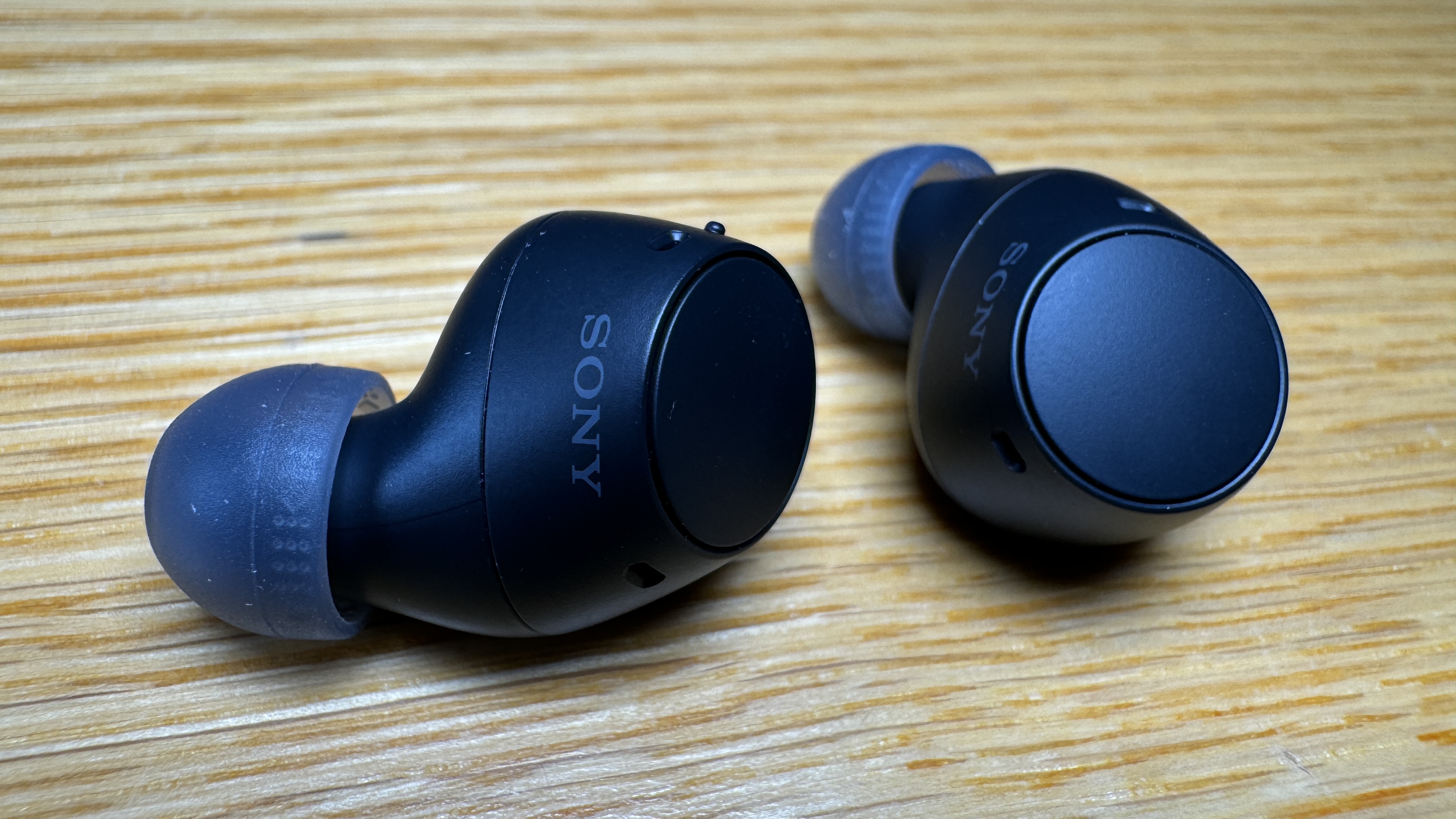
The Sony WF-C510 earbuds had me the moment I put them in - before I even started listening.
Not only is it a snug and secure fit, because the WF-C510 buds are so small and light, it's a super-comfy fit as well. This means you can wear them for hours and hours without any discomfort.
 Of course, being so small, I naturally assumed the battery life would be average at best. I couldn't have assumed more incorrectly. Sony claims up to eleven hours continuous use on full charge with another eleven hours in the case. When I first read that, I thought it must have been a typo. If memory serves, I've never tried any other buds capable of reaching double figures when it comes to continuous playback. Eleven is literally off the charts.
Oh, did I mention the price? RRP: NZ$149.95 - right down the bottom end of the scale for a pair of premium earbuds.
 So you would assume there's no Active Noise Cancelling here. Which is true. Well... sort of. Because these buds fit so well, the Passive Noise Cancellation is actually better than the ANC I've experienced on many other (much more expensive) earbuds. Which is why instead of ANC, Sony has gone with AMS instead - Ambient Sound Mode.
So rather than turning ANC on to block traffic and other noise, you activate AMS when you want to hear the outside world.
You still get options for 360 Reality spatial audio and DSEE to help reconstruct the fidelity of compressed files.
The WF-C510 sound great, have fantastic passive noise cancellation, unprecedented battery life and above all else, they fit beautifully.
Click here for more information on the Sony WF-C510.
9. JBL Auracast Speakers

The Go 4, Clip 5 and Xtreme 4 are all excellent JBL speakers in their own right.

As JBL's smallest portable, the Go has been a favourite little powerhouse of mine for a few generations now and this latest model steps things up with even more surprising bass response than ever before - I still can't figure out how they squeeze so much power from such a tiny package. A speaker of this size should sound thin and tinny but the Go 4 just doesn't.
Like the Go 4, the new Clip also comes in six colourways and it's equally water and dustproof.
 The Clip 5 packs quite a bit more punch than the smaller Go 4 and I found it to be a very useful travel companion on a recent overseas holiday. The totally redesigned carabiner at the top now opens wide enough to fit the Clip onto pretty much anything, from handlebars to shower heads.

Finally, for a bigger, boombox-like experience, the Xtreme 4 steps in - also rugged and rubbery, also IP67.
This is quite a feature-packed (and power-packed) device.
There are two woofers, two big drivers and dual bass radiators, so if you're after a bit of woomp woomp woomp in your life, the Xtreme 4 can definitely deliver.
 But for me, the big news here is Auracast, a whole new way of connecting bluetooth devices together which could well revolutionise the way we think about multi-speaker and multi-room setups.
Just a press of the triangular Auracast logo on any (or all) of these speakers and they're instantly paired, playing the same song. This means when you use Auracast to connect the Go 4 and Clip 5 together, suddenly you have a much bigger, room-filling sound. Add the Xtreme 4 into the mix and suddenly all that extra power and bass response is also at your disposal.
Click here for more information on the JBL Go 4.
Click here for more information on the JBL Clip 5.
Click here for more information on the JBL Xtreme 4.
10. Twelve South Butterfly

The Twelve South ButterFly is worth its over-the-top price tag. It'll cost you around NZ$240.00 or thereabouts which is obviously kind of insane for a travel charger and I get that.
Except...what if it's the best charger you've ever used?
 It's certainly the smallest - when the two are halves magnetise closed together the whole thing isn't much larger than an Oreo cookie - if that Oreo was made of anodised aluminium layered with vegan leather. Yes, despite its small size, the ButterFly - like all Twelve South accessories - certainly looks and feels like the premium product it is.
Oh sorry; did you want to know what it actually does? Fair enough - it's a 2-in-1 MagSafe charger - specifically designed for charging an iPhone with one half and an Apple Watch with the other.
 This is the most compact dual-charger I've ever come across. It looks fantastic, feels very durable and as I've outlined, it's amazingly versatile given its small form factor. Is it worth almost two-hundred and forty bucks? If it's the best there is... maybe so.
11. Amazon Echo Pop

While pretty tiny, it turns out the Echo Pop is just as clever as any other smart speaker
What's more, it comes in a selection of colours; Charcoal, Glacier White, Lavendar Bloom and Midnight Teal.
 I'm not going to do a deep dive on all the various ways this speaker can help you access information and connect to the vast majority of IoT devices you have in your home. We've already been there and done that for many Echoes in all their various shapes and sizes.
All you need to know is the Pop works exactly the same way, controlling smart lights, air conditioners and countless other devices by following your voice commands.
 But probably the best way to use the Pop is as an add-on speaker. If you're already using a larger Echo Show device, or maybe the truly excellent Echo Studio, which is a big speaker with genuinely decent bass response, adding a Pop or two into the mix will give you a much more room-filling sound. Recent updates to Alexa's ability to group several Echoes together mean this feature is much more dependable and really makes creating an affordable, multi-speaker system very easy.
In fact, with two Echo Pops you can create a stereo pair and I imagine the result is a much bigger sound overall. (I haven't tested this myself but I'm confident in recommending the setup as I've tried it with the slightly bigger Echo Dots and it works insanely well)
For around NZ$85.00 you can add onto your existing Alexa setup very easily and affordably. I've found the Pop does everything you'd expect it to, sounds better than you'd expect it to and I do believe, given its prompt responses demonstrated in the video below, it may even be the best listener of all the Echo devices to date.
12. Samsung Galaxy S24 Ultra

Just when I thought I had a handle on how smartphone cameras work, Samsung has blown my mind by taking out the 10X zoom lens and replacing it with a 5X one. Don't panic, this has actually resulted in better close-ups. That's because last years zoom sensor was only 10MP - the 5X one on the S24 Ultra is 50MP. That significant jump in resolution combined with the sheer processing power of the Qualcomm Snapdragon 8 Gen 3 for Galaxy chip adds up to some spectacular photographic wizardry.
 Because of the way the S24 Ultra now uses multiple images from multiple sensors to create the absolute best photo possible, terms like "optical" or "hybrid" zoom have kind of lost their meaning. Enter the age of Galaxy AI.
The really impressive thing about this new Galaxy AI is how fast it works on this phone. Not just when taking photos - and to be sure options like nighttime shooting are noticeably quicker - but also when editing.
 The large, flat, bright screen makes the S24 Ultra a fantastic gaming phone and it's one of the few to offer ray-tracing via its improved GPU for the most convincing graphics response you could ask for. Samsung has also completely revamped the cooling system, combining several layers of different cooling techniques to ensure maximum performance over even the longest gaming session.
But the big star of the S24 launch was Galaxy AI - and justifiably so. Want a live transcript of your meeting or lecture? Just select the shortcut from the pulldown menu on the notification bar.
 Need a translator? There's another shortcut for that. Simply download whichever language pack you require and you'll have instant access to both written and spoken translations. There are currently 13 languages on offer, presumably with more on the way and thanks the the S24 Ultra's NPU, the translation happens on the phone itself - no data connection required. This might be pretty handy if you've just arrived in a strange country and you're trying to find out where to buy a local sim card. You can even live-translate your phonecalls which makes dealing with international business partners so much smoother. The potential productivity gains are pretty obvious.
While Samsung's latest flagship may not look dramatically different from its predecessors, its new Galaxy AI capabilities combined with the latest, most powerful Android SoC available mean the performance and useability of this device are worlds ahead of where we were twelve months ago.
Click here for more information and pricing on the Samsung Galaxy S24 Ultra.


