Monday, 23 September 2024

Sony WF-C510 - Tiny Is Terriffic

I think I'm having an existential earbuds-based crisis.

I used to think there were all sorts of important criteria to consider when choosing a pair of earbuds. Things like sound quality, battery life, wireless charging, connectivity, customisable controls etc...

But just recently, something has changed.

Suddenly, all I care about is how well they fit.

That's because most buds I try these days sound pretty good and most have decent battery life. And yet, even after all these years, I constantly come up against earbuds that won't stay in.

Oh, and I'm way too old and uncool to care about how they look.

Then, every now and again - maybe once or twice a year - I unbox something that's so well designed, it gets five stars from the moment I power it on.
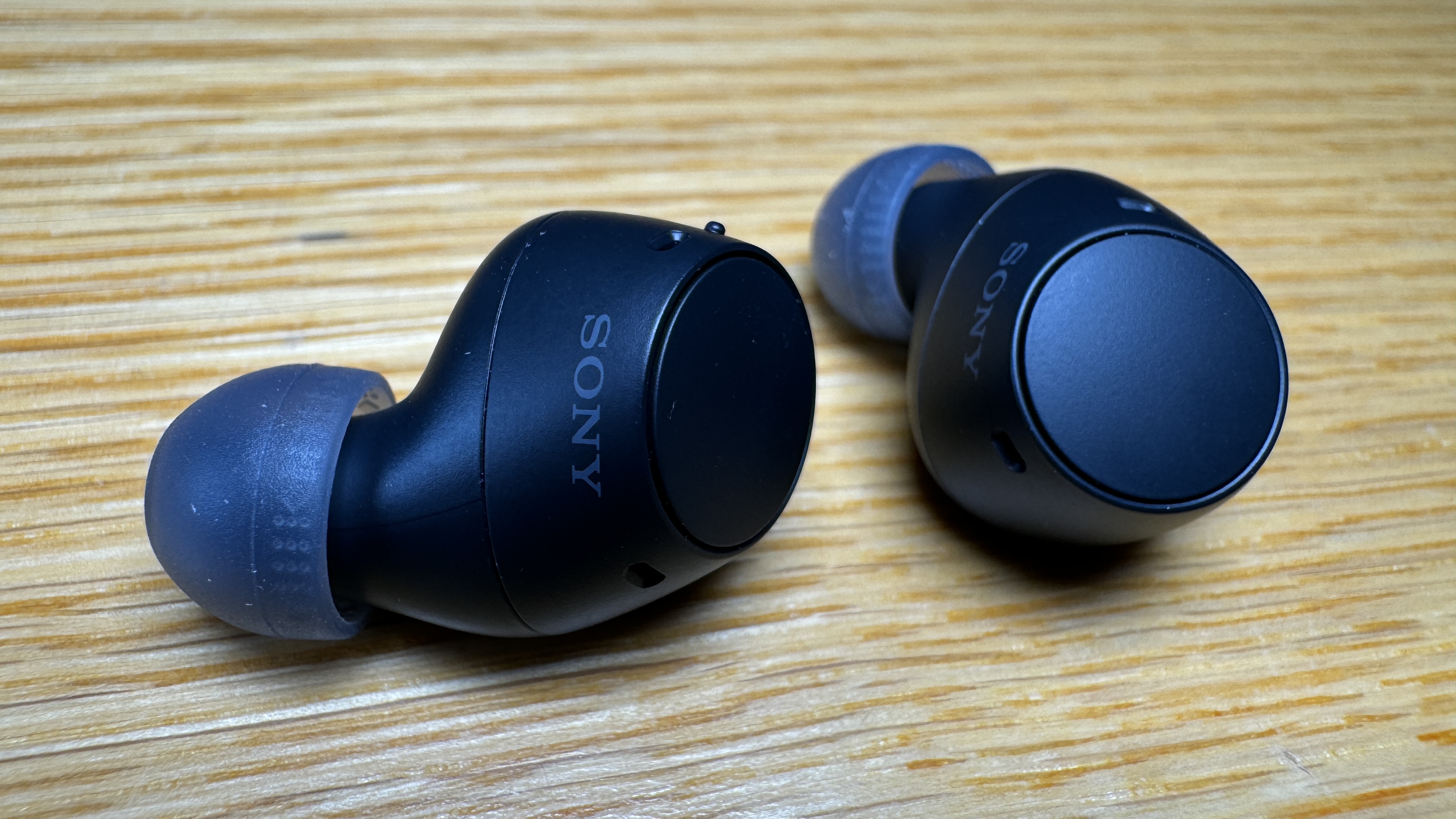

In fact, the Sony WF-C510 earbuds had me the moment I put them in - before I even started listening.

At first I thought there'd been a mistake. The case was so small and light I wondered if maybe they'd forgotten to put the earbuds in but no, they're just that small. Sony claims to have been collating data about ear shape since introducing its first in-ear headphones in 1982. Now, I know all ears are different but you have to admit, 42 years-worth of data has to count for something and in my case, it was a perfect fit.

Not only is it a snug and secure fit, because the WF-C510 buds are so small and light, it's a super-comfy fit as well. This means you can wear them for hours and hours without any discomfort.

Of course, being so small, I naturally assumed the battery life would be average at best. I couldn't have assumed more incorrectly. Sony claims up to eleven hours continuous use on full charge with another eleven hours in the case. When I first read that, I thought it must have been a typo. If memory serves, I've never tried any other buds capable of reaching double figures when it comes to continuous playback. Eleven is literally off the charts.

So is it true?

Here's the thing... I don't know yet. You can do a lot with the Sony Headphones app; change and customise EQs, analyse your ear shape, assign different controls to each button - and importantly, track your activity. So I know for a fact I've been using the WF-C510 buds for eight days now, totalling 14 hours and 2 minutes.

On a single charge.

The app also shows both buds are still at 100% (and I've been using them for over an hour already today) while the case is now down to, wait for it, 50%.

So, by my calculations, I'm going to blow through that 22 hour combined total easily.

Which definitely softens the blow of my one disappointment with the WF-C510 - no wireless charging. The case is USB-C only. Even I have to concede if I'm only charging it every fortnight or so, who cares?

Oh, did I mention the price? RRP: NZ$149.95 - right down the bottom end of the scale for a pair of premium earbuds.

So you would assume there's no Active Noise Cancelling here. Which is true. Well... sort of. Because these buds fit so well, the Passive Noise Cancellation is actually better than the ANC I've experienced on many other (much more expensive) earbuds. Which is why instead of ANC, Sony has gone with AMS instead - Ambient Sound Mode.

So rather than turning ANC on to block traffic and other noise, you activate AMS when you want to hear the outside world.

Admittedly, this means there is no Adaptive Sound Control, automatically changing the level of ANC to suit your environment but I'm an all-or-nothing guy when it comes to noise cancelling so that's a compromise I can definitely live with.

You still get options for 360 Reality spatial audio and DSEE to help reconstruct the fidelity of compressed files.

This all adds up to a very satisfying listening experience indeed.

Six60's hit "Don't Give It Up" begins with exposed vocals over a simple, booming bass riff and somehow, it does indeed boom on these minuscule buds.

"South of the Border" by Ed Sheeran and Camila Cabello is another fine example of the WF-C510 providing crystal-clear vocals over a precise-yet-powerful bass and rhythm section.

Neil Young and Crazy Horse separate the guitars left and right on "Down By the River" and yet again, the small size of these buds defies physics by creating plenty of space while also, somehow, making Young's voice sound... quite nice.

Because there isn't much surface area to the WF-C510 form-factor, it's a relief they're controlled by physical buttons on each bud - capacitive touch controls would mean accidental plays and pauses every time you put them in or took them out. I was also pleased to discover I could turn AMS on and off with a single press on one bud, while playing and pausing on the other. The only control quirk is volume - rather than a long press of either bud it relies on multiple presses (ie; more than three). This takes a bit to get used to - but at least volume controls are there. That's not always the case.

I can't finish up without mentioning the range, which is not something I always pay much attention to but in this case I thought it was worth pointing out I can leave my phone on my bedside table and still get crystal-clear reception while making a coffee two rooms away on the other side of the house. Pretty impressive.

So the WF-C510 sound great, have fantastic passive noise cancellation, unprecedented battery life and above all else, they fit beautifully.

And yes, another advantage of being so small is (although I don't care) they look fabulous - hardly even noticeable from some angles. Available in blue, yellow, white and black, the smallest things I've reviewed this year may just be the best.


Click here for more information on the Sony WF-C510.

Thursday, 19 September 2024

Ring Battery Video Doorbell - Cheap. Easy. Good

When it comes to causing product line confusion, Ring has a lot to answer for.

I've commented on this before; they have a lot of different doorbells and it's not always immediately apparent what differentiates one from another.

And that's before you get to the chimes, security cameras and floodlights.

Luckily for you, I'm here to help.

Today's example is quite different in some ways, yet it has enough in common with other Ring products we've featured before to make it well worth your consideration.


The Ring Battery Video Doorbell stands out from other Ring Battery Doorbells because it doesn't actually have a battery.

See? I told you I'd make things less confusing.

Of course, in reality, it does have a battery but unlike other Rings, this time it's built-in. The only real disadvantage to this all-in-one form factor is you can't simply swap out the battery for a spare one when it goes flat,

Instead, you have to remove the whole device from its mount to recharge it, leaving you without a doorbell in the meantime.

On the up-side, the built-in battery lasts much longer than before and Ring has come up with an ingenious push-pin system to remove the Battery Video Doorbell from its mount. One push with the supplied tool and the doorbell comes free. Then, once fully charged, it's even easier to push back into place with a single click.

In fact, installing the mounting plate only takes a minute or so, using the four self-tapping screws provided.

The Battery Video Doorbell comes in two attractive finishes; Satin Nickel - which is a neutral, silvery colour - and Venetian Bronze - a dark brown which would be more suitable for black or other darker walls or doors. Quick note; because there's no removable battery, there's also no removable faceplate - so you'll be stuck with whichever colour you choose.

I've talked you through the setup process using the Ring app before. As you'd expect, every step is clearly laid out, in some cases with accompanying diagrams or even videos. I reckon most people would have the Battery Video Doorbell up and running in under five minutes.

As with other Ring doorbells and cameras, you have the option of creating customised monitoring zones so you can exclude certain areas - a public footpath perhaps.

The 1440 x 1440p video is clear - and in colour, even at night. Ring describes it as Head-To-Toe video, because the 150° lens is wide-angled both horizontally and vertically. There is quite a bit of fish-eye distortion at the edges but at least you won't miss anything.

Especially if you opt for the Ring Protect subscription. I've complained about this in plenty of previous reviews so I won't moan too much this time around - I just think having to pay to record your videos is a bit stink. However, the plans start at just NZ$4.50 a month and that gets you 180 days of cloud storage, rich notifications - so you can see a preview on your phone or smartwatch - and the option of People Only Mode; so you'll only get notified when the doorbell sees people, not cars or pets. You can also choose to receive Package Alerts so you know if valuable online orders have been left on your doorstep.

As a more budget-friendly option, there are some tricks the Battery Video Doorbell can't perform, unlike its more expensive siblings. If you want the option of Bids-Eye-View, 3D Motion Detection or Pre-Roll recording, you'll have to consider a more premium model.

Still, there are plenty of other great features even without a subscription. I've found the alerts and notifications seem to come through faster than ever with this latest Ring device and there's also no lag at all when making use of the Two-Way Talk functionality. This was particularly useful for me yesterday when a delivery arrived while I was still driving home. I was able to give the courier detailed instructions on where to stash the package all through the Ring app. He heard me, I heard him. Nothing got stolen. Brilliant.

You can even set up pre-selected Quick-Replies, pretty much answering the door for you. This includes asking visitors to leave a message you can listen to later, effectively turning your Battery Video Doorbell into an answering machine.

All for just NZ$169.00, which I think is pretty good value for this amount of innovative tech.

Oh, and by the way... Although this is a battery doorbell you can still do a wired connection if you prefer. See? Not confusing at all.


Click here for more information and pricing on the Ring Battery Video Doorbell.

Tuesday, 17 September 2024

Nanoleaf Blocks - A New Dimension In Smart Lighting

When Nanoleaf launched its first range of light panels in 2016, many of us, especially the geeks among us, could see they were onto a winner.

By that stage, RGB lighting for gaming rigs and accessories was already a thing and it didn't take a genius to figure out there'd be a receptive market if you took that same kind of customisable lighting and attached it to the walls, plugged it into lamps and eventually, stuck it to the ceiling.

Combined with the on-demand ability to change theme at a simple button press - or even a voice command - Nanoleaf's various shapes, bulbs and strips began popping up everywhere.

Then, as more and more people started integrating more and more IoT devices into their homes, Nanoleaf was right there too - responding to automated routines to turn on, off or change colour.

I still have a set of Hexagons in the garage that's set to light up whenever the Domestic Manager gets home. That's because she usually spends the next five minutes sitting in her car checking her phone, then the light on the garage door opener goes out and she can't see anymore. Thanks to Nanoleaf, we've fixed that. Ain't technology grand?

But perhaps the most important thing about setting up and using Nanoleaf products is, it's fun.

And now they've made it more fun.


Nanoleaf Blocks are pretty self explanatory; essentially the square light panels we've seen before but now... with depth. About 29mm of depth, to be precise.

Not only does this make your bespoke smart-panel installation look more appealing - especially from an angle - but it also opens the door to a whole new range of accessories and add-ons that wouldn't have been practical with the previously flat shapes.

I'm reviewing the Blocks Combo XL Smarter kit here, which means four large squares, four small squares, a light pegboard, two pegboard hooks and a shelf.

The kit also includes a swag of hardware for installation including numerous mounting plates, stick-on tapes, a power supply, a control panel and just enough rigid linkers to join everything together electronically.

If you haven't had a play with Nanoleaf Shapes before, the rigid linkers click into place at the back of each panel, connecting them in whatever configuration you choose. This overall layout is then automatically detected so different coloured themes can be applied using the Nanoleaf app, or via any other smart-home ecosystem. And I mean all of them; Apple Home, Amazon Alexa, Samsung SmartThings, Google Home - even Razer Chroma (for all you hard-core gamers).

What's more, because Nanoleaf Blocks can act as a Thread border router, eventually it will make your smart home network stronger, improving IoT connectivity.

I've certainly been impressed at how quickly these new panels respond to my spoken commands, as you'll see me demonstrate in the video below. (Once I remember how to talk to Siri, that is)

The physical control panel lets you toggle through different themes and colours too, some static, some dynamic and you can set the panels to respond to sound and music as well - always a crowd-pleaser. Although not included in the Combo XL pack, you can also purchase Textured Squares which claim to offer, "a 3D multi-faceted design."

Of course, being thicker means the Blocks are quite a bit heavier than previous shapes so the mounting system is a little different. It's still a combination of two-sided tape and plastic mounting plates but these plates are now in a cross-shape that stretches right to the edge of each panel.

Nanoleaf also insists if you're adding the Light Pegboard or Shelf, these need to be screwed in, not just taped-up. This is because they're rated to support up to 1.5kg for the shelf and 3kg for the pegboard. In fact, the pegboard itself is considerably more weighty, due to the fact the hole-festooned cover is made of metal. While this makes it nice and durable when hanging up things like headphones or gaming controllers, I'm sure Nanoleaf could have found something just as tough and a bit lighter.

Either way, I decided to risk it and 24 hours later my tape-only installation is still hanging in there. This is good news because although I asked for planning permission from the Domestic Manager before putting my random arrangement of blocks up on the wall, you never know when the interior design approval might be revoked. That's why it's always safer to have done as little permanent damage to the paintwork as possible.

Although you can use the Nanoleaf app to try out different configurations before you hang your blocks, I still found it quite a challenge installing them. Like all the best puzzle games, because each block needs to be connected to the others by a Rigid Linker, you need to think about which order you're going to put them up and it's very satisfying if you get it right first time. I didn't. But I can imagine it would've been very satisfying if I had.

Luckily, you can simply unclip each panel from its mounting plate once you've stuck it all up. This means you can swap different types of panels around and add others later.

What's more, because they all use the same kind of linking system, if you own previous models of Nanoleaf Shapes, you can add some flat ones to the Blocks for even more variety.

As I said at the top, I've always found Nanoleaf products to be a lot of fun but there's something about playing with actual blocks that speaks directly to my inner child. They click together. They light up. They respond to music. Come on, tell me that doesn't sound like a great time.


Click here for more information and pricing on the Nanoleaf Blocks Combo XL Smarter Kit.

Tuesday, 10 September 2024

GoPro HERO13 Black - Action Through a New Lens

So I'm in the middle of Mt. Albert Domain, pretty much at the summit of the volcanic cone itself.

I have the dog with me because why would I waste an opportunity like this... especially if it leads to another exciting instalment of Extreme Dog-Walking?

That's right; it's GoPro time again.


I'm not sure there's anything very earth-shattering to say about the new HERO13 Black itself. It looks very similar to the last few generations; large touch display on the back, colour preview window on the front, quick launch button on top and power/mode button on the side.

No real shakeup there.

The usual improvements have been made. The HERO13 Black will now survive even hotter and colder temperature extremes. The battery is bigger and lasts longer. You can replace the battery compartment door with a magnetic charging mod and you know how I love me a bit of wireless charging.

You can now record slow motion bursts in three different resolutions, taking things to an insane level of detail. That includes 5.3K - only GoPro does that. Have you ever heard of HLG HDR? Nope, me neither. But film professionals know what it is and the new camera can do it. (Pretty sure it has something to do with better colour and detail in low light situations)

GoPro has brought back GPS capability with the HERO13 Black so you can add location and speed graphics and the Wi-Fi protocol has stepped up to Wi-Fi 6 - this makes quite a difference when taking advantage of the Auto-Upload to the Cloud function - more on that later.

In an effort to make mounting, unmounting and swapping out accessories even easier than it already was, GoPro has now added a magnetic mounting system to the universal 1/4-20 mounting thread and its more brand-specific folding-fingers option. This pretty much eliminates the need to waste time screwing and unscrewing cameras to move them from mount to mount, or in my case, from chest harness to dog harness. You simply squeeze the new magnetic mount to release and then just click it into place when you need it again. As is usually the case with GoPro accessories, it's a brilliant piece of design and virtually indestructible.

But there's one extremely compelling reason to upgrade your GoPro in 2024; the introduction of HB-Series Lenses.


My "Legit (Review) Kit" included the Ultra Wide Lens Mod, Macro Lens Mod and four ND Filters. There's also an Anamorphic Lens Mod option but unfortunately it won't be available till next year.

What makes these new lens mods so unique is the HERO13 Black automatically detects which one you've attached without any adjustment required from the user. Swapping the lenses out takes mere seconds, although it did take me a few goes to get used to the press and twist technique. Each type of lens comes in its own rubberised case. Once you remove the cap you're left holding the lens with the rubber body of the case. This means you can grip it more easily and prevents you touching the lens directly with potentially sweaty, muddy or wet fingers.

Once in place, all the lenses are, of course, water, dust and shock-proof.

Let's go through them.

The Ultra Wide is pretty self-explanatory. If you thought GoPro already did a pretty great job of getting everything in shot, wait till you try this out. You get a little bit of fish-eye distortion at the edges but in this case I think that's a deliberate effect. You'll see an example of what it does in the videos below, once we make it to the top of the hill. The Ultra Wide also adds the option of a 1:1 aspect ratio, which means any way can be up in post production and also makes for some nice still shots.

The Macro Mod is fun to use because it offers variable focus with its rotating lens ring. As I demonstrate in the first couple of dog shots in my videos, sometimes the action happens right up next to you. The Macro Lens can get you four times closer, even creating a slight bokeh (blurred) effect in the background if you're feeling artsy.

Speaking of which, if you want to get really cinematic, it's worth having a play with the four-piece ND Filter pack. As a total amateur, I had know idea what a neutral density filter was or why I'd need to choose between ND4, ND8, ND16 or ND32. Luckily, thanks to its auto-sensing abilities, the HERO13 Black figures out if the light is right for the filter you've chosen and if not, will suggest you go up or down with a helpful arrow on the screen.

So what do these ND lenses actually do? The idea is to create a sense of movement and speed, both in photos and vids. Because GoPros are so good at generating smooth, clear, wide-angled footage, sometimes the viewer can be fooled into thinking you weren't travelling all that fast or the terrain/ocean/track wasn't all that rough. The right ND filter leaves the main action crystal clear while blurring the edges, in much the same way we do with our natural eye mods. I tried to capture this effect when the dog went through the gate and close to boulders but I don't think he (or I) was really moving at terminal velocity.

I've got to say, I can't wait to try the Anamorphic Lens and it's a shame I have to wait until 2025 and couldn't feature it here. It offers the widest Field of View on any GoPro to date and means you can even shoot in the movie-theatre-style 21:9 aspect ratio, with no distortion at the edges whatsoever. This larger, curved, rectangular mod also produces those eye-catching lens-flare moments when the sun, headlights or other bright flashes hit the lens at certain angles. Imagine how the dog will look when I shoot him with that!

Our trek up the (long extinct) volcano turned out to be a lot more exciting than I'd bargained for, as I mention in the second video below. Good to know when you drop an entire case of ND filters down a slippery bank, they'll survive the fall safe and sound in their case. Just a shame I wasn't still filming when I rolled down the hill after them.

It turned out to be a great test. Although I ended up covered in mud, leaves and managed to stick my hand in a pile of... other stuff, I was still able to change lenses quickly and cleanly without getting any dust or dirt where it shouldn't be.

When I got home, I plugged the HERO13 Black in and let it auto-upload to the cloud, as I've demonstrated in previous GoPro reviews. Then, when I opened the Quik app, I had access to an AI-generated highlights video - which you can tweak - but I've left in its original state for you to watch here.


Obviously, I'd prefer to add titles and some of my commentary while removing shots with no dog or ones where my fat fingers were in the way. If I'd been more careful with when I started and stopped the camera, this AI-vid would have pretty much done the trick.

Instead, I used the Quick app on my iPhone to make this "Director's Cut..."


Remember, that was all done on my phone, titles, sound mix, the lot.

The new battery life, Wi-Fi boost and software tweaks are great but they were expected.

The magnetic mounting system is a revolution. So easy. So effective.

But the lens mods really steal the show here, making cinematic film techniques accessible to the masses. And idiots who fall down slippery banks.


Click here for more information and pricing on the GoPro HERO13 Black.

Thursday, 5 September 2024

Samsung Galaxy Buds3 Pro - At Last, Music to My Ears

Fit, fit, fit.

The more earbuds I try (and as I always say, I probably review more earbuds than any other type of device) the more I'm convinced a good fit is the single most important feature.

Oh sure, some people might argue sound quality is actually the priority and I guess, yes, if you're going to the trouble of sticking something in your ears to make noises, then they should probably make nice noises - but I'd argue your earbuds won't ever sound good if they don't fit properly anyway.

Some people choose comfort over performance and prefer a more open fit that rests on or near their ears. Those people are obviously wrong.

A nice, snug, in-ear seal provides better sound - particularly when it comes to bass response - and also does half the job of noise cancellation before you even need to activate ANC.

And yet, many manufacturers keep tweaking the form factor of their bud - perhaps none more so than Samsung.

Samsung's earlier efforts in the True Wireless area were quite bulky things, and were even equipped with their own internal storage so you could load music onto the buds themselves and use them independently of a phone. Crazy times indeed.

Over the years, the shape became more refined, more subtle and at one point, weirdly bean-like - all in the name of a better, more comfortable, more secure fit.

But we never had stems. Until now.


The Samsung Galaxy Buds3 Pro are perhaps the most striking devices Samsung has launched in 2024. That's saying something. We've seen amazing TVs, new tablets and heaps of phones... including the foldable Galaxy Z Flip6 and Galaxy Z Fold6. And yet, none of these have been completely redesigned like the Galaxy Buds3 Pro have.

Whether you're a fan of buds-with-stems or not, Samsung has decided their flagship buds now come with stems - sorry - not stems, "BLADES." Not sure how many people like the idea of putting blades in their ears but to be fair, they're not cylindrical, they have a triangular profile which rests a flat side against each earlobe for stability.

Up until now I wasn't really sure if I was a stem/blade guy or not. Previously I'd always favoured the buds-only style because I thought it looked more subtle. I'd prefer if people didn't even notice I was wearing earbuds at all. You know? Like a secret agent.

In the past, more often than not, buds with stems meant an open-fit design too. And as we've already firmly established, that's just wrong.

But once many brands moved towards what I call a hybrid-stem design - stems and sealed tips combined - I started to change my tune. There's no arguing the more points of contact the buds have with your ears, the more evenly the weight is distributed, the more comfortable they are and the longer you can wear them for.

Samsung has absolutely nailed this combination on its first attempt. The Buds3 Pro may be the most comfortable AND the most secure fit I've tried to date. There are three sizes of soft ear tips included in the box, all with an oval-rather-than-circular design, which everyone seems to agree, matches up better with the majority of earholes out there.

There are more advantages to stems/blades than drawbacks, it seems. You get better, more directional mic performance for phone calls - that's kind of obvious. The blade is also a much more practical place to put your on-board controls, which is exactly what Samsung has done.

While recent Galaxy Buds were definitely small and subtle, because you controlled them by touch, it was pretty much impossible to put them in or take them out without accidentally playing, pausing or skipping tracks. Now play/pause happens with a deliberate pinch of the blade. Volume is an intuitive swipe up or down and ANC can be toggled on or off with a long pinch. This is all customisable and none of it will be fired off by mistake. A massive improvement.

Samsung would also like you to believe the blades look really cool. So much so they each have an LED strip that can light up down the middle. Have I ever mentioned that I hate silly little lights? I have? I still don't really understand what the lights are for or how they work. I think it might be something to do with battery level. Maybe volume? Who knows? Who cares? It's not like I can see them when I'm wearing the buds anyway and for that reason, it doesn't really bother me.

As we're all aware, 2024 is the year of compulsory AI and so Samsung has obliged by squeezing plenty Galaxy AI into the Buds3 Pro too.

Apparently, we've got Galaxy AI to thank for improved, customised sound performance as well as some of the best Active Noise Cancelling I've come across. ANC can be set to adjust automatically to your environment or if you're like me, you just wind it up to max and block everything out all the time.

In terms of overall sound performance the Buds3 Pro aren't just good, they're great.

Lucid 3 is a Kiwi band known for it's excellent production and dominating, sweeping bass lines. Their song "Wheel" is a fine example and the Buds3 Pro really do it justice; fat, warm bass and distinct stereo effects.

I'm always impressed when something as small as an earbud can produce a genuine sense of space. This is crucial when it comes to bringing surround-sound and 360° effects to life. And thanks to the latest Bluetooth 5.4 codec, when the Buds3 Pro are paired with a flagship Samsung Galaxy handset, you'll achieve legit hi-res playback.

There's a long list of technical reasons why these are Samsung's best-sounding buds yet - does the phrase, "enhanced 2-way speakers with planar tweeters" mean anything to you? Don't worry, I had to Google it too. Let's just say whether it's the acoustic blues of Amos Lee's "Skipping Stone," or the relentless, driving rock of "Ain't Gonna Get" by the Baby Animals, the sound is big, accurate and addictive.

These are perhaps the most full featured earbuds I've tried... Thanks to Galaxy AI they'll even translate for you, almost in real time like the legendary Babel Fish of Hitchhiker's Guide to the Galaxy fame. I tested this out with a Russian sci-fi series on Netflix. It was interesting.

The Russian dialogue was subtitled as, "Good morning, Georgy. It's time to wake up. The world belongs to those who get up early."

But thanks to Galaxy AI, what I heard was, "Good afternoon, Georgy Nikolaevich, It's time to stand aside, Siri's foreheads are served."

Is there a way both versions could be right? Anyway, the Buds3 Pro are potentially a very useful travel tool indeed.

Added extras aside, I've worn too many earbuds that just don't stay in. The Buds3 Pro definitely do, they carry an IP57 water-resistance rating and they have good battery life, so they're an excellent choice for exercise and that includes long runs or bike-rides. Thanks to Adaptive Noise Control, Ambient Sound and Siren Detect, you'll probably even hear that firetruck coming up behind you before it runs you over.

These are easily the best earbuds I've tried this year and maybe ever. Even with the stupid lights.


Click here for more information and pricing on the Samsung Galaxy Buds3 Pro.

Tuesday, 3 September 2024

Sony BRAVIA 9 - Home Cinema Has a New Home; the Old One

Well, I have to say, I didn't see this coming.

I remember when Sony seemed to be at the leading edge of so many consumer electronic devices, starting with Playstation then right across the board. Be it a flat panel TV, a surround sound speaker system or even just a pair of headphones - if it was Sony, it always seemed cooler somehow.

Some of it was down to design. Some of it was about performance. No doubt, a lot of it was hype. Certainly, being inextricably intertwined with the magic of Hollywood movie production only added to the overall effect of the brand. Sony was cool.

Then, more recently, I feel like in some areas Sony sat back on its heels a little. Obviously Playstation keeps doing its thing but particularly with TVs, suddenly other manufacturers seemed to be hogging the limelight, innovating new panel technologies, operating systems and in some cases changing the size and shape of TVs completely.

Sony was still part of the equation but had begun to lose out when shoppers made the all-important in-store comparisons.

This year, Sony has made a powerful attempt at regaining the crown of cool. BRAVIA is back in a big, big way...


Firstly, I mean that quite literally. The flagship BRAVIA 9 I'm reviewing here only comes in 75 and 85-inch variants so if you're looking for anything smaller, you'll need to consider one of the other BRAVIA options.

Luckily for me, I have the perfect wall in my living room for a 75-inch screen. Don't underestimate how much heavier a TV of this size is though. Setting it up will require at least two people, especially when it comes to attaching the feet which slot into the base of the BRAVIA 9, meaning the whole TV needs to be carefully lifted and positioned several times. Maybe get a third person, just in case.

While brute strength is required to attach them, the aesthetic design of the feet is to my personal taste; very minimalistic. They're essentially flat and can be installed at each end of the TV or in a more central position if, like me, your entertainment unit isn't quite as wide as this massive telly.

The rear of the BRAVIA 9 is a look we've seen on previous Sony TVs; a featureless array of black plastic squares, disguising removable panels for the legs and cables. The whole design is slim (without being super-slim) and uniform, prioritising tidy cables and integration with the new BRAVIA soundbars.

The remote control also appeals to my minimalistic tendencies. It's small, without being easy to lose and has about the right number of buttons, including a Google Assistant button for voice commands. (Whether this will morph into a Gemini AI button in future software updates, who could say?) As most TV remotes seem to have these days, there's a bank of shortcut buttons to take you directly to apps like Netflix, Disney Plus and Prime Video. I'm not sure if I would have dedicated a whole button the the anime-centric Crunchyroll service and we'll deal with a thing called Sony Pictures Core shortly.

The best thing about the remote is the backlit buttons light up whenever you grab it, making it far less likely that you'll push the wrong button in the dark.

Turn the BRAVIA 9 on and once you're all set up you'll be confronted with a home screen that'll be very familiar if you've ever used any Google TV or Android TV devices. It's not my favourite. You get giant, changing and worst of all, sponsored viewing recommendations that take up the top half of the screen. These are usually for things I've already seen or are for platforms I don't subscribe too.

Then you have a row of smaller thumbnails... also recommendations... also for things that don't seem particularly relevant to my interests, particularly when most of them I've already watched or decided not to.

There doesn't seem to be any way to customise any of this which is pretty crazy when you consider you've just paid almost $7k for this TV.

Many of these recommendations are for the aforementioned Sony Pictures Core, a kind of Sony-centric movie streaming service that lets you download and keep your own copy of the movies you select... for a price. You get ten free credits when you first sign in along with the ability to stream for 24 months but unless you're really determined to curate your own movie library, I don't quite see the attraction.

Once you scroll past all the recommendations you may or may not appreciate, things get good. There's a row of your installed apps which thankfully IS customisable and because this is essentially a Google TV, you've got access to one of the widest selections of smart TV apps available.

Below that, there's a Continue Watching row. Click on a thumbnail and you'll jump right back into the show or movie you were only halfway through, regardless of which app it was on. Nice.

Confusingly, there are two settings buttons on the remote. One is more specific to the user interface - screensavers, Wi-Fi settings, software updates - that sort of thing. The other, a little spanner icon, brings up a dashboard of quick settings along the bottom of the screen which are more to do with tweaking the panel itself - although, there is some overlap and when you click on any of them enough times you'll eventually end up in the same place.

Overall, I find the UI easy enough to navigate and I like the way I can make some adjustments to sound and picture without stopping my movie or show.

As for the main event, this TV looks brilliant. The Sony XR processor is driving a 4K Ultra HD, Mini LED panel with full HDR that adjusts the picture to the ambient room conditions. What that means is even in a sunny, far-too-bright-for-TV living room like mine, the BRAVIA 9 shines through, quite literally.

Sony's X-Wide Angle and X-Anti Reflection technology mean this huge panel looks perfect from pretty much anywhere in the room. Sony seems to have collaborated with every major streaming service to tweak the picture automatically to make the most of whichever content you're consuming and you can take advantage of Dolby Vision and IMAX enhancement too. In fact, there are at least ten different preset picture modes to enhance whatever your content is; from photos to TV to blockbusters to gaming.

The picture is very bright and always clear, regardless of what you're watching - dark chase scenes, glaring snowscapes, frantic sports action or just the news. Even in Vivid mode, I've found the colours never really get carried away, keeping it real and not oversaturated as is sometimes the case on other displays.

And then we come to the speaker performance which was almost the biggest surprise of all. Somewhere in the BRAVIA 9 there are two tweeters, two mid-range drivers, two beam tweeters and two subwoofers. Although you can't see any of them, once you conduct the Acoustic Auto Calibration, you end up with an immersive, room-filling sound. I wouldn't describe the surround effects achieved by bouncing sound off the walls and ceiling to be distractingly convincing or the bass-response from the woofers to be vibratingly boomfy but it's good enough that I don't think about it when I'm watching something. The only time I've felt the need to tweak anything was watching the mumbling frogmen on Seal Team. Luckily, you can easily boost dialogue and lower surround effects so I could fully appreciate "Bravo One's" existential crisis as he blew up some kind of drug factory in Myanmar.

I could go on and on about how good this TV is. It's so good, I've pretty much much forgotten those things I was complaining about before with the home screen. Now I'm like, who cares? The performance of the BRAVIA 9 is a truly barnstorming return to the top ranks of TVs available today.


Click here for more information and pricing on the Sony BRAVIA 9.

Monday, 2 September 2024

Norton Ultra VPN - Taking Online Privacy to the Next Level

There are many downsides to living in the current age of technical enlightenment.

On the one hand, most of us now have access to virtually all the information in the world - history, science, even how to fix your own leaky sink mixer - if there's something to be known, it's out there.

On the other hand, once you set foot "out there" (digitally) your identity then also becomes "something to be known." Not just your name but your IP address, your physical location and if you're not very careful, details like your bank logins, credit card information and maybe even access to your entire photo library could follow right behind.

Of course, there are tools to help protect yourself from exposing your digital footprint in this way. But even then, there are more superficial frustrations to online life.

One of my pet peeves is not being able to access free entertainment.

In New Zealand, streaming services like TVNZ+ and ThreeNow offer ad-supported content at no charge. Simply create an account and away you go. So what if you want to watch similar content from the ABC in Australia? Or the BBC or ITV in the UK?

Sometimes those shows and movies might make their way here, to one of our local streaming services and I have no issue paying for content, as long as the subscription is reasonably priced and there's a good selection on any service I sign up to.

But other times to see a certain show - especially new releases - if you're not in the country of origin, you're out of luck.

What's the point of the internet if we can't be everywhere all at once? And safely?


Norton Ultra VPN might just be the answer. I've been using Norton's cyber security products for years now and I've always found them to be reliable and user-friendly. Most importantly, I've found I can set them to work quietly in the background and they seem to take little toll on my devices' resources or my internet speed.

Norton VPN has been my constant companion, especially on my phone. By now, most of us will be familiar with the concept of a VPN, an app that reconnects you to the net anonymously, disguising where you actually are both online (your IP address) and physically. In fact, a good VPN will offer the option to connect through local servers from any of a wide range of countries - in Norton's case there's a list of about 28.

These days, many of us work for large companies who have very strict cyber security protocols and if you're not in your home country, it can often be very difficult to access essential resources like work email clients and shared business folders. That's one reason I've found Norton VPN to be an essential - because even when you're on holiday, sometimes you still need to check in.

Now Norton has taken its basic VPN service and supercharged it. For only a small increase in your subscription, not only do you get the secure, reliable and fast VPN services I've come to rely on, you now get access to many of Norton's other fantastic security offerings, just by installing Norton Ultra VPN on your phone, tablet or computer.

You can activate real-time protection against viruses, malware, remote attacks and even scams.

There's a password manager to help with the headache of those constant requests to change your logins.

You'll even get access to Norton's dark web monitoring service, so you'll be notified if your details ever turn up where they're not supposed to be.

Not to mention the option of a 10GB cloud backup of your essential files should the absolute worst ever happen.

The Ultra plan covers up to five devices simultaneously and there's also a Plus option to protect double the devices which comes with a host of family protection features to keep younger family members safe.

But most importantly, as a VPN, Norton is still the best I've used and now it's been tweaked to work even better.

One thing that puts a lot of people off installing comprehensive cyber security solutions like this is the complicated setup. Norton Ultra VPN really couldn't be much easier. You just follow a few prompts and before you know it, your browser is being monitored for risky websites and your email is restricted from automatically downloading potentially dangerous attachments.

The best thing about using Norton Ultra VPN is the speed. Firstly, it activates almost instantly. I've used other services in the past that take forever to find a viable connection or sometimes won't even connect at all on the first attempt. With Norton it's as easy as toggling a switch on the app. In fact, it can be even easier - you can activate it to start automatically when you power up your device or when you connect to an unfamiliar network.

Secondly, when you choose the "Fastest Connection" option, you'll see very little, if any, drop in connection speed. Don't believe me? Check out my video demonstration below. Obviously, if you choose to connect to another country, that'll have an effect. It's just physics.

Even then though, there are advantages to using the latest Norton product. If you take a little look at the settings menu, under VPN Protocol Settings, you'll find you can manually select the Mimic option. This is described as, "A fast and secure protocol made by our experts to bypass VPN restrictions." Now, I don't technically know what that means but what I do know is I've never been able to play content from the BBC or ITV before, and the Australian ABC site has always been a bit hit and miss.

These sites seem to be able to detect when users are connecting with a VPN, even when they've connected to the country in question.

Now, with that Mimic setting toggled on, I've had no issue at all. Somehow, Norton's latest VPN disguise is the most convincing yet, meaning there's nothing stopping you setting up accounts and using overseas streaming services we simply don't have access to here in New Zealand.

Best of all, it's free to try for 30 days to see if works for you as well as it works for me. I've always enjoyed using these Norton products. Now they're more integrated and easier to install and operate, I'm enjoying them even more.


Click here for more information and pricing on Norton Ultra VPN.