Monday, 29 June 2020

PNY launches ultra-high performance XLR8 Gaming RGB Desktop Memory in New Zealand and Australia

Ultra-high performance meets brilliant RGB Style

AUCKLAND, 30 June 2020 - PNY Technologies, the leading memory manufacturer now making an even bigger push into the A/NZ markets with their highly-acclaimed extreme performance memory, NAND flash products and professional gaming graphic cards, has launched its new XLR8 Gaming RGBTM DDR4 Desktop Memory range.


XLR8 Gaming RGBTM DDR4 Desktop Memory

PNY Director – Sales, ANZ & Oceania Richard Clarke explained, “PNY have made a serious commitment to Australia and New Zealand in terms of launching new and exciting products in 2020 and beyond. XLR8 Gaming RGB DDR4 modules are the first of these as they provide a dynamic, ultra-high performance experience for gamers, modders and enthusiasts alike by combining RGB customisation with overclocking capability. XRL8 RGB DRAM also uses a selected aluminum alloy heat spreader with a state of the art surface finish technique and design to create an extraordinary look and feel.”

XLR8 Gaming RGBTM DDR4 Desktop Memory

XLR8 Gaming RGB is compatible with major motherboards and is ready-to-sync with Asus AURA SYNCTM, Gigabyte RGB FUSION 2.0, MSi Mystic Light Sync and ASRock Polychrome SYNC1 for an ultra-high quality RGB experience.

The overclocked modules provide ultra-high performance and a superior computing experience thanks to the aggressive overclocking, heat spreader and XMP 2.01 support, delivering PNY’s fastest speeds, highest bandwidth and lowest latencies These in turn maximise PC stability and responsiveness during memory-intensive gaming and application use.

Backed by PNY’s Limited Lifetime Warranty and supported by live tech support, the XLR8 Gaming RGB boasts 3200MHz frequency and is backwards compatible with 3000MHz, 2933MHz, 2800MHz, 2666MHz, 2400MHz, 2133MHz.

Product Features:
            Faceted, 3D geometric design and aluminum alloy construction with state-of-the-art surface finish create an extraordinary look and feel while providing heat dissipation to keep the modules cool under pressure.
            Brilliant LEDs and frosted light guide lens provide a wave of continuous colour eliminating shadows and dark spots by utilising a dual-sided 5x2 LED configuration.
            RGB sync allows for total control of colour and patterns creating an endless array of different combinations resulting in the ultimate lighting experience.

Product Specifications:
            DDR4 RGB enabled Desktop Memory
            Built-in heat spreader
            Frequency: 3200MHz (PC4-25600)
            Timing: 16-18-18, CAS 16, tRas36
            Voltage: 1.35V

Availability
The PNY XLR8 Gaming RGBTM range is available now from PB Tech (www.pbtech.co.nz) in the following configurations:
            32GB (2x16GB) DDR4 3200MHz Desktop Kit
            16GB DDR4 3200MHz Desktop Single Channel
            16GB (2x8GB) DDR4 3200MHz Desktop Kit
            8GB DDR4 3200MHz Desktop Single Channel

Follow @PNYasia and @XLR8Gam1ng on Facebook, Twitter, Instagram and join the PNY community on LinkedIn


Wednesday, 24 June 2020

THE PUCK WITH PUNCH

The competition to be the smartest smart speaker has really heated up over the last year or so.

It's now more than just a question of streaming your favourite song just by asking for it - although that's always cool.

Smart speakers are now the access point for all your other smart devices too; lights, security cameras, appliances - perhaps most importantly, other speakers.

The days of having to wire your whole home for a multi-room sound system are long gone, not when you can just plonk a WiFi connected speaker in every corner.

So which speaker to choose? Is there a difference? Does it even matter?...


The Google Nest Mini might not look like much, but I think that's kind of the idea.

Whether you've chosen Chalk or Charcoal, this latest little disc of audio delight is basically all speaker and the subtle colours and the absence of any screen or garish lights means it will blend in with any decor. What's more, if you're at all environmentally conscious, you'll  be pleased to hear the Nest Mini's external enclosure is made from 70% post-consumer recycled plastic, while the fabric covering itself is all recycled bottles. Fun fact; a single half-litre plastic bottle provides enough material for more than two Nest Minis. See? You're basically saving the world by listening to this speaker.

One of its only physical features is a simple wall mounting on the base if you really want to get it out of the way - bearing in mind it still needs a power cable attached. This is my main lingering frustration with most smart speakers at the moment; they're not rechargeable, therefore not portable. Rumour has it we will see more carry-about smart speakers on the market by the end of the year, so watch this space.


Meantime, the Nest Mini is the next best thing because it really couldn't be more simple to set up. Plugging it in is the most complicated part - but only because the plug itself is rather oversized; it's slightly too big to fit next another plug in most standard New Zealand double outlets - either vertical or horizontal versions. However, once you have powered it up, you only need about a minute for the four white LED status lights to calm down and then it's just a matter of adding the device with the Google Home app - the same app you use to set up a Chromecast dongle or any other Google-enabled gadget. If you've already used Google assistant before - and if you own an Android phone, you probably have - your voice recognition data will be instantly transferred to the Nest Mini as well.

This seems to be where Google is just nudging ahead at the moment; figuring out what you mean. If you've used a smart speaker you'll be familiar with how satisfying it is to have your favourite music playing in seconds just by asking for it. You'll also be familiar with the acute frustration induced by having to repeat your requests, at increasing volume, before realising no matter how angry you get, you're never going to get Norah Jones' new album to play because you can't remember the name of it. Although the Nest Mini is no mind reader, I've found it to be reasonably good at following orders, if not actually that intuitive. Not only does it give me accurate weather forecasts and play my favourite playlists and live radio stations, the far-field mic setup seems to work extremely well and my instructions are very rarely missed, even when the speaker's playing pretty loud.

In fact, even as I've been using it while writing this review, I've been prompted to improve Google Assistant's voice recognition by reading a few phrases displayed on my phone. This seems to prove Google is indeed evolving the software over time. You can't say they're not trying.

You can still perform some operations manually, if you really want to. The Nest Mini can detect when your hand is getting close and will light up a few LED's accordingly to show you where to tap to pause, play or adjust the volume.

In terms of controlling other Google-enabled devices around the home, it's been easy to switch lights on and off and do more complicated things like play specific Netflix shows on my TV - even if the telly's off when I give my instruction. If these things don't work first time, it's usually because I haven't quite worded things the correct way but Google Assistant is pretty good at prompting you in the right direction.

At the end of the day, no matter how smart it is, the Nest Mini is still a speaker, albeit a tiny one. Despite that, I've been really impressed with the sound it pumps out. Somehow, even though it's so small, there's a relatively spacious dynamic range and even the bass response is okay. I wouldn't exactly describe the sound as "room-filling" - there's simply not quite enough speaker for that but it comes pretty damn close. You won't be thumping out an all-night dance party with this thing but it does a great job of providing a warm, ambient musical atmosphere - especially with more acoustic tracks.

And it's the easiest thing in the world to group a few Nest Minis together to have that same background music playing throughout your home - or you can move your stream from one speaker to another just by saying so. Google Duo means using multiple Nest Mini's as room-to-room intercoms is an option too, very handy around dinnertime.

If you're looking for a low priced, subtle-looking, multi-room audio solution, at just $89RRP a speaker (or even less on special) the Google Nest Mini might well be the answer.


Click here for more information and pricing on the Google Nest Mini.

Saturday, 20 June 2020

JBL GETS IN THE GAME

To describe myself as an amateur gamer is somewhat of an understatement.

But I can't really think of anything that sounds more useless than that. I simply don't have the time. I put this down to bad management. I have plenty of friends who spend hours gaming every day. I just seem to get caught up doing other things. Like sleeping. And doing my job. You know, boring stuff like that.

However, when I heard JBL had a whole new range of gaming headsets, I felt it was time to put in the hard yards...


Talk about jump in with both feet; the Quantum range of gaming headsets is actually seven different headsets, to suit pretty much every budget and technical requirement. There are both wired and wireless options, some with customisation software, some with active noise cancelling.

The JBL Quantum 400 sits right in the middle of the range, so it seemed like a good place to start.

Given other JBL products I've reviewed in the past, I was surprised at how muted and subtle the general design of the Quantum 400 is. Mostly black with just a few orange highlights on the USB and AUX leads - and if you look hard enough, the connecting cable that runs into the headband between the two earcups is orange too, as are the L and R indicators inside the cups.

There's a black rubberised JBL logo on the top of the headband, which doesn't seem to serve any technical purpose so I assume it's just for show. The all-plastic construction seems to be solid and durable, with just enough flex for comfort. The headband adjustment is very firm and clicky which I like because it saves having to readjust every time you put the headset back on. The mic boom is also some kind of durable plastic, with just enough bendyness to adjust to your ideal position, or you can flip it up out the way completely.

The memory-foam ear cushions are comfortable and provide a good seal. They're a slightly unusual shape; oval but flat at the bottom. This certainly seems to be a good profile to cover my weird ears completely, so I'd guess that'd be true for most people. The tight seal does a good job of passive noise cancellation but it also means my ears do get hot after a while.

The headband is not as well cushioned, although its dimpled surface does mean it's a bit more breathable. The solid construction means an excellent, secure fit, however the lack of padding makes it feel a bit hard after a while.

The Quantum 400 offers two connection options; a 1.2m 3.5mm audio cable or a generous 3m USB-C to USB-A cable. The first choice connects you to anything, the USB option is really only for PC but this is how you access a whole world of customisations, both aural and visual.

Plug in via USB and you'll be prompted to download JBL QuantumENGINE, the Quantum 400's companion app. For some reason, this takes ages to download but it's worth it. This is where you can adjust all the sound settings to your preference and I do mean all the settings; there are volume and game chat dials on the left earcup itself, the latter allowing you to control how much of your conversation is added to the mix. But the QuantumENGINE app lets you choose from a selection of preset EQ's or create your own.

But most impressively, there's a choice of spatial sound options - DTS headphone: X or JBL's own QuantumSURROUND, a 7.1 experience that really is very convincing when playing first person shooters like Apex Legends. Not only can you identify friends and threats from left or right but also from behind or in front of you.

QuantumENGINE can also adjust the RGB logo that lights up on each earcup when you connect via USB. Again, there are preset patterns and colour schemes to choose from or you can create your own. I'd like the option to lower the brightness but that's a minor niggle.

My major niggle is the app looks really bad. What it can do is awesome but it's so hard to actually use, mostly because everything is tiny. The text is small and the controls are so little - especially the colour wheel for picking your RGB preference. Every time I tried for red I got purple instead. It feels like one of those apps a computer nerd designed without running past a real person, all function but no form whatsoever. I like the way you can view the app in three different sized windows but none of those windows are full screen and none of them make the controls any bigger or easier to use. I'm sure a future update will address this as I can't be the only frustrated user out there.

It's a shame, because the sound options really are pretty great. Not only is there crazy bass and treble punch for mighty explosions and gunshots but a few EQ tweaks make using the Quantum 400 for music very pleasurable indeed. "Gold on the Ceiling" by the Black Keys is a banger of a track that's produced to make the most of every instrument and they all come through loud and clear. On a more spartan song, like Benee's "Soaked," there's a lot of space between beats and you can definitely get a sense of it with this headset.

I wasn't expecting to enjoy my playlists as much as I have on the Quantum 400. Nor was I expecting the mic quality to be so good. Often the mics on gaming headsets are so low quality everything is muffled and muddy, or they're set up to boost highs and sibilance to cut through the background noise and music in games. Because the Quantum 400 has a dedicated game chat dial, you can balance your conversation accordingly so that toppy EQ isn't as important. I was immediately impressed by the clarity of the mic and that means this is a good headset for video conferencing too.

At $169.95RRP, I think the Quantum 400 is a steal. It has a lot of premium features, the surround sound experience is convincing, it's comfortable enough and the mic quality is very good. Obviously, if you're looking for something wireless, you'll need to move further up JBL's Quantum product line and the app definitely needs a facelift but in terms of the features on offer, this headset delivers.


Click here for more information on the Quantum 400 USB over-ear gaming headset.

Tuesday, 16 June 2020

CRAMPED BUT CAPABLE

Microsoft's range of Surface devices keeps evolving, expanding and improving.

As a general concept, I've always been a big fan of the Surface's unique form factor; a tablet with a built-in kick-stand and a detachable keyboard cover.

On the other hand, I have had issues with various Surfaces over the years - some have been woefully underpowered processor-wise, far more expensive than they should be, often with bad battery performance to boot.

On the other other hand, more recently I've had nothing but great experiences and have found the last few Surface Pros to be sublime examples of mobile computing design.

So where does the new little brother fit in?...


If you've used any Microsoft Surface before, the Surface Go 2 will feel strikingly familiar - just a bit smaller. That is, unless you've been using the original Surface Go. The second generation has a slightly larger screen than that of its predecessor - now clocking in at 10.5" yet the device itself is not really any bigger. This means smaller bezels around the edges - not tiny bezels mind you, we're still talking about 1cm of unused blackness top, sides and bottom but it's definitely an improvement.

Because the Surface is designed to be used with its magnetised type cover as well as being a tablet, the cameras are on the long side and they're surprisingly good cameras too. A 5MP front-facing lens and an 8MP rear lens, both capable of 1080p shooting and with many phone-camera style options like HDR and panorama. Instead of a frustratingly limited photo experience, as you're likely to find on most laptops and tablets, you can actually shoot some half decent pics and vids with the Surface Go 2.

In fact, the multimedia experience the Surface Go 2 provides is first-rate - not only is the 3:2 Pixelsense display bigger, it's a pleasure to watch and the speakers are impressively powerful with good bass response. Dual stereo mics make this a great device for video conferencing too.

Which all dovetails nicely into its general usefulness as BYOD for school or uni. It really is super light and compact, barely noticeable when slipped into a schoolbag or backpack.

While the Surface Go 2 only comes in one colour, Platinum, there are different options available for the type cover, Surface pen and Surface mouse; including Ice Blue, Poppy Red and plain old black. None of these accessories come in the box of course but we'll get to that shortly. Unfortunately, this is where the Surface Go 2's biggest strength becomes its biggest weakness; it's small. That's great. But it also means the type cover is small too - the keys are smaller and the whole keyboard is more narrow than standard. This not only means you get the feeling your wrists are being squashed together while you type but I've also found myself mistyping. A lot. I'd say this issue will improve with more use as muscle memory kicks in but it's definitely an issue.

As usual for a Surface, Microsoft hasn't exactly gone overboard with the selection of ports - in fact, other than the magnetic power (Surface Connect) slot, there are just three; a headphone jack, a microSD slot and a USB-C port. This is a trend we're seeing across the board, most manufacturers moving towards wireless connectivity via bluetooth and WiFi accessories. To be fair, Windows makes projecting your display to a wireless monitor or smart TV pretty easy these days, so not having some kind of universal display-out port isn't the end of the world.

The Surface Go 2 is the first device I've reviewed with Windows 10 S Mode installed. This is a version of Windows designed especially for more entry-level, lower specced devices like the Surface Go 2. The idea is to enhance security and improve speed and performance by restricting users to apps only available on the Microsoft Store. This helps with loading times and ensures you're only installing purpose-built content, not forcing the device to run programs designed for more powerful processor or graphics configurations.

At first, I was a little nervous. I'm not a fan of Microsoft Edge as a default browser but in S Mode it's your only choice - although in saying that, the new version of Edge is based on Chromium and as such, it's a breath of fresh air. I encourage you to give it a try.

What I was surprised to discover is just how many apps I use already are available on the Microsoft Store. This is by no means a barren, insular wasteland of Microsoft-only software you normally wouldn't use unless you had to. Messenger, iTunes, Netflix, Spotify... all these are available and easily installed.

On the other hand, if I was to consider using the Surface Go as my primary work device, I'd need to be able to install more full-on tools like Adobe Audition - a no go in S Mode. Thankfully, you can exit out of S Mode with just a couple of clicks, although strangely this is a one-way option, you can't go back if you have second thoughts. Even more strangely, I've noticed almost no difference since flicking into Windows 10 Home, other than I can now install all the apps I need.

As a result, using the Surface Go 2 is now pretty much a fantastic experience all round. It runs my Adobe Audition projects without issue - even syncing my cloud-based audio files while I'm editing. Obviously this is no gaming-level powerhouse but I'd be surprised if too many people expected to run Red Dead Redemption on a 10.5" tablet.

Microsoft has improved battery life on the Surface Go 2 but not enough to make it a feature worth skiting about. The website claims up to ten hours of "ordinary use." Their idea of what's ordinary must be a lot more ordinary than mine because I never got near ten hours before having to plug in the charger. You should get through a day of school okay but not by much.

My biggest issue with any Microsoft Surface has always been the price and unfortunately, the Surface Go 2 does nothing to change my view on this. At $729 as a starting point, it might not seem too pricey - but remember, that doesn't include the type cover, mouse or Surface Pen. At that price you're also only getting 64GB of eMMC storage and 4GB of RAM. Given the limitations I've already described using the 8GB version, I wouldn't feel comfortable recommending you go for half the processing power. Add the type cover and the extra RAM and 128GB of SSD storage, suddenly the price tag immediately leaps to over $1200. At that price point, there are probably full-size laptop options out there with even better specs so you're really only paying for the Surface Go's great portability and unique form factor. That's not a reason to not buy it, just the choice you need to make.

In the configuration I've been using I've experienced no real limitations in my day-to-day computing other than having to deal with the undersized keyboard, a small (excuse the pun) price to pay for the extreme mobility and comprehensive multimedia performance of this device. At the end of the day I love the Surface form factor and if you do too, then its slightly inflated price tag is just about worth it.


Click here for more information and pricing on the Microsoft Surface Go 2.

Saturday, 13 June 2020

GOOD LOOKS BUT NO SMARTS

I'm not really a party speaker kind of guy.

To be honest, I'm not sure I'm a party kind of guy.

Bright lights. Thumping bass. Drinking. Actually, I don't mind the drinking.

The point is, I've never been a fan of flashing lights and silly noises. I love music but I can't see how adding a sensory assault to the process actually enhances it.

However, somewhere in my youth, way, way back... I do remember owning a lava lamp and thinking it was pretty cool. And if I'm going to be perfectly honest, I was probably playing music a lot of the time too.

The point is, I admit, lights and music can be a good combo...


It's been a while since I reviewed the original JBL Pulse - four generations ago to be precise. It's amazing how much has changed in the world of speaker technology since then.

Smart speakers are now all the rage and they come in many shapes and sizes. Often, people have several around the house and they've become an effective and economical way to set up a multi-zone sound system in your home.

The JBL Pulse 4 is not a smart speaker. It doesn't connect to your WiFi. It won't respond to your virtual assistant. It can't stream directly from your favourite online music service.

On the other hand, it's portable, it's waterproof and it looks completely crazy.

There's quite an obvious difference between this generation and its predecessors; no mesh-covered speaker compartment at the base. Instead, the sound from the downward firing woofer is dispersed from gaps in the undulating base design. This means not only does the Pulse 4 now offer a 360-degree light show, it's also uninterrupted from top to bottom.

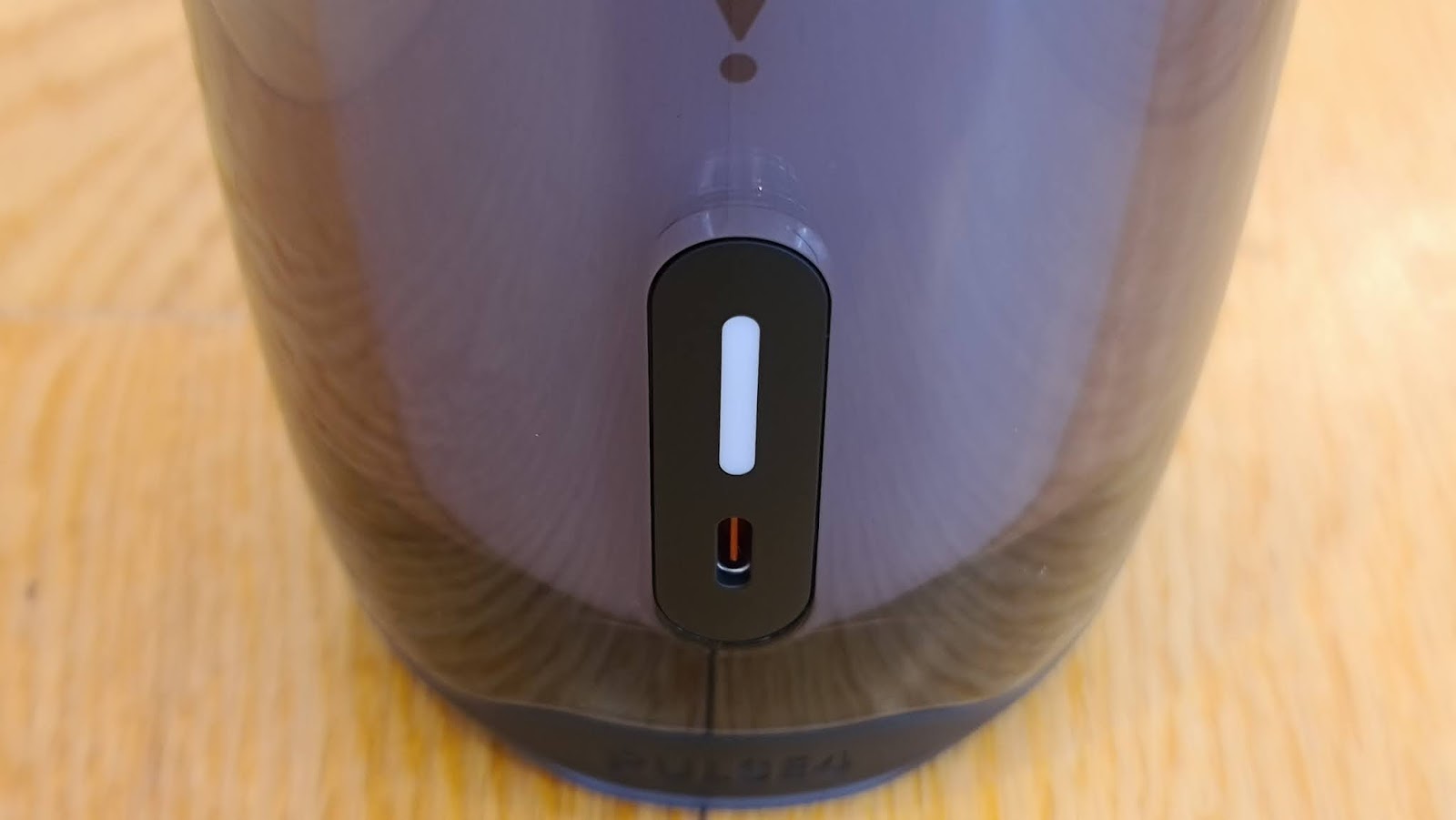
I suppose there's a front and a back, although again, this is not particularly important, given the Pulse 4 fires out your music in every direction. The obligatory JBL badge is just above the base at the front, while the USB-C charging port and charging LED is to be found directly opposite at the rear. Unlike previous incarnations, there's no rubbery plug to protect the charging port from water. The speaker is still IPX7 waterproof, you'll just need to dry it properly before you charge it.

The location of the controls has also moved - you'll find these in three groups around the top bumper; power and bluetooth, volume and play/pause, light show and Partyboost. While most of those functions are pretty self-explanatory, the last two are more interesting. The Partyboost button lets you connect to another Pulse 4 to create a true-stereo sound system, or you can link to multiple speakers with the Partyboost function. Unfortunately, this does not seem to be backwards-compatible with older JBL speakers featuring the similar Connect+ option - I've tried it and it doesn't work. Something to bear in mind if you're looking to the Pulse 4 to expand your existing network of party speakers.

As for the light show, well that's really why we're here.

Sure the Pulse 4 sounds great - I don't think I've ever tried a JBL speaker that didn't impress me with how much sheer power and bass response it can thump out given its size and the Pulse 4 definitely stacks up. All the room-filling sound required to get a small party started or alternatively, you'll have no trouble hearing your playlist from the other side of the pool.

But there are many speakers out there that can deliver the same thing - or similar. Many of these have an auxiliary port so you can hardwire your source device too, whereas the Pulse 4 doesn't - bluetooth is your only option. Other speakers offer voice-assisted control too, via the virtual assistant on the phone or tablet connected to them. Not the Pulse 4.

But no other speaker looks quite like this. The multicoloured, 360-dgree LED display really is mesmerising and what's more, it's super customiseable. You can cycle through four preset light show patterns using the button on the speaker but the real fun begins once you open the JBL Connect app. From here you can change the colour of any of those patterns to whatever you like. You can even use your phone's camera to match the light show to the surrounding decor - perfect for a colour-themed party. There's also the option to create your own, custom light show, creating a repeating sequence from a selection of nine different patterns.

You can alter the overall brightness from the app too, either to better suit the mood or just save a bit of battery.

All these patterns pulse, move and shake more or less in response to the music playing from the speaker. If you have connected other Pulse 4's via Partyboost, you can sync light shows by giving the speakers a shake - although I was unable to try this feature as I only had one device to play around with.

JBL claims up to twelve hours play time on a full charge and while I haven't scientifically put this to the test, from my regular use of the speaker over a few weeks, it seems believable. It's not the longest playback of a speaker out there but a twelve-hour party seems plenty long enough to me. On the downside, it will take between three and four hours to fully charge, so best plan ahead if you're looking to dance all night long.

The clear outer casing certainly seems durable enough to take a few knocks although it does tend to attract fingerprints as there's not really anywhere else to grab the speaker by. Luckily, it's waterproof, so you can just wash it off.

The Pulse 4 is an interesting progression in this line of speakers because unusually, JBL has removed some features, rather than adding more. To be fair, features like voice-assistant integration and the auxiliary port were probably under-utilised in a device like this anyway and therefore unnecessary. The light show has always been the main event for the Pulse and fourth time round, JBL has definitely made it bigger and brighter than ever.


Click here for more information and pricing on the JBL Pulse 4 portable bluetooth speaker.

Thursday, 11 June 2020

PIMP YOUR FEED

Every year, phone cameras defy reality and get better than the year before.

For the right price, you can now by a phone that can take wide-angled pictures in the dark, from hundreds of metres away.

Some phones can even remove unwanted passersby from the background of your shots, or take myriad pictures of all kinds all at once, letting you choose whichever you think is best.

And yet...

Those damn influencers. Why do their best lives still look so much better than your best life? How do their photos always look so... arty. Surely they're not more creative than you. That can't be right. Especially when so many of them seem to be kind of... you know... thick.

If you're looking for a secret weapon to lift your social media game, don't buy a new phone; the answer might lie in an app...


When I was asked to review Adobe Photoshop Camera, I was quick to point out a) I don't usually review software and b) I don't really know anything about photography. They said, "Perfect." This is exactly the app for know-nothing social medial noobs like me who simply don't have the time or the inclination to touch up, tweak and preen their pics.

Essentially, Photoshop Camera is a comprehensive suite of filters, lenses and editing tools with one crucial point of difference; you can apply the effects before you take the photo, or alter the shot later. No matter if you're clicking off selfies or portraits, landscapes or meals, you can take pictures directly from the app itself, posting straight from Photoshop Camera too.


The other beautiful aspect of the app (excuse the pun) is how automatic it is. Sometimes your photo doesn't quite capture what you were intending. This might be a brightness issue, or contrast, or focus or any one of a million other technical things you shouldn't have to worry about. This picture of my beach walk the other day is not a bad picture...


But then I open it in Photoshop Camera and just let it do its thing. Straight away, the whole scene is slightly more vivid, the colours less washed out. More importantly, now there's more detail to be found. The trees, grass and bushes to the left are now green and distinct, no longer lost in shadow. You can even tell the subject in the middle is wearing a blue hat, whereas before you could barely see her head. But wait, there's more....


Photoshop Camera features an expanding, downloadable library of filters. If I apply Blue Skies to the photo, this is what happens. I've gone from mid-winter to late summer with a couple of swipes. I didn't have to isolate the area of sky I wanted to enhance, the app is clever enough to work that out for itself.

Of course, I find making selfies more interesting (and less realistic) to be a major challenge. Nobody wants to see a true-to-life image of me - I wouldn't inflict such a cruel and unusual punishment on anyone. This is where Photoshop Camera really comes into its own.


You ever feel like you're going through a Billie Eilish phase? She has her own library of lenses here. This one, like many of the effects in Photoshop Camera, actually moves and can be saved as a video with the stick men appearing to move out of the screen towards you. Probably disturbing enough as it is.

As I've pointed out already, you can apply this after you've taken the shot or while you're posing, giving you the opportunity to react to those green guys in real time if you want.


This is me having some ideas, I guess. I don't know really - I just like balloons. Oh yes, there's hours of mindless fun to be had here.

Personally, I find Photoshop Camera's ability to touch up existing pics a bit more useful but each to their own.

There's other stuff worth playing around with too, options that let you create art, not just photos.


This is a pretty average picture of a bird that was hanging around while I ate lunch yesterday - and that's after I touched it up with the app. Sure the detail and colours look pretty good but composition-wise... not much of a snap. Do you know how hard it is to get birds to stand still while you wave a smartphone at them? Complete nightmare.

However...


A touch of the old "Color Echo" and hey presto! That's actually something kind of cool I would have never have usually thought of trying to create myself. That's what Photoshop Camera seems to be able to do; turns idiots like me into artists!

Admittedly, I tried the app out on a couple of pretty flash phones but if you don't have the latest, greatest and most expensive camera tech in your pocket, Photoshop Camera might be a far more inexpensive way to add some pizzazz to your gallery.


Click here to download Adobe Photoshop Camera for your Android phone.

Or click here to download Adobe Photoshop Camera for your iOS device.