Tuesday, 9 June 2020

BETTERING THE BEST

Back in February I reviewed the Jabra Elite 75t true wireless earbuds. It was a pleasure, to say the least. At the time I declared them to be pretty much the best buds I'd ever tried.

I've been through a fair few other makes and models in the months since and that original opinion pretty much still applies. In fact, more often than not my Jabra Elite 75t's are the ones I go back to.

Now there's a variation from Jabra, the Elite Active 75t. I know. It's confusing. Not only is the name basically the same, it turns out, so are the buds. I'm not complaining. I loved the originals, remember?

So maybe we just go through that February review and see if it still holds up...


To start with, one of the things I liked about the non-Elite version was the lack of flash and bling. This follows through here, the Active Elite 75t's have the exact same form factor. Same size, shape, case, everything. The colour choice could be considered a little more out-there I suppose - copper/black, sienna, mint or navy, as pictured above. Don't worry, still no shocking pink or neon yellow.

Like the non-Elite version, the Actives also carry a 2-year warranty against dust and water damage. But this is the really big difference; they're IP-57 rated to resist dust and water, not just IP-55. This may not sound like a big jump but it actually means they'll probably survive being completely submerged (temporarily of course).

The point is, if you work out a lot, go really hard on your runs or you just live somewhere really, really hot, your sweaty earholes won't kill these things. That's what makes them so "Active". There's supposedly a more durable coating to make them more grippy for your damp workout digits. I can't say I've detected a massive improvement but then I'm probably not working out hard enough to appreciate it.

The Jabra website also makes a big deal about the silicon EarGels, also treated with a special dry film, soft touch, grip coating. Like the non-Elites though, there are still only three size options and I still can't quite seem to find the absolutely perfect fit for my left ear. Right ear? Rock solid. Damn my lopsided brainbox.

Everything else really does match up feature for feature between the Elites and the non-Elites but it's still interesting to go though them because I've been using those non-Elites for four months so you can get a good idea of their longevity.

As far as I can tell, Jabra's claims of up to 7.5 hours of continuous use from a single charge, with a total of 28 hours from a fully charged battery case are still totally valid. I hardly ever put the case on to charge and when I do, it charges very quickly. There's a tiny LED on the back of the case that lights up briefly when you shut the lid. It changes colour when it's time to charge up. Works for me.

The itty-bitty battery case, as I've mentioned, is exactly the same for the Actives, although it comes in a matching colour obviously.

Whatever those silicon EarGels are coated with, they still provide a fantastic passive noise isolating fit. Remember; there's also a "HearThrough" mode, activated with a push of the left bud, introducing a feed of what's going on around you into your personal mix. I find this helpful when it's time to stop ignoring the other people in my house completely.

Sound-wise, both the Actives and non-Actives boast identical hardware which is great news, because the Elite 75t's are still the best true wireless buds I've listened to. Which of course means the Active version is also the best set of true wireless buds I've listened to. I've revisited the Sound+ app and discovered there are more ways than ever to customise your listening experience, from personalised EQ's to choosing between voice or tone connection notifications.

Over the last few months I've really come to appreciate the tap controls on the Elite 75t's - unlike so many other setups I've tried, the physical press controls are easy to find, comfortable to use and they make sense.

Bluetooth connectivity still impresses, as does call quality - these are things Jabra gets right every time. Just a reminder, you have the advantage of being able to use the Elite Active 75t's with just one earbud if you want and you can use the Sound+ app to control whether your audio feed pauses automatically when you remove one bud or not.

Because the Actives are the exact same shape, that means they're also about the smallest, lightest true wireless buds available. I love subtle design like this and I really appreciate the way they hardly protrude from my ears at all.

The Jabra Elite 75t earbuds come at a price. I think that's okay because they really are among the best true wireless buds I've used - if not the best. The Actives come at a $30 higher price. Probably not so much more to pay for the peace of mind you need if you work out hard.


Click here for more information on the Jabra Elite Active 75t true wireless earbuds.

Friday, 5 June 2020

SETTING THE BAR AT A WHOLE NEW LEVEL

I've been reviewing gadgets for a while now.

I'd like to say I love them all equally but that would be a bald-faced lie.
Some devices are innovative, unique, well designed.

Many others simply copy what has come before and add a new feature or two to make them seem new and exciting.

Some fall completely flat. Maybe a good idea but poorly executed, often let down by cost-cutting compromises or maybe they're the entry-level version of the expensive thing the manufacturer really wants you to buy.

Then there are brands that are almost in a class of their own. Devices with a reputation. Gadgets you don't just want to try, gear you're desperate to own.

Sonos has always been that nirvana for me...


Until now, not only had I never owned a Sonos speaker, I'd never even had a decent play with one. Yet many people I know have filled their houses up with Sonos gear and they all swear by it. In short, I've been suffering from Sonos FOMO for years.

So it was with eager anticipation I awaited delivery of my Sonos Arc review unit; the very latest in the Sonos line, successor to the Beam, perhaps the single most influential speaker of the last decade.

Unfortunately, when the Arc was sent out to me, New Zealand was only just coming out of nationwide lockdown due to the Covid-19 pandemic and courier services were under unprecedented demand. So I had to wait. And wait. And wait.

The one device I'd always wanted to try and day after day... it just didn't arrive. Ah, cruel fate. All I wanted, all I'd ever wanted was to get my hands on something Sonos and yet I just kept getting "Processing at depot" messages instead.

In the meantime I studied up. I downloaded the beta app. I read all the review guides. I was ready. Oh boy, was I ready.

Finally, a big box arrived at my door. I could have kissed the courier - except that would have gone against all the social distancing rules. The Arc was here at last!

The Arc is a serious piece of hardware, at well over a metre wide it's perhaps a bit longer than many other soundbars out there. This is definitely to your benefit though, as there's a lot of firepower under the hood. I'm going to list everything off because it makes it sound more impressive: Eleven Class D amplifiers, eight elliptical woofers, three silk-dome tweeters and a four far-field microphone array. Somehow all of that is tucked inside an attractive, circular casing, available in white or black.

Physically, setting up the Arc couldn't be more straightforward; plug in the power lead and the HDMI cable (preferably from your ARC port on your TV) and you're good to go.

Technically, I had a few more issues. The Sonos Arc is not a bluetooth speaker, it connects via WiFi (or ethernet) to connect with other speakers, access streaming services and enable Google or Alexa voice assistants. You set all this up via the app of course and as I've mentioned, I've been using a beta version because the new, official one hasn't been released at the time of writing this review. This may be why a had a few issues - not major issues, just niggles. I couldn't connect the Arc to my WiFi until I put my phone right next to the router. Once I was connected, it took several attempts to install updates when prompted. I was lucky enough to be sent a pair of One SL speakers to add to the Arc for surround sound. I added these to my new network with no issue, other than the app kept forcing me to pair them as the opposite side to where they actually were. In the end, I just went for the obvious solution; I paired them then swapped them over.

I'm sure all this stuff falls under the category of teething issues and will easily be sorted in future updates. And to be honest, I couldn't care less, because now I've set my Sonos system up, I'm in heaven.

Let's just stay on the app for a moment because other than the setup issues, I really like it. It's clear and simple, even though there are lots of options. You'll definitely want to set up your voice assistant as alluded to earlier, because although there are touch controls on each Sonos speaker themselves, there's no fun in getting up off the couch just to play, pause or adjust the volume - especially when that four far-field mic array seriously does the business. I've experienced far less miscommunications with Alexa than I'm used to - even when listening with the volume up loud.

Before we get to the main event - home theatre - it's well worth pointing out how great your favourite music streaming service sounds through this system. Remember, I only have the Arc and two rear speakers set up and yet my playlists sound gorgeous. It's easy to judge a sound system by sheer power; how loud is it? How much bass can we pump out? Rest assured, the Arc has those bases (and basses) truly covered. But I'm often more impressed by a speaker setup that can play music quietly. Often you don't want the songs to be the centre of attention, you're trying to create atmosphere - not a dance party. This is exactly what the multi-directional speaker array of the Arc achieves with ease. You can even set the surround speakers to Ambient rather than full to complete that, "I can't even tell where the music's coming from" feeling. There are EQ settings... but not many. Bass, treble, balance - fairly basic but I've never felt I'm missing out on something.

Not only can you easily access your favourite services like Spotify, iHeart Radio and Apple Music, Sonos even has it's own streaming service, featuring countless commercial radio stations from here and around the world, not to mention a wide range of Sonos-specific offerings, from jazz to current hits and stations specifically curated by artists like Thom Yorke of Radiohead. Me likey.

Shall we turn the telly on?

Yes.

Please.

I could go on. And on. But this review is getting pretty long already. Let's just say, I've tried a fair few soundbars and speakers over the years and put simply, the Arc is the best. It brings you into the action when required, leaves you as an impartial observer if that's more appropriate. Sonos recommended me a list of cool stuff to watch and listen to and I have to say, the choice of the opening sequence of Drive to Survive, the Netflix doco on Formula One was inspired. There's a lot going on in this sequence - music, cars, sound-bites, crashes - so much to take in from all directions at first I struggled a bit to hear the main narrative. Not to worry, there's a setting for that - I selected "Speech Enhancement" and everything was perfect.

If your source content has been recorded in Dolby Atmos - and much of what's being streamed these days is - you'll really find yourself in the middle of things.

There's even a Night Sound setting to soften loud sound effects if you're getting your SciFi fix while someone else in the house is trying to sleep. Sonos has brought out a new Sub this year but to be frank, I'm getting heaps of bass response from the Arc as it is. I can only imagine the rumble effect a dedicated subwoofer would add to the equation. Exciting.

The best thing about the Arc? It lived up to all my expectations. The hype was justified. It looks so good, especially in white. The LED status lights are extremely subtle and you can turn them off completely if you prefer. I prefer. On its website and via its press releases, Sonos goes to great lengths to explain exactly how it achieves such a complete surround sound effect. The CEO, the designers, famous collaborators all have their say but none of it means anything if it doesn't actually deliver awesome, room-filling sound, both at high volume and at low, background levels. The Arc delivers in every category. It was worth the wait.


Click here for more information and pricing on the Sonos Arc.

Tuesday, 2 June 2020

LOOKING BACK IN TIME FROM YOUR FRONT DOOR

Over the last few years, Ring security cameras and video doorbells have established themselves as dependable, durable and subtle devices capable of displaying and recording useful, high quality footage of what's happening at your doorstep and beyond.

This year marks the third generation of Ring's classic camera-in-a-doorbell. At $419 for the Plus version, this is certainly not a budget option. However, rest assured, you'll get far more than budget results...


If you haven't come across a Ring Video Doorbell before, let me cover off some of the basics. The Video Doorbell 3 Plus is a D.I.Y. option for entranceway surveillance. There's a small, but powerful camera built into the device and a large, visible doorbell button which not only sounds a chime but fires off several other possible functions via your home's WiFi network.

The Video Doorbell 3 Plus can be set to send notifications of physical bell presses and detected movements to your mobile device, or to the phone of anyone else in your household too. You can then choose to monitor a live feed from the doorbell's camera and microphone - even talking with the person at your door if you wish. Remember, you don't have to be home to do this; you can open the Ring app from anywhere.

Even if you're not able to deal with any visitors or deliveries in real time, the Video Doorbell 3 Plus will record what it sees for you to review at your leisure.

Of course, there are other video doorbells and security cameras that offer similar functionality. so what makes the Video Doorbell 3 Plus so special?

For starters, ease of installation. Every time I set up a Ring device, I'm amazed by how many tools and accessories are included in the box to allow for a multitude of installation variations. Not only can you choose to run the Video Doorbell 3 Plus on mains supply or the included rechargeable battery, but there's a choice of faceplates; Satin Nickel or Venetian Bronze. There are two angled mounting plates to allow you to tilt the unit up, down or sideways if necessary. My preferred install site was a weatherboard wall, so the angled plate was ideal to keep the camera pointing more-or-less horizontally. There are plenty of screws of all sizes and the Video Doorbell 3 Plus now lets you easily remove the faceplate to access the battery, without having to take the whole unit off the wall.

There are two kind of app out there; the frustrating, poorly designed ones and the ones that just work. The Ring app definitely falls into the latter category. Everything is presented clearly, even though there is certainly now a long list of set-up options to work through. The step-by-step app-based guide is fairly foolproof, although I recommend establishing your WiFi connection in close proximity to your router before taking the doorbell outside - this took me a few a attempts despite the Video Doorbell 3 Plus now offering dual-band connectivity. Once set up, the WiFi connection remains stable.

What's more, enabling the Ring skill in your Alexa settings will let you access the doorbell from Amazon video devices like the Echo Show. That's right, Alexa will show you your front door. All you have to do is ask. Alexa-powered smart speakers can also be selected to play the chime from your doorbell so you're guaranteed to hear it all over the house.

Alternatively, you can use Ring's own Chime or Chime Pro - this second device also works as a WiFi repeater if your front door is too far away from your router for a reliable connection.

By now you can see this is a very smart doorbell indeed. The 1080p HD video quality is crisp and clear day or night. Sure the images are distorted at the edges due to the camera's fish-eye format - but that doesn't make them any less useful. There are several new options for customising motion detection zones and sensitivity - very important if your entrance is close to the street as getting a notification every time somebody simply walks, rides or drives by is just annoying.

In fact, the Video Doorbell 3 Plus can now tell the difference between a person or something less interesting, like a cat. I don't know about you but I prefer not to receive notifications from my cats.

So a heck of a lot of features there... but my biggest issue with the Video Doorbell 3 Plus, or indeed any Ring product is the subscription service required to store video. There are many other camera options out there that let you record to a local hard drive or SD card, or even a cloud service of your own choice. Not Ring. Now to be fair, at just $45 to cover one or two Ring devices for a whole year, it's a subscription that's hardly going to break most people's banks.

$45 is not much to pay for the peace of mind the Video Doorbell 3 Plus offers, especially when it gives you access to its new star feature; Pre-Roll. This is a 4-second black-and-white recording of what happens before the doorbell records any events. While at face value this may not sound massively useful, when you think about it, it's often the moments before the camera detects movement or people that matter most; delivery people rush up, drop their packages, turn their backs and leave. Thieves tend to do the same. (Although that middle step changes to picking up the package instead.) This means without Pre-Roll, you're often left with a crystal clear video of the back of whoever came to your door. Not all that helpful. Ring's new 4-second clips make all the difference.

Other than the slight niggle of having to pay to record, the Video Doorbell 3 Plus is another solid performer from the Ring line - I particularly like the way I can make it chime through my smart speakers and those 4-second Pre-Roll vids are definitely a useful feature to have.


Click here for more information and pricing on the Ring Video Doorbell 3 Plus.

Sunday, 31 May 2020

NOT MY STYLE - BUT MAY BE YOURS

Ah buds.

Seems like only yesterday wireless earbuds were just a concept. Now they're absolutely everywhere, in all shapes and sizes and priced to suit every budget.

If you're not comfortable spending $300 or even more on something so tiny, be warned  - there are some pretty big gaps between the cheap and nasty and the more high quality items on offer. However, not all decent buds need to break the bank...


The JBL TUNE 220TWS is a good middle-ground option - both in terms of features and price.

The biggest question here is, are you a stick person or an in-ear person? Obviously, the external column-based design of the TUNE 220TWS means these buds are for stick people. I'm definitely more of an in-ear kind of a guy - although I do get why people go for this form factor.

There's far less fiddling around with different caps, cushions and fins to find the perfect fit... because there aren't any. Earbuds like these aren't designed to fit perfectly. They're meant to fit comfortably - and the TUNE 220TWS buds definitely do that. While there's no hermetically tight seal to provide passive noise cancellation, the upside is you can wear these for hours on end with no real fatigue or discomfort. This is partly due to their lightness, good balance and the feel of the soft-touch paint. (Black, white, pink or blue)

Despite not having outside noises safely sealed away, I found there was plenty of sound supplied by the buds themselves to keep distractions at bay. In fact, I keep getting into trouble while writing this review for ignoring the Domestic Manager... but only because I didn't actually know she was saying anything.

I've been extremely impressed by the clarity of the music reproduction. Yes, there's a pleasant amount of JBL's trademark bass kick (Or JBL Pure Bass Sound as they call it) but it's not at all overpowering and doesn't tend to muddy the general soundscape as can happen when other earbuds go for a big bass response. The overall result may not be quite as warm as other personal sound experiences but it's nice and bright, without being too sibilant or piercing. The steady thump, thump of Lady Gaga's latest dance tracks on Chromatica come across powerfully. Meantime, Sting's acoustic version of Fields of Gold shows off every finger-picked guitar string.

Call quality is great too. It's another big advantage of the column-style earbuds; if you stick the microphone at the end of the column, it's pointing towards your mouth, so it's likely to do a better job of picking you up clearly. This definitely seems to be the case with the TUNE 220TWS - very handy in the current age of Zoom meetings and other online video calls. In fact, I've found these to be great laptop companions indeed.

The JBL website claims you'll get about three hours non-stop use on a full charge and nineteen hours of charge time in the case. This is good, although far from the highest performing true-wireless earbuds out there. In saying that, I haven't tested these claims scientifically; I rarely wear earbuds for more than three hours at a time and there's a very clear LED indicator in the case to let you know when you need to plug it in.

Perhaps my biggest frustration is getting these things out of the case. It's definitely snug, no argument about that but my fat fingers struggle to grab anything firmly enough to slide them out. In fact, in one of my bungling efforts to prise the left bud out of the box, I accidentally shot it from the case and it fell on the footpath - not ideal. All this could have been easily avoided with one small design modification; a lid that flips all the way back instead of one that only opens to right angles - this simply isn't enough room for my fumbling digits to dig each earbud out its resting place, not easily anyway. It's a shame, because the two-tone case is very compact, comfortable to hold and looks great, with the JBL logo embossed on the front.

The on-board controls are a bit of a disaster, I'm afraid. There's an almost microscopic button, about the size and shape of a grain of rice on each earbud. They're hard to find and very uncomfortable to push because you have to press with enough force to jam the earbud into your ear to get it to work. The functions are fairly standard; one press to play/pause, or take calls, double press to return to the beginning of the track etc. But there's no volume control at all - this has to be done from the source device. Why JBL would include voice assistant control (which I'm pretty sure hardly anyone ever uses) instead, is a mystery to me.

Unfortunately, the TUNE 220TWS are not IP or IPX rated for dust, sweat or water resistance, so they're probably not a good option for rigorous exercise. I'm always feel a bit insecure wearing column-style buds running anyway; because they really only sit in your ears rather than fit in your ears, it seems like any decent jolt will send them flying. In defence of the TUNE 220TWS, I haven't actually lost one out of either ear while I've been using them, so perhaps my fears are unfounded. That soft-touch paint finish certainly adds an extra grippyness to help you feel more secure.

While perhaps not the best option for the gym, I'd have no reservations about recommending the TUNE 220TWS as a great commuter option, streaming video or music via phone or tablet and as I've mentioned, they're the perfect solution for online video chats. They look stylish, sound really good, pack a decent bass punch and they're less than $200. Now if I could just get them out of the case...


Click here for more information on the JBL TUNE 220TWS earbuds.

Wednesday, 27 May 2020

WHEN LIFE GETS MESHY

WFH.

Looks like for many of us, Working From Home is the new normal. In fact, after being forced into setting up a home office in emergency circumstances, a lot of people are wondering why they haven't been working this way for years.

There are so many advantages; no commute, no car or public transport costs, no parking issues, more time to do the job because you're spending less time traveling. Oh - and you can spend all day in track pants if you want to.

There are disadvantages too, of course. Distraction is perhaps the biggest issue of all. Unless you can set yourself up in the right part of the house, away from other people, you can easily find yourself being drawn into non-work related problems like, "Mum! Where's the tomato sauce refill?"

Not what you want to be dealing with in the middle of a Zoom staff meeting.

That's if your connection is strong enough to keep you in that meeting in the first place.

Many of these challenges can be solved in about ten minutes, by setting a decent Mesh WiFi network...


The COVR-1102 AC1200 Seamless Mesh WiFi system from D-Link was designed to make upgrading your home or small-business network as easy as possible.

Right away, the first thing you'll notice is how compact the system is; the two COVR-1100 units the kit ships with are perhaps the smallest, most inconspicuous WiFi access points I've ever set up. If you're worried about cluttering up the house with a whole lot of extra, ugly tech gadgets this is definitely the option for you. Each unit is tiny, the shape of a Rubik's cube and not much bigger - but much, much easier to solve.

Not only are they small and subtle but there's only one minuscule LED status indicator in the centre of the top of each unit. Even this can be turned off once you've set everything up. The COVR-1102 is certainly the most invisible WiFi system I've seen so far... you won't need to hide it (which often causes connectivity issues) because you don't really notice it in the first place. It really is just two little white boxes.

Setting up the COVR-1102 is very easy, although I do have a couple of pieces of advice for you to help the process along. Firstly, be patient. The D-Link WiFi app has become extremely streamlined over the years and makes setting up any D-Link device foolproof. However, there are obviously some standard settings built into the app that allow time for devices to start up or reboot. In the case of the COVR-1102, these default times are clearly far too long; the LED changes from red to flashing orange to indicate it's ready for setup at least sixty seconds before the app will let you proceed to the next step. This is frustrating, as the setup process could be even more efficient than it already is. My point being; there's no use trying to rush things. Just do each step as prompted and you'll be fine.

Except...

On my first attempt at pairing the second unit, it simply didn't work. I was surprised to find the COVR-1102 units pair wirelessly, as previous COVR models have involved connecting each additional device via an ethernet cable to get them to sync. I reset both units and started from scratch, this time taking care to follow the app's suggestion to place the units face to face - in fact, I put them right in front of each other, almost touching. This seemed to solve whatever issue was preventing the pairing process first time round and I was then free to place the remote unit wherever I wanted.

And I do mean wherever - for such tiny little things, they provide surprisingly powerful coverage; up to 325sqm which is plenty for most homes. If you're lucky enough to live in some kind of castle or mansion, not to worry - you can buy extra units to add to your network. Remember, because this is a Mesh system, that means the same network name for the whole house. D-Link's Smart Roaming technology guarantees your devices will always connect to the strongest signal as you move around your home with no dropouts at all.

Smart Steering means your device will connect to whichever of the COVR-1102's dual-bands are less cluttered and most suitable for your needs; not everything needs the extra oomph offered by the 5GHz band but gadgets like smart TV's and gaming laptops do.

The COVR-1102 is also a WiFi certified EasyMesh system. This is a new industry standard that ensures your system is future-proofed to work with EasyMesh devices from other manufacturers too.

There's also an ethernet port on each unit if you need to hardwire something into your network, or you can use the COVR-1102 kit as a dedicated WiFi bridge - the perfect solution if your smart TV or gaming console is out of cable range from your router.

Discrete, powerful, whole-house WiFi, set up and ready to connect to in under ten minutes. If that's all it takes to move your home office off the kitchen table to the other end of the house, away from all those distractions, what are you waiting for?


Click here for more information and pricing on the D-Link COVR-1102 AC1200 Seamless Mesh WiFi System.

Wednesday, 13 May 2020

THIS TRACKER IS WAY SMARTER THAN IT LOOKS

It's been a little while since I last reviewed a Fitbit device. Last time I tried one I was impressed, as always, by how good Fitbit does its main thing; fitness tracking. This is only partly due to the features and functions of the tracker itself and probably more to do with the Fitbit app, which seems to expand its capabilities constantly, while still remaining user-friendly.

At the same time, many recent Fitbits have made overtures towards being genuine smartwatches; there's a whole gallery of Fitbit apps these days and there are now many functions offered that aren't really anything to do with working out.

So where does the latest Fitbit fit in to that scheme of things? Is it just another tracker or have they managed to squeeze a little more out of the new band?...


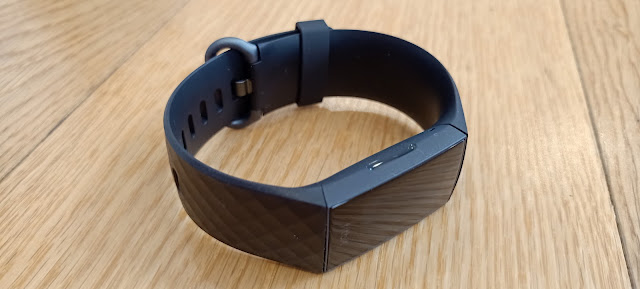
The Fitbit Charge 4 looks exactly like... well, like a Fitbit.

A cursory glance and you'd be forgiven for making a lot of assumptions; Simple. Functional. No frills. Shall we say... boring?

No. Don't say that. Not before you actually use it.

First, take another look. The diamond patterned Classic strap is available in Black, Rosewood or Storm Blue and looks quite a bit more classy than previous flat or grooved bands. For another $20 you can upgrade to the Special Edition - which basically means you get the Granite Reflective Woven band with the standard black one thrown in. The bands are more straight-forward to swap out than ever, making the Charge 4 easy to dress up or down depending on the occasion.


The tracker itself is extremely light and slim and if you choose Rosewood, both band and body come in that colour. Most striking of all is the screen itself, a surprisingly responsive touch display that - as per usual for most Fitbit devices - is very easy to read in all light conditions. Although it's only a monochrome display, there's enough use of shading, greys and animations to keep everything looking modern and interesting.

Funnily enough, because the screen curves gently away in all directions, it's actually led to a few mis-swipes. Being so narrow (and my fingers being so fat) occasionally when attempting to swipe up or down, I've accidentally swiped left instead. I want to be clear; this is one-hundred percent operator error, there's nothing wrong with the Charge 4 - other than it is really very compact. This also means some of the information on display is pretty tiny, so if you need strong reading glasses to make out small print, better take them running with you.

There is still one actual button on the left edge of the Charge 4... or is there? It's inductive, so it's actually more of a recess than a button and it vibrates when you use it - a bit like the fingerprint sensor on a phone. Because it doesn't physically stick out, it took me a little while to get used to finding it. As it turns out, there's a knack to it; once I stopped thinking of it as a button and just started squeezing the tracker with my thumb and forefinger it worked for me every time - to be honest, much more intuitive than fiddling around for a button like I was trying to do in the first place.

This button-that's-not-a-button is your go-back key. With a long press it also brings up shortcuts for Do-Not-Disturb, Screen-Off and a recently added Sleep mode, which is kind of a combination of the other two. This means no unexpected vibrations or flashing displays in the middle of the night. 

All the activity and sleep tracking options you've come to expect are still there of course, along with a host of little refinements to accompany them in the Fitbit mobile app. Sleep data seems more clear and more comprehensive than ever - unfortunately for me, no less depressing. There's even an SpO2 sensor to measure blood oxygen - perhaps not top of mind for most people but if big variations show up on the app during the night, it might be time to consult a doctor.

You can choose a selection of six exercises to track from a longer list, although I'd prefer to see even more specific exercises and sports there. Obviously you can select running, walking, cycling and swimming (yes, this band is very waterproof) but while golf and tennis make the cut other common activities like aerobics and football don't. I usually settle for something like "Outdoor Workout" or "Interval Workout" instead but given how awesome the Fitbit app is at everything else, I think it's about time they added a few more exercises.

Of course, there are many other workout and coaching options available if you subscribe to Fitbit Premium, which is free for 90 days with your Charge 4 purchase. Frankly, I've never felt the need to have more Fitbit app than what's already provided; it's pretty comprehensive as it is.

But back to the device itself - what a joy the Charge 4 is to use while exercising. As I've already pointed out, the controls are simple and intuitive, the display is clear and you can easily toggle through things like pace, distance and duration with a single press of that number on the screen. The Charge 4 will auto-sense any exercise you do - I was impressed to see it thought half an hour of table-tennis in my garage counted as "Sport." There are two major advances the Charge 4 brings to the table here; the first being GPS. You can now leave your phone behind secure in the knowledge the Charge 4 can map your walks, runs or rides independently - pretty impressive for a device this compact. For some reason GPS only tracks workouts you activate manually; you won't get a little map of your run if you've left it up to auto-tracking.

The second new feature is the introduction of Active Zone Minutes. The Charge 4 vibrates to let you know when you're in the Fat Burning zone or the Cardio zone and these minutes are saved to your workout and then displayed on your map too. All your daily stats, now including Active Zone Minutes are quickly shown with a swipe up from the main screen.

It's the unexpected abilities of the Charge 4 that have really impressed me though. There are a couple of gimmicky ones; firstly, a Spotify controller that can run your music or podcasts if you're logged in and have the app open on your phone. This works well but I'd rather it was a more generic media controller like Fitbit offers on the Versa 2. Fitbit Pay is another app pre-loaded onto the Charge 4; great news if you're an ASB customer but unfortunately it doesn't work with any of the other major New Zealand banks - which is a bit of a shame in this current age of contactless payments. The point is, both those add-on features work. As do push notifications. Hallelujah, praise be! The Fitbit Charge 4 stays connected to my phone, shows notifications from any app I choose and what's more, I can even set up customised quick replies for each of those apps. This is a real breakthrough for Fitbit. I've always found the reliability of phone notifications to be a bit scratchy on previous Fitbit devices but not this time. Whether it's an alert from my security camera or a work email, everything comes through straight away, without fail. I love it.


This means the Charge 4 is actually more of a smartwatch than some of Fitbit's smartwatches! I'm not trying to oversell the notification services but I really have been genuinely impressed by how reliable they are - and how I can read whole emails on such a small display.

The big letdown for me is battery life. Fitbit claims you'll get up to seven days use on a single charge but I'm not sure how. Perhaps, if you're prepared to turn everything off, don't keep it "always connected" with your phone, don't use any alarms and don't use GPS you might squeeze out a week's worth but what's the point of having a device that can do all the things the Charge 4 can do if you don't actually use it to do any of those things? Using it the way I have been, tracking one or two workouts a day and receiving all my messages and other notifications, I can just about eek out three full days before the battery warning takes over from whichever watch-face I've chosen. (There's a vastly improved selection of these too) 


This doesn't particularly phase me as there are plenty of smartwatches out there that barely last one day on a full charge, let alone two. What's more, the Charge 4 goes from 0-100% in under 90 minutes. Some things don't change though - there's yet another weird charging dongle, specifically for this device. Par for the course for any Fitbit it seems. This style of clip-in charger is easy enough to use, just don't lose it because nothing else will work.

Okay, so other fitness bands often have a much longer battery life but this is the only one I've come across that comes this close to being a bona fide smartwatch so I can definitely forgive the heavy drain, due mostly to the independent GPS.

The Charge 4 looks stylish, without being garish. It's comfortable but durable. It does all the cool Fitbit tracking you've come to expect and it's smart. Really smart. Starting from $269.95 I think it's pretty good value.


Saturday, 25 April 2020

THE GREAT COVER UP

For some reason, smartphones are more expensive than ever.

In the last year alone, I've reviewed several handsets priced over two-thousand dollars and a couple even stretch into the $3K+ range.

So much money for something you can easily drop onto the kitchen tiles.

Crazy.

I take pretty good care of my phones - in fact I've only ever broken one, not by dropping it, but by dropping an empty coffee cup onto it. Accidents definitely happen.

If you've invested all that money in a phone, you'd be a fool not to protect it properly...


As the number one-selling smartphone case brand in the U.S., Otterbox has developed a reputation for stylish ruggedness - if that's a thing. Now widely available in New Zealand, there's a new range to match up with the new range of Samsung flagships.

You won't find much more solid protection than the Otterbox Defender Pro. In fact, I don't think I've ever come across a case as drop-proof as this one. Not only is every edge of your S20 device protected by thick, multi-layered bumpers but there's also a soft, foam-like shock absorbing pad to protect the glass back of your phone as much as possible.

Now, I'm not brave (or reckless) enough to go around dropping my phone from various different heights to test how effective the Defender Pro actually is. On the other hand, some things just feel solid, dependable - really well made. The Defender Pro is one of those things. It just seems trustworthy.

Especially given it also includes OtterArmor Microbial Defense; an extra layer of anti-microbial technology built in to ward off a host of common germs. Pretty timely in the current climate, wouldn't you say?

The other bonus feature of the Defender pro is its belt-clip holster, included in the box. Although constructed from extremely sturdy plastic, it's very easy to clip your S20 device in and out of it, thanks to the purpose-built sockets on the edges of the Defender Pro case. Despite that, once it's in, it's in - and it stays in with no chance of being accidentally knocked or popped out. Obviously, wearing your phone on your belt isn't everybody's favourite fashion statement but given the target market for a case as rugged as this is likely to include construction workers, tradies and outdoor sportspeople, I'm thinking fashion isn't necessarily top of mind.

The bonus feature (the belt-clip holster) has its own bonus feature; the clip can rotate around and click into an open position to serve as a kickstand. This means you can watch Netflix or join that Zoom meeting without getting a tired arm after five minutes. I hope whoever thought that up got the rest of the day off.

Of course, you don't have to just clip your phone onto your belt - there are probably any number of convenient things you can use as a makeshift selfie tripod now you can instantly clip your phone onto them.

I'm not going to lie, the Defender Pro, while super secure is, shall we say, a bit on the bulky side. While you may still be able to slide a Defender Pro-protected Galaxy S20 in and out of your pocket without too much difficulty, given the S20 Ultra is two sizes bigger, the Defender Pro makes an already massive phone a size and a half bigger again. 

Yes, you get plenty of peace of mind - including a dinky little charging port protector to keep out dust and dirt - but the case is undeniably large, it's stiff and to be frank, I'm surprised the volume and power buttons work as well as the do through all those layers of protection.

Not to worry, if the Defender Pro is too over-the-top for your tastes, Otterbox does provide other options, like the Symmetry series.

The Symmetry case is still precisely engineered, still feels dependably durable but is much slimmer, lighter and more elegant. In fact, it would be easy to think there's not much difference between an Otterbox Symmetry case and the standard TPU case that comes in the box with your S20 phone but don't be fooled. On closer inspection you'll discover a much softer inner layer around the inside edges of the case, helping to absorb the shock of any accidental drops. The Symmetry is sturdy but still flexible enough to make getting your phone in and out a pretty straight-forward exercise.

The attention to detail with both these cases is exact - and that's what really sets them apart from the cheap alternatives you may find online. Every button, camera cutout and port access is meticulously placed. The build materials are unquestionably tough and durable and what's more, Otterbox cases come with a lifetime (seven year) guarantee. No, they aren't cheap - but your Galaxy S20 wasn't either. A decent case like this is about the best insurance you can buy.


Click here for more information on the Galaxy S20 range of Otterbox cases.