The challenges of working remotely are many and varied.
For a surprising number of people, just maintaining a half decent internet connection is the biggest obstacle of all. In an ideal world, we'd all have a zoopy-doopy gigabyte UFB connection plugged directly into our laptops. Sadly, back in reality, just over half of us are connected to fibre right now and it's still not even available for more than twenty percent of the population.
Very difficult to work from home without the internet.
But, who needs cables anyway?...
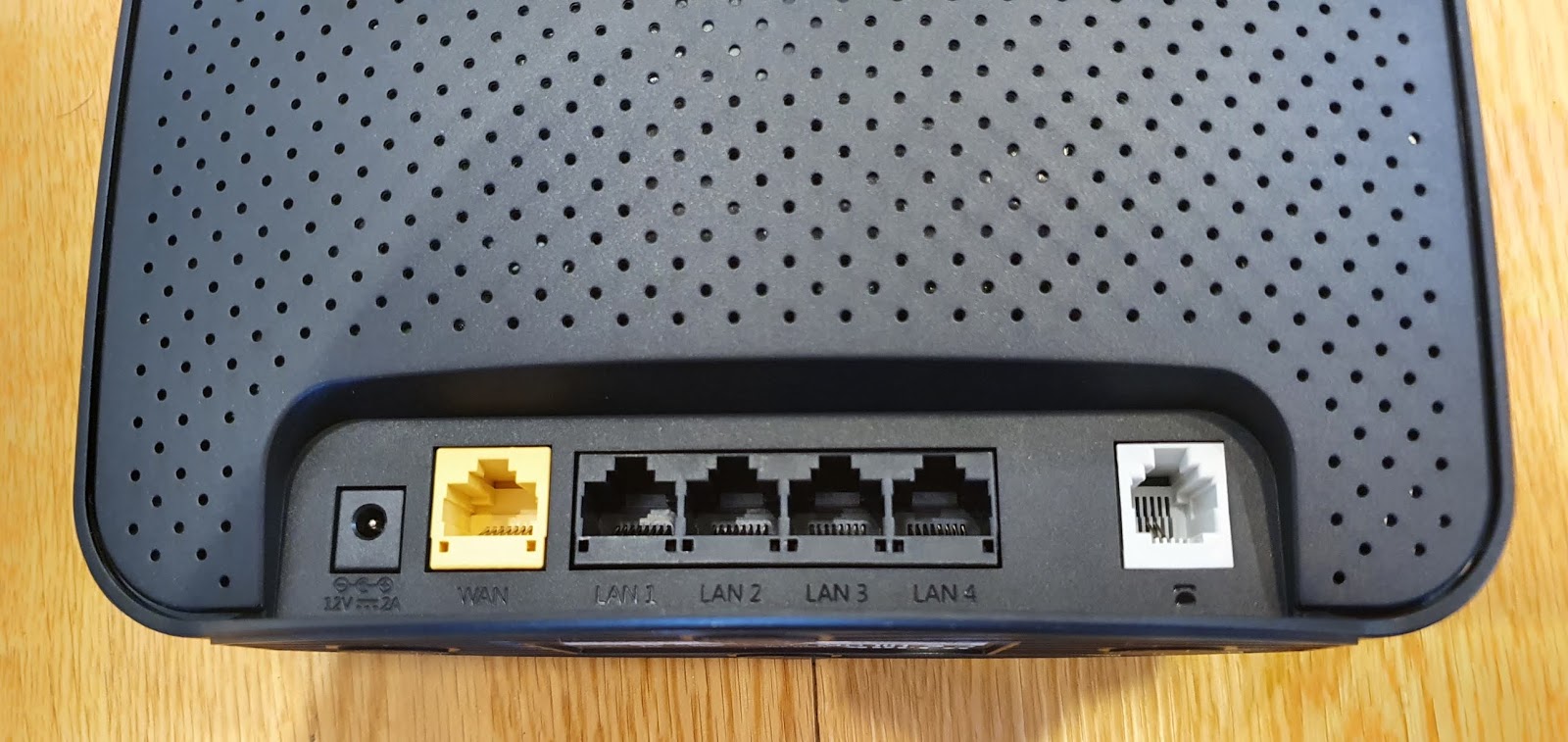
It might not look like much but the DWR-956 from D-Link could be the guaranteed connection that keeps your business online.

In most ways, the DWR-956 operates like any other router, except it has a slot for a sim card as well. The best thing about that is you can choose to run the router over a hard-wired ethernet connection or via 4G LTE mobile data. Better still, whichever method you choose, you can set the other option as a default back-up if your preferred connection falls over - this happens automatically, in a matter of a few seconds without the need for any manual setting change or reboot. Strangely, the slot is for a standard-sized sim, which might be a bit of an issue for anyone wanting to use the micro or nano-sim out of their phones. You can buy a sim adapter if need be but if you're looking to use the DWR-956 on 4G full time, you'll probably be ordering a new sim specifically for it anyway - now's as good a time as any with good deals available on high/unlimited data plans due to the Covid-19 crisis.

Which brings us to the usefulness of such a device at a time like this; with all meetings and more business than ever happening online, being able to connect all your smart office tools through one router, wherever you are is definitely a bonus. There are four gigabyte ethernet ports available, meaning TV's, printers and desktops can plug straight in. The simultaneous dual-band Wi-Fi means less congestion even with multiple devices connected. Although the box only claims "Small Home" coverage, I've found no issues staying connected throughout my two-storey, four-bedroom house. There's even an RJ11 port to connect a VOIP phone - this really is a comprehensive internet solution, without a land-based connection, if that's what's required.
D-Link promises the DWR-956 is "easy to set up and use" - I've found that to be true in most ways but not altogether the case. Yes, there is a reasonably straight-forward browser-based wizard that walks you through the steps to set up your own Wi-Fi network and I had no issues connecting to my UFB connection or getting my sim up and running. However, there were a few settings that weren't quite so automatic.
For instance, changing your default connection to or from ethernet and mobile data is a bit fiddly, although the "Failover" mode seems to kick in with no issue as long as you've taken the time to set up both connection types. The main problem with the browser-based interface is there are far too many options - one or two misguided clicks can take you down a settings rabbit hole you had no intention of going anywhere near; very dangerous for someone who likes to tweak things like I do. Given the last few D-Link devices I've reviewed have been extra-easy to set-up via mobile app, going back to this web-based labyrinth of pull-down menus seems like a bit of a step backwards. Take my advice; if you're not a hundred-percent sure what a particular setting is for, leave it alone - otherwise you might be in for a factory reset and you'll have to start the whole process all over again.
I don't want to overpromise what the DWR-956 is capable of delivering when connected via 4G - obviously that's going depend largely on how good the coverage is in your area. For me, I've been clocking up download speeds of around the 30Mbps mark as opposed to 80Mbps+ via my UFB connection - and that's only on 3G. Not sure why I couldn't seem to pick up 4G in my neighbourhood, but even at those speeds, most things worked pretty well. Obviously, this not going to be an ideal solution for serious online gamers or a large home with multiple users streaming HD video simultaneously but I had no issues using Netflix and the like.
Unfortunately, the DWR-956 doesn't offer 5G connectivity, but given most areas where 5G is available so far are also likely to be areas that are fully UFB connected, it's probably not much of an issue right now.
This is a very compact device and the external antennae rotate easily out of the way (or screw off completely) making it extremely portable. If necessary, you can move your whole office from place to place without having to reconnect any of your gadgets - just plug it in and your own network is fired up and ready to go in mere minutes.
To me, the peace of mind Failover Mode offers is the main attraction of a device like the DWR-956. With so many of us working or studying from home right now, protecting your internet connection is pretty damn important. Combine that functionality with all the features you'd expect from a decent router and you have a winning formula to see you through tough times online.
Click here for more information and pricing on the D-Link DWR-956 4G LTE Wi-Fi router.
We've never seen people accessing the web from home like we're seeing right now.
The major Internet Service Providers are all reporting massive surges in residential online activity. Traditional peak times have been turned upside down. The roads may be empty but the information super-highway is chocka.
Working from home is basically the new norm, many businesses only able to stay in business thanks to a collection of hurriedly accumulated bits and pieces, plugged into each other and connected to the net.
The problem with an ad hoc, thrown-together arrangement like this is there's not always the opportunity to do the usual due-diligence. Unfortunately, in your haste to figure out how to do a staff meeting by remote control, cyber security might have been the last thing on your mind.
Sadly, hackers, fraudsters and troll farmers are still in business and all this extra internet traffic is too tempting for them to ignore. Trouble is, in many cases business-level online security has now been seriously compromised and is only as strong as any given staff-member's home router settings.
If that staff member needs better WiFi connectivity at home anyway, it might be a good idea to sort that and beef up security in one fell swoop...
We've talked about the D-Link COVR 2022 seamless mesh WiFi system before but it's well worth revisiting given the current, extraordinary climate. Especially because now the COVR 2022 kit is secured by McAfee.
Although I've featured several systems with router-level security, the obvious advantage to using something like this for your work-from-home setup is you're basically McAfee protected from the moment you turn it on.
That means McAfee's Secure Home Platform is accessing its cloud-based Global Threat Intelligence database to actively scan your home network for any vulnerabilities, including IoT threat detection - everything from security cameras to TVs become virtually hacker-proof. You can assign each connected device to a specific person on the network. Then you can customise those profiles accordingly. It's very easy to set schedules to control when people or devices are or aren't allowed to access the network, or to filter the kind of content available.
With kids schooling from home while you're working, it's going to be a challenge to monitor their internet usage - it can be tempting for them to stray down inappropriate cyber-rabbit-holes when they should be doing online lessons or assignments. McAfee's app makes supervising this a heck of a lot easier, just by checking a few boxes. There are age-appropriate templates to choose from, each of which you can customise with an impressive list of options. If you've turned something off your young user thinks they legitimately need access to, they can request a change. But perhaps most useful of all is the ability to pause or allow internet access altogether. No more excuses for turning up late to meal times.
Five years of that comprehensive protection is included free with the COVR 2022 kit.
And at the risk of sounding like a TV infomercial, that's not all.
Once you've registered your McAfee account, you'll also be able to install McAfee LiveSafe on an unlimited number of devices for two years free. That all adds up to hundreds of dollars of online safety included in the price of the COVR 2022 mesh WiFi system.
Which is still a great system by the way. The attractive base units (I know they're attractive, because the Domestic Manager has told me they actually look quite nice) offer dependable, uninterrupted, whole-house WiFi using the same network address (SSID). If you've been dealing with the hassle of swapping from one network to another using a more traditional extender, you've got to give a mesh system like this a go. You won't look back.
The COVR 2022 is fast and powerful too - this is because the base units communicate with each other via their own, dedicated 5GHz band, with separate 2.4GHz and 5GHz channels for all other devices to connect to. Smart steering means more high-demand gadgets (TV, gaming) get priority over things that don't need as much bandwidth.
The point is, it's a quick, user-friendly solution when it comes time to turn your home into a place of online business as well; you get better whole-house connectivity with all that added McAfee security to keep your business dealings secure and your kids safe.
Set-up really is very straight-forward, using the D-Link WiFi app. You don't need to know anything about MU-MIMO, WAN, LAN or Tri-Band connectivity, all you need to be able to do is download the app and follow the instructions.
These crazy times are stressful enough without exposing yourself, your kids and most importantly, your business to the ever expanding collection of online bandits out there. Now D-Link has built McAfee's protection into the point of connection, it's one less thing for you to worry about.
Click here for more information on the D-Link COVR 2022 seamless mesh WiFi system.
Once in a while I find myself reviewing a device with genuine "wow" factor.
Personally, the way I measure that isn't from my own impression but from the reactions of other people when they see me using it.
The latest little laptop from Dell definitely has "wow" factor. I know this, because people literally keep saying, "Wow. That's cool!"...
Yes, when I unboxed the Dell XPS 13 9300, even my cat wanted to know what the fuss was about. Who could blame her? Strikingly elegant from the outside in machined aluminium, a classy, matte finish that doesn't show fingerprints. Even more distinctive once opened, especially in arctic white, with the eye-catching woven glass-fibre palm rest.
The build quality here is genuinely first rate - despite how slim and light the device is, everything feels reassuringly solid, from the stability of the hinge mechanism to the rock-hard Corning Gorilla Glass 6 edge-to-edge touch panel.
That 13.4-inch screen really is something else. So unbelievably thin, yet with the most narrow bezels I've ever seen on a laptop. It truly deserves its InfinityEdge moniker, even the slightly wider bottom bezel is pretty much hidden by the offset hinge design. The touch operation is accurate and responsive but what has impressed me most is how non-reflective the screen now is, making the 9300 so much more usable in bright, outdoor or backlit conditions.
Colour, definition and clarity are wonderful. The 16:10 aspect ratio makes both media consumption and desktop productivity feel significantly less cramped than the 3:2 or 16:9 displays found on most other devices.

Because of those almost non-existent bezels, the whole laptop seems more like a much smaller, 11-inch notebook. That's not to say things feel cramped at all; like the screen, the keyboard also stretches right to the very edge. There's plenty of space for plenty of keys, including dedicated Home and End keys. Due to the taller aspect ratio of the screen, the corresponding lower half of the laptop has surprisingly ample palm rests (both UV and stain resistant) and a nice, big trackpad. There are three backlight settings to suit your preferences and there's also a power key that doubles as fingerprint reader for secure login. The sensor works very reliably and extremely quickly with one small drawback - the key is positioned where you'd find the Delete key on most other keyboards. This means I've accidentally turned the screen off a few times when I've been in the middle of typing something up. I'm sure I'll get used to it.
Especially given logging on and off is fast and efficient, either via that fingerprint reader or using the 720p Windows Hello camera for face unlock. The webcam is far from the best quality camera I've used on a laptop or tablet but it's perfectly adequate for video chats and most importantly of all, like most things on the 9300, it's tiny, taking up no extra space whatsoever on the top bezel.
The bottom-mounted, side-firing speakers are loud, rich and powerful, creating a fairly accurate listening environment for most media, although lacking full-on bass boom if you're watching something with a lot of explosions or listening to some EDM. There's a very comprehensive suite of both Dell and Intel sound and vision apps to tweak things the way you want. In fact, the sheer volume of pre-installed support software is probably a bit over-the-top; there are apps for updates, performance, device registrations, tips and tutorials... but it's not like you have to use them if you don't want to.
The configuration of XPS 13 9300 I'm using to write this on is pretty high end, to say the least. The 10th-gen IntelCore i7 CPU is teamed up with 16GB of RAM and a substantial (and fast) 512GB M.2 PCIe NVMe SSD. The integrated Intel Iris Plus graphics capabilities have now reached the point where anyone but the most fanatical gamers will be satisfied with the performance. To date, nothing I've thrown at this device has caused it to stutter, lag or even hiccup. Audio and video editing, streaming, gaming... everything performs admirably, which is of course what you should expect from a $4000+ laptop.

Some people complain about the lack of connectivity options; there are just two Thunderbolt 3 ports, a microSD card reader and a headphone jack. But bear in mind, Thunderbolt means versatility - charging, external displays, fast transfer speeds - and there's a Type-C to USB-A adapter in the box. These days, so many of my peripherals connect wirelessly, either via WiFi or bluetooth, my lack-of-port-anxiety levels have definitely plummeted.
What I will complain about - and it's perhaps my only complaint - is battery life. I know it takes a lot of power to run a 4K display and I know there are all kinds of things I can do to the settings to conserve battery consumption but here's the thing; I don't want to. If I've paid over four grand for my laptop I want my 4K and I want it to last all day. Unfortunately, while I do get several hours use from a full charge, I certainly wouldn't risk being out on the road without the 9300's power adapter. Even more unfortunately, it does not charge particularly quickly, although I appreciate the flexibility of having Thunderbolt ports on both sides so the cable is always out of the way, wherever you need to plug in.
Given none of us are about to embark on much long-haul travel any time soon, that kind of extended-life battery use is perhaps less of a concern at the present time. Oh well.
I've been using the XPS 13 9300 for a while now. In fact, I keep trying to find more excuses to use it. That's because the more I use it, the more I like it. It has more than enough processing and graphics power for anything I need. The display is perhaps the best I've seen on a laptop to date and the design touches like woven white glass-fibre palm rests are just so damn cool. Taking all that awesomeness into account, I can definitely forgive the average (not actually bad) battery performance.
Overall, the 9300 feels like a reliable, high-performance, future-proofed device that looks pretty classy with it. Small in size, but big on "Wow!"
Click here for more information and pricing on the Dell XPS 13 9300 laptop.
I think we're all agreed aren't we?
When it comes to cordless vacuums, Dyson is pretty much in a class of its own. There are plenty of imitators out there but other than the people who make those other machines, I haven't heard anyone claiming they perform anywhere near the level Dysons do.
This is largely due to the culture of design innovation Sir James Dyson and his team have established. I've met some of the Dyson engineers over the years and they're fanatical in their dedication to making their already great products even better.
Last year's V11 cordless vacuum had it all; intelligent sensors to automatically adjust suction for different surfaces. Unprecedented battery life, with a crystal clear LCD display to show you how much charge remains to the nearest second. And of course, the freaky little heart of it all, Dyson's patented Radial Cyclone technology and Hyperdymium motor, spinning at almost supernatural rates to provide more suction than you can shake a stick vacuum at.
So yes, the 2020 model is even better. But this time the improvements are so simple, they may be the most ingenious yet...
I've waxed lyrical many times before on the captivating design prowess entwined into any Dyson device. None more so than the last few generations of stick vacuums. So the prospect of trying out the new Dyson V11 Outsize was positively mouthwatering. Trouble is, I can't get my hands on the damn thing!
I don't know what it's like in your bubble, but living in lockdown has meant a massive spike in housework rates at the glennzb residence. Desperate for something, anything to do, even my kids have taken up some cleaning duties - although doing a terrible job of most of them obviously.
Not the case with the vacuuming though. Very difficult to get that wrong with a Dyson as part of the equation. Especially one with a 25% wider cleaner head. Yes, this year's first stroke of genius from the boffins at Dyson was to take that already amazing, auto-sensing, High-Torque head and stretch it... quite a bit. This means a significant time-saving of course, as you're covering more floor area with less strokes. It's still as manoeuvrable as ever, still knows the difference between carpet and hard floors - it's just wider.
As usual, there's an alternative "fluffy" head, specifically tailored for wood and tiles included in the box but if my experience with the original V11 is anything to go by, the auto-sensing head is so effective, the fluffy will probably stay in that box. Unlike the other five tools you'll also find in there, two of which you can carry around with you, snapped securely into the wand storage clip.
The second big innovation of the year is the other reason the Outsize is called the Outsize. The bin now has a generous 1.9 litre capacity - 150% bigger than before. Most weeks the V11 could handle me vacuuming my whole large family home without having to empty the bin halfway through... most weeks. Let's just say between three long-haired women, two medium-haired cats and Dyson's unparalleled suction power, you'd be amazed how much gunk can be sucked up on any given Friday morning. Now the V11 Outsize has plenty of room to spare. See? Simple but genius.
There's a third major upgrade which isn't really about size at all but will still be music to any Dyson fan's ears. The V11 Outsize features a replaceable battery - the feature some people have been waiting for before they purchase a Dyson at all. For a device of this size and power, the battery life is impressive anyway; up to sixty minutes on Eco mode. However, it does take a few hours to charge so running flat in the middle of your vacuuming can definitely put a dampener on things. Now you have the option of purchasing a spare click-in battery, which can be left charging in the same drop-in wall dock you store the V11 Outsize in. There's a simple, one-button release mechanism to swap out batteries in a matter of seconds. Of course, this goes a long way to reassuring prospective owners their $1399.00 purchase will definitely last them years, with a user-friendly battery replacement always an option if charge times start to fade down the track.

I love how Dyson refuses to rest on its design laurels with further little tweaks here and there. The power trigger has been modified to make it more comfortable to use for long periods and that outsized cleaner-head now has a revamped release mechanism so you can take it to bits for cleaning far more easily than before.
This is why using any Dyson product is always such a joy; design, design, design. You could simply say the V11 Outsize is pretty much the same, just bigger. That alone would be a pretty good reason to try one. But it's all those other little things, the tweaks and upgrades that mean I keep coming home to a freshly vacuumed house. I wonder if I'll ever get to have a turn?
Click here for more information and pricing on the V11 Outsize cordless vacuum.
When it comes to earbuds, there's one thing that matters more to me than anything else.
It's not how they look. It's not the case they come in. It's not what they're made of. It's not the battery life.
It's not even the way they sound.
Don't get me wrong; I have some definite thoughts, opinions and preferences about all those things but there's something I need even more than any of that...
They have to fit....
Cards on the table; when I was sent the JBL Reflect Flow true wireless sport headphones, I was suffering from a severe case of bud fatigue. I mean, how many pairs of earbuds can you really try? How different can they really be?
I even considered just copying and pasting bits from my other earbud articles and shuffling them around in a different order.
Joke. That was a joke.
I'm glad I didn't because the Reflect Flows had a massive surprise in store for me.
These are not the most styley looking earbuds I've ever seen. Oh, there's nothing wrong with them, it's just there's no particular curveyness or streamlining going on. Yes, there's a choice of four different colour options but at the end of the day, they're quite large, round and boring.
Likewise, the case is fairly industrial. It's a rectangular box that, while the corners have been rounded off, is still pretty boxy. Yes, it fits in your pocket but it will definitely leave a bulge. In saying that, everything certainly feels super sturdy. The lid snaps shut securely. The buds themselves are held in place magnetically, although they are slightly fiddly to get into place as the compartments are shaped to fit exactly.
So first impressions? Everything seemed a bit clunky and nothing looked particularly sexy.
Downer.
Then I started using them.
First things first. There's a good selection of tips and Freebits. (Most manufacturers call these fins, but if JBL wants them to be Freebit enhancers, I guess that's what they are) Three sizes of tips and three sizes of Freebits pretty much guarantees there'll be a combination that works for you. I usually start with the default configuration (which is generally medium) and adjust things as necessary from there.
So I worked the Reflect Flows into place and the world went away.
What I mean by that is I experienced an almost perfect seal, instantly. There's no Active Noise Canceling function built into these earbuds but there doesn't have to be; the seal is so good almost all ambient noise is blocked out. In fact this works so well, JBL has included TalkThru and Ambient Aware modes if you do need to let some of the outside world in. TalkThru mutes what you're listening to and feeds you everything else so you can have a conversation with someone, while Ambient Aware adds outside sounds into your mix which is a good safety feature if you need to listen out for traffic or hear commuter announcements. Both these modes are easily toggled through by single-tapping the left bud.
A good, tight seal usually means powerful bass response and JBL certainly doesn't disappoint in this department. In fact, there's an impressive "roominess" to the way the Reflect Flows sound, a feeling of space that belies the fact you're listening to a couple of pretty small speakers. If I had to make a criticism, I'd describe most tracks as sounding a little flat rather than rich and full, so it's a shame there's no companion app with which to adjust the EQ.
The battery life is certainly impressive, comparing extremely well with some of the best earbuds I've tried - up to ten hours worth on a single charge, with another twenty hours waiting in the case. Charge them up before you go away and you'll probably have enough battery to last your whole trip. Unlike many other wireless earbuds, the Reflect Flow case has a very clear battery indicator leaving you in no doubt how much charge you have left every time you put the buds back in the box.
The on-board controls are relatively limited, with no way to alter the volume other than from the source device itself. You can access your preferred voice assistant with a long press of the right bud though, so that's something.
But none of that matters at all because then I went for a run. 7kms. Up and down hills. Concrete, gravel, grass. I never had to touch the Reflect Flows. Not once. No adjustment necessary. These are the most secure, comfortable earbuds I've ever worn, straight out of the box. I've been on many runs since and the experience is the same every time. So secure. So comfy.
I think this is partly due to the well designed fins (sorry, Freebits) and mostly due to how waterproof they are. The Reflect Flows carry an IPX67 rating so they're not just sweat and splash-proof, but absolutely weatherproof. This means absolute peace of mind you're not ruining your $250 earbuds by getting a bit sweaty. It also means they don't start slipping and sliding around once you get hot.
I can't stress strongly enough how impressed I've been by how secure these earbuds feel, no matter what level of activity I attempt. If you exercise regularly, these are the ones.
Click here for more information on the JBL Reflect Flow true wireless sport headphones.
There are two general options when it comes to home security; do it yourself or pay someone else to do it.
Here's the problem... or actually, here are the problems...
Paying someone else to do it is obviously way more expensive and you can easily end up being talked into installing a lot of over-the-top equipment that is too complicated for you to use.
Doing it yourself?
Yes you can shop around for different devices that will meet all your needs - and your budget - but does that mean wiring? Drilling? Pairing? And trying to get different gadgets from different manufacturers to work in unison for a complete home security solution can be a nightmare... sometimes even impossible.
Helpfully, D-Link has bunged a few useful bits in a box for you...
The Smart DIY Security Bundle (DCS-8331KT) includes the DCS-8330LH Full HD Camera, the DCH-B112 Door/Window sensor and the DCH-B122 Motion Sensor. That might not sound like much but it actually offers a surprising amount of smart home security functionality.
The key to this is the DCS-8330LH camera, by itself a great security cam but it also serves as Smart Home Hub, to which you can add other Smart DIY devices. Obviously this is the device to set up first, which - as is now standard for all D-Link devices, involves a few quick steps guided by the mydlink app. Basically, scan the QR code, enter your WiFi password and you're in business.
The camera is small, light and comes with both stick-on and screw-in mounting options. It can be rotated and swiveled to face almost any direction and you have the option to invert the image once up and running if you want to mount it on the ceiling or underneath a shelf.
In fact, when it comes to options, the DCS-8330LH camera offers more than ever before; great HD 1080p picture day or night, time stamp and a variety of recording options (microSD, cloud or ONVIF). You can monitor several user-specified zones at once, detect when specific boundary lines are crossed or you can set up a special Priority Zone and be notified when someone moves in or out of it. Like other D-Link security cams, the DCS-8330LH has a microphone for sound detection too - very versatile indeed for such a small device.

Which makes the next step all the more surprising. The camera has a D-Link Smart Home Hub built in, so any Smart DIY devices you add don't need to be connected to the WiFi at all - they all run through the camera, taking the pressure of directly managing extra traffic away from your router. One such Smart DIY gadget is the DCH-B112 Door/Window sensor, a two-piece magnetic switch that can notify you when a door or window is open or closed. It can also be used to turn lights on and off, set off alarms or trigger recordings from connected cameras. If you have a cupboard you wish worked like the fridge - you know, open the door and the light comes on - this sensor can literally make that happen. It happens pretty quickly too - virtually no lag as the message is relayed through the D-Link hub and WiFi router.

The DCH-B122 Motion Sensor is fairly self explanatory and like the door/window device, works consistently and quickly. It's very small and can be stuck or screw-mounted practically anywhere. Both these sensors are Alexa, Google Assistant and IFTTT enabled, so if there aren't enough automation options available to you via the mydlink app, or you want to control a different kind of smart device, there's nothing stopping you.
Both sensors are battery powered, claiming up to two year's battery life and you can track how much charge is left via the app. No wires means super easy installation - and that's really the whole point of this bundle; whether you choose to stick on or screw mount, the only cable required is a simple microUSB power lead for the camera/smart hub unit.
Between that great indoor security cam and the two sensors, you can protect a lot of territory, either by recording video, sending rich notifications, sounding a siren or activating any other compatible smart plug, light or appliance.
It's easy, streamlined, and great value at just $349.99 for the whole box. Not much to pay for peace of mind security you can do yourself.
Click here for more information and pricing on the D-Link Smart DIY Security Bundle.
FOMO.
That's basically why I review gadgets. I can't stand the thought of missing out on the very latest technology... even when it might be something I don't need or didn't even really know existed.
But sometimes it makes sense to do a bit of future-proofing. Although you might not need something now, there's no harm having it ready to go for when everybody else catches up.
Amazon is sort of here in New Zealand, but not really. But when it does land, oh boy - have I got the device for you...
There's no denying the Amazon Echo Show 8 is basically just the middle-sized member of the Echo Show family. We've already seen the original ten-inch Show, the more bedside table-friendly five-inch Echo Show 5, now we have an eight-inch display. So is it, to quote Goldilocks, "Just right?"
Now, just because it's not that different to the other models, that's no reason not to buy one - especially if you don't have any Echo Show yet. Let me just quickly remind you what's so cool about all the Echo Shows...
Firstly, these are great looking devices. The footprint is really only as big as the display, with the speakers tucked discretely away in the back section of the wedge. That back section is covered in a pleasant two-tone fabric and the rubberised base ensures the Show stays put, even on slippery benchtops.
Alexa is pretty clever. I'm not sure if she's still the most intuitive virtual assistant around but she's certainly on top when it comes to controlling enabled smart devices like security cameras, plugs and the like. The big advantage with the Echo Show range is you can "see who you're talking to," so to speak. You can see what song's playing, you can view security or door-cams live and you can show the day's calendar and weather forecasts.
As smart as smart speakers can be, for some ancient reason, there's still something more reassuring about receiving a visual response to your spoken commands, even when those commands are to play music.
Like all Amazon speakers, via the Alexa app you can designate one of a variety of streaming services to be your default player; Spotify, iHeart Radio or of course, Amazon Music. Unfortunately, the video side of the equation is decidedly more restricted. Amazon Prime Video is really your only option here in New Zealand - not that there isn't some great content on that service. It would just be nice to have access to all the content so you can really put that screen to use.
The Echo Show 8 will play video from Vimeo and Daily Motion though. So when you ask Alexa to show you a recipe for fish tacos, that's where she'll get it from. Just a bit of a shame we can't get a bit more YouTube or Netflix action happening.
Another fun video trick to try is Dropping In. If you have two or more Echo Shows connected to the same network, you can ask Alexa to "Drop In" on another room. This allows you to video chat directly with anyone in that room - a high quality video intercom connecting your home or your workplace.
Amazon has recognised some people have fears around privacy, either founded or not. As a result, the Echo Show 8 includes a physical slide, to shutter the camera off if you don't want to use it. There's also the usual mute button for the microphone if you don't want Alexa listening out for your commands. Trouble is, then she can't listen out for your commands.
Which she does well enough, although I've found the far-field mic array on the Echo Show 8 is not quite as sensitive as the Echo Studio for example. Certainly if you have music playing loudly, there's usually a bit of shouting involved to get Alexa's attention.
But that might just be because you can play your music nice and loud. Of all the Amazon speakers I've tried, the sound quality from the Show 8 is second only to the Echo Studio - which is certainly impressive given its relatively small size. Without going into too much detail about cone size and wattage, rest assured the Show 8 can blast out a rich, room-filling signal with plenty of warm bass tones, all of which can be EQ'ed via the Alexa app.
To be honest, if I didn't already have a smart display/speaker, this would be the one I'd probably consider first. While it doesn't occupy too much shelf space, the screen is big enough to show off your photos and to display video from a reasonable distance away. The sound is really first rate and of course, all the Alexa functionality is built in, raring to go.
Click here for more information and pricing on the Amazon Echo Show 8.